Answered

Calculating variables into recall information

  • October 11, 2023
  • 8 replies
  • 149 views

Hi, I’m trying to do something that seems like exactly what Variables + Recall are built for, but can’t seem to figure out how to do it.

We want to have users tell us (a) how many miles they drive each year (b) their car mileage and (c) the price of gas where they live.  After they input A, B and C, we want to feed back a Statement that says “We think you’ll pay (D) for gas.

I’ve created @milesdriven @mileage @gasprice @gallonsperyear @gasperyear that are conceptually linked as follows:.

@milesdriven (A) / @mileage (B) = @gallonsperyear (C) * @gasprice (D) = @gasperyear (E)

A, B, and D are customer input.  I’ve set up logic for A, B and D so that when someone answers how many miles they drive = 10,000, that is added to @milesdriven, etc.  So they answer these questions and the A, B, D variables should then retain their answers.

I’ve then set up logic in one of the questions saying [Always] [divide] [@milesdriven] / [@mileage]), which should equal @gallonsperyear - but there is no way that I can see to connect that Logic to @gallonsperyear so that I can save the output into that variable (C) and then do the same to multiple by (D) and use that to spit out (E) into a number that can be Recalled into a statement to user.  

Nor can I set up a Custom Variable to reference another Custom Variable into an equation.  So I can only do one math step.  

Am I missing something that with all this logic functionality there’s no way to do the basic math here?  

Best answer by john.desborough

@nathanwyeth  @Liz 


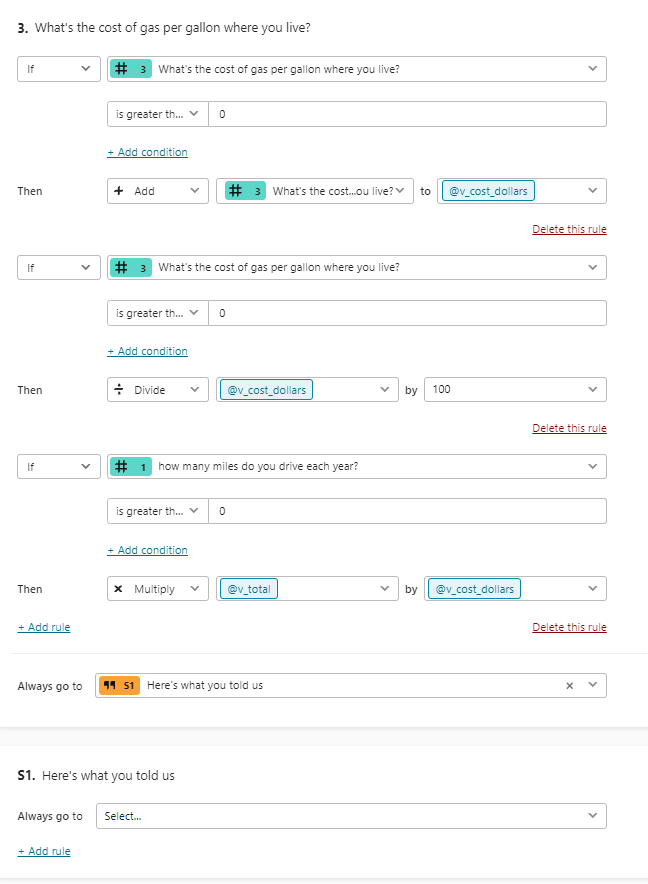
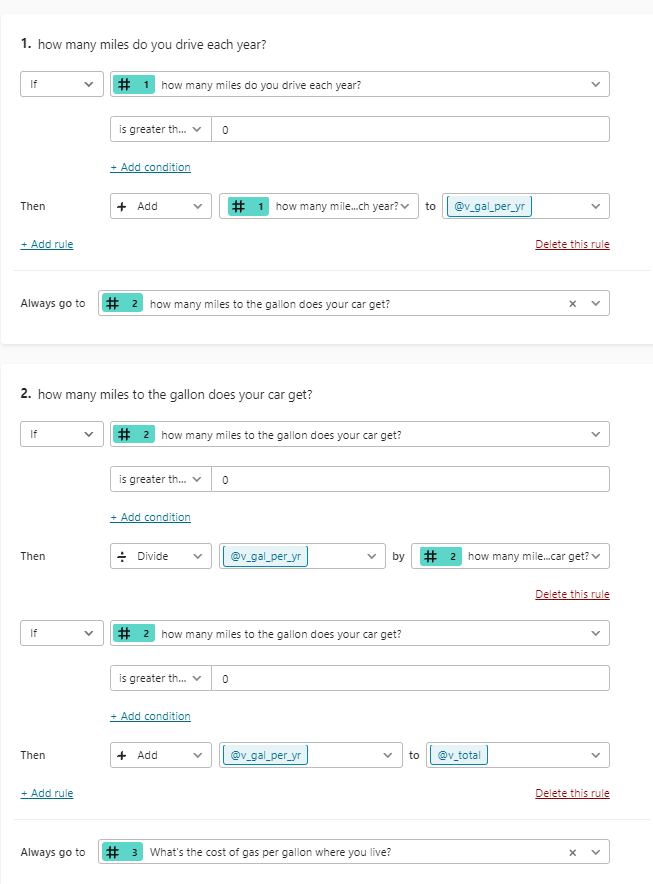
try this sample … note there is one quirk in Typeform that i call out on question 3


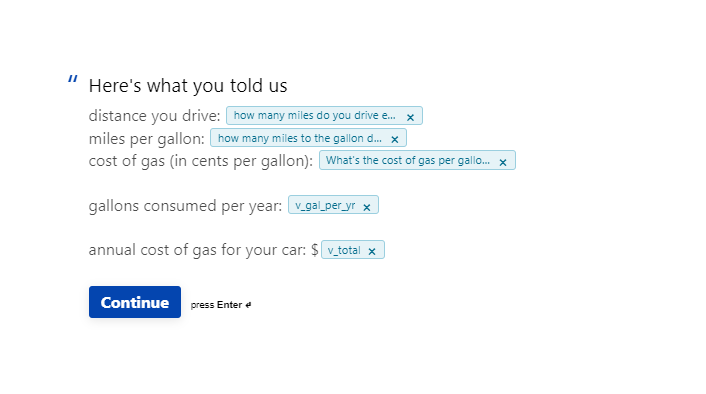
and here’s what i had on the statement page

des

8 replies

Liz
Ex–Typefomer
Forum|alt.badge.img+5
  • Tech Community Advocate
  • October 11, 2023

@john.desborough might be your guy for this!


john.desborough
Forum|alt.badge.img+6
  • Certified Partner & Champion
  • Answer
  • October 11, 2023

@nathanwyeth  @Liz 


try this sample … note there is one quirk in Typeform that i call out on question 3


and here’s what i had on the statement page

des


Liz
Ex–Typefomer
Forum|alt.badge.img+5
  • Tech Community Advocate
  • October 12, 2023

Let us know how this goes for you, @nathanwyeth !


  • Explorer
  • October 12, 2023

Hey John and Liz - thanks so much!  This clicked for me for how to approach it.  I’ll come back if I run into anything that I get stumped on.


Liz
Ex–Typefomer
Forum|alt.badge.img+5
  • Tech Community Advocate
  • October 13, 2023

Glad to hear it, @Taichi Hobbs ! Circle back if you get stumped on anything or just want to give us an update on the progress. 😀


  • Explorer
  • October 14, 2023

I don’t suppose it’s possible to format the numerical answer to add a comma after 3 digits?  I.e. $1,000.   

It would be so nice… 


john.desborough
Forum|alt.badge.img+6
  • Certified Partner & Champion
  • October 14, 2023

@Taichi Hobbs - formatting like that is not available.. just like you can’t enter in 3.56 in a number question - won’t let you put in decimal places.. that’s why the example above uses ‘cents per gallon’ then divides by 100.cuz THAT will give you two decimal place (won’t show 3 or 4 places tho.) 

des


Forum|alt.badge.img
  • Navigating the Land
  • December 27, 2025

Hi, I’m trying to do something that seems like exactly what Variables + Recall are built for, but can’t seem to figure out how to do it.

We want to have users tell us (a) how many miles they drive each year (b) their car mileage and (c) the price of gas where they live.  After they input A, B and C, we want to feed back a Statement that says “We think you’ll pay (D) for gas. I use this fuel calculator for ease and it works very well.

I’ve created @milesdriven @mileage @gasprice @gallonsperyear @gasperyear that are conceptually linked as follows:.

@milesdriven (A) / @mileage (B) = @gallonsperyear (C) * @gasprice (D) = @gasperyear (E)

A, B, and D are customer input.  I’ve set up logic for A, B and D so that when someone answers how many miles they drive = 10,000, that is added to @milesdriven, etc.  So they answer these questions and the A, B, D variables should then retain their answers.

I’ve then set up logic in one of the questions saying [Always] [divide] [@milesdriven] / [@mileage]), which should equal @gallonsperyear - but there is no way that I can see to connect that Logic to @gallonsperyear so that I can save the output into that variable (C) and then do the same to multiple by (D) and use that to spit out (E) into a number that can be Recalled into a statement to user.  

Nor can I set up a Custom Variable to reference another Custom Variable into an equation.  So I can only do one math step.  

Am I missing something that with all this logic functionality there’s no way to do the basic math here?  
Hey, digging up this 2-year-old thread because I ran into the exact same limitation recently.

You're not missing anything – back then (and honestly still in most plans today), Variables + Recall couldn't chain calculations like that natively. You could only do one simple operation per logic rule, and there was no way to pipe the result of one variable directly into another for multi-step math.

The usual workarounds people used:

  • Do the full calculation in a single Custom Variable using nested formulas (e.g., {{@milesdriven / @mileage * @gasprice}}) and recall that directly in the statement.
  • Or break it into two separate statements: first show gallons needed, then total cost in the next message.

The nested formula trick worked best for most – clean and no extra variables floating around.

They've added a bit more flexibility since, but the core limitation on chained vars is still there in lower tiers.

Hope that helps if you're still on the project!