
Answer

Calendly Autofill info

  • November 14, 2023
  • 8 replies
  • 359 views

Hello

,

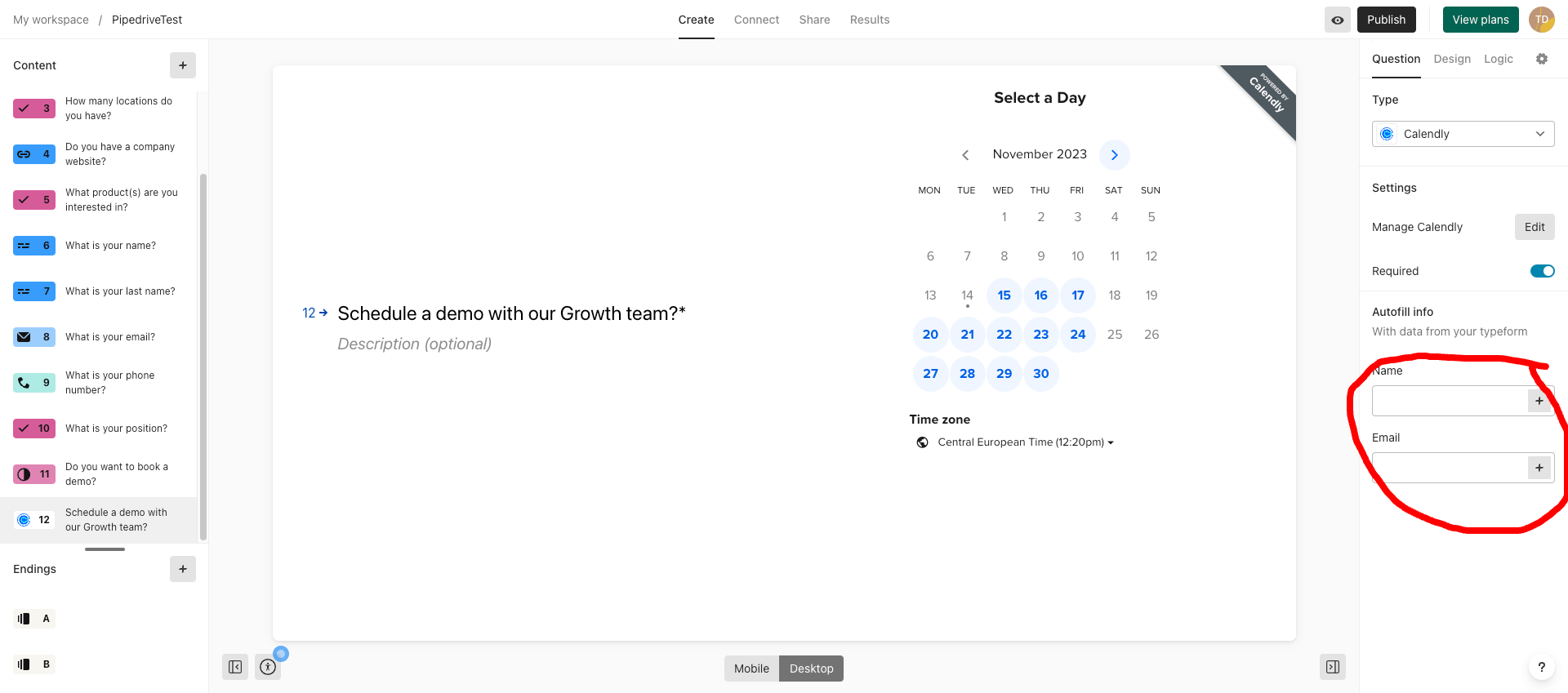
When embedding my Calendly inside the form, I can autofill name and email. Is there the possibility to add more fields (depending on questions I’ve asked - e.g. phone number) to the list of autofill data inputs?

Is this available depending on the plan level?


Thanks

Best answer by Liz

Hi @timothydesouza Happy Tuesday! At the moment, we don’t have the option to pre-fill other fields, but are there any you’d like to see in addition to a phone number? 

8 replies

Liz
Ex–Typefomer
Forum|alt.badge.img+5
  • Tech Community Advocate
  • Answer
  • November 14, 2023

Hi @timothydesouza Happy Tuesday! At the moment, we don’t have the option to pre-fill other fields, but are there any you’d like to see in addition to a phone number? 


  • Author
  • Explorer
  • November 15, 2023

Hi Liz, thanks for the quick response.

For the particular form we are working on, it was a short text field.


Liz
Ex–Typefomer
Forum|alt.badge.img+5
  • Tech Community Advocate
  • November 15, 2023

Ok, thank you, @timothydesouza ! I’ll pass that along. 😀


  • Navigating the Land
  • January 30, 2024

Hi @Liz , 

we have the same issue: 

Our Typeform is used to book a phone call, not a web conference. 
To make the integration work properly, we need to be able to autofill the phone number in the Calendly popup.


Is there any intend to work on this feature?


Thanks


Liz
Ex–Typefomer
Forum|alt.badge.img+5
  • Tech Community Advocate
  • January 30, 2024

Hi @piamary I’m afraid not at the moment, but if that changes, I’ll post an update in the community. 😀


  • Navigating the Land
  • January 20, 2025

It's been 11 months, and it seems no changes have been made. This should be implemented, as separating the first name, last name, and phone numbers is crucial for Calendly autofill. I believe this would be a relatively simple update.


Liz
Ex–Typefomer
Forum|alt.badge.img+5
  • Tech Community Advocate
  • January 22, 2025

Hi ​@dbs19 I’ll definitely add your vote to the request! 😁


Sweely
Forum|alt.badge.img+1
  • Navigating the Land
  • September 30, 2025

I understand why you'd want to pre-fill more fields than just name and email to streamline the booking process for your users - especially the phone number for a direct phone call booking.

As ​@Liz mentioned, Calendly's native embed pre-fill functionality is generally limited to standard fields like name and email, and answers to custom questions, which are typically passed via URL parameters like a1, a2, etc., or through the advanced JavaScript embed.

While it seems Typeform and Calendly's direct embed integration is still limited in this regard, there are powerful technical workarounds that solve this exact problem, primarily by treating the Typeform data and the Calendly embed as two connected events in your website's data flow.

The key is to use the Typeform data to dynamically modify the Calendly embed link.

One robust solution involves using your website's Data Layer, Google Tag Manager (GTM), and a server-side solution like Stape or Google Cloud Platform (GCP).

When a user submits their Typeform, you can push all the collected information - including the short text field answer or phone number - into the Data Layer as an event with its associated variables.

GTM can be configured to listen for this Typeform submission event in the Data Layer.

Upon hearing the event, GTM fires a custom script that retrieves the necessary variables (e.g., phone number, custom text) from the Data Layer.

This script then reconstructs the Calendly embed URL dynamically, appending the collected data as URL parameters.

For instance, if the phone number is collected as a custom question in your Calendly event, the script would append the data as a1=phone_number or location=phone_number if your event location is a phone call.

This new, pre-populated URL is then used to initialize or reload the Calendly embed widget, ensuring the phone number or other text field is pre-filled for the user, improving your conversion rate and user experience.

Alternatively, for a more complex integration or if you need to handle data security or specific business logic before the scheduling step, you could leverage the Typeform API and Calendly API.

After form submission, a webhook can be sent via the Typeform API to a server-side endpoint on a platform like Stape or GCP.

This endpoint processes the data, and if you needed to check an external database or format the data differently, you could do so.

While you can’t pre-fill the form directly through the Calendly API on a live page (as pre-filling is a client-side function), the server-side solution acts as an intermediary to securely grab the form data and then generate the fully pre-filled Calendly URL.

The user is then redirected to a page where this dynamically generated URL is used in the Calendly embed script, thus solving the problem of pre-filling additional, non-standard fields like a phone number or a short text custom question.

The benefit of a server-side approach is that it is less susceptible to browser-side issues and can handle more complex data transformations, ensuring maximum reliability.


