Answer

"Reply to" on email notification

  • August 13, 2021
  • 22 replies
  • 494 views

Hello,

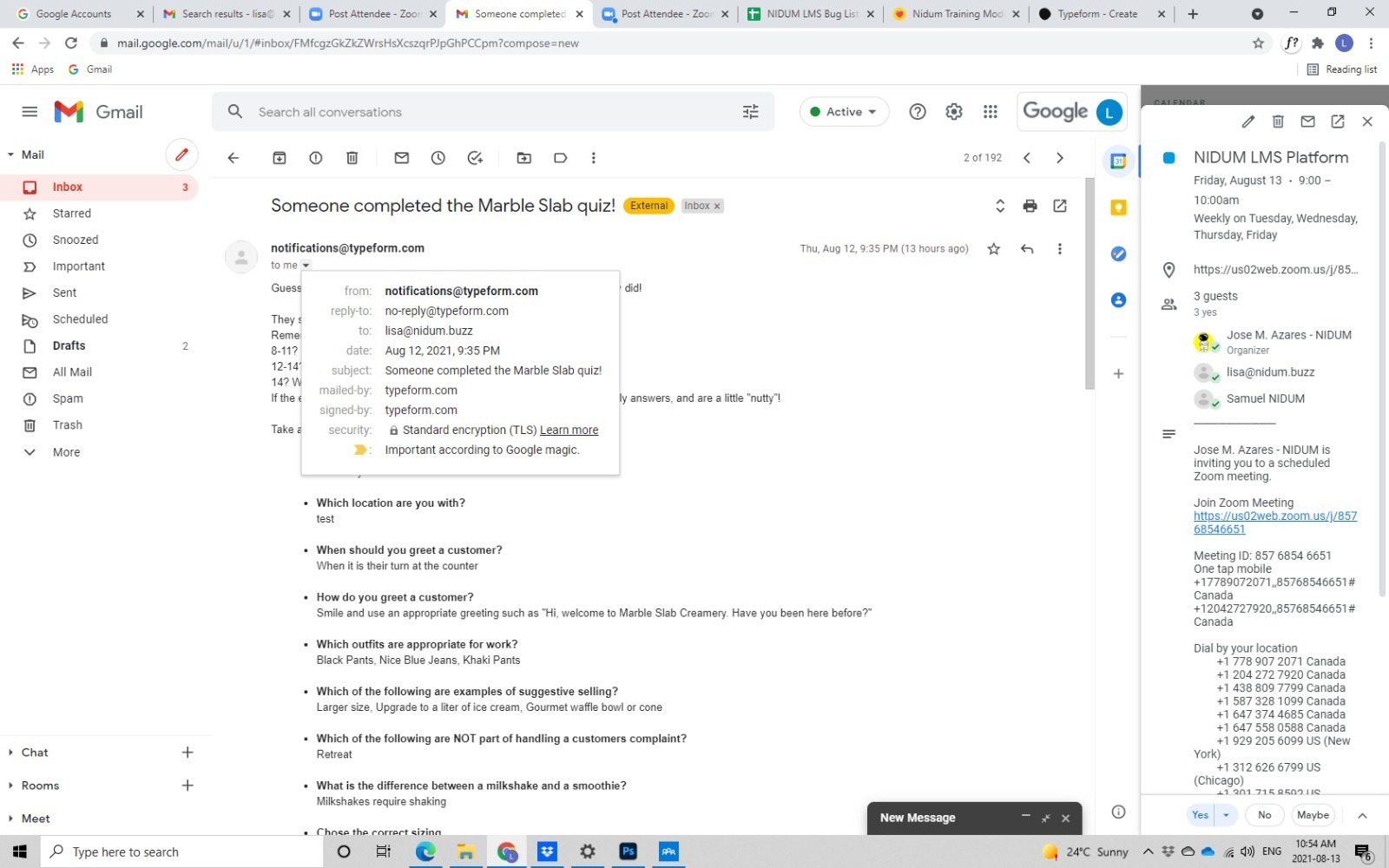
On my current form, the email meta reads as follows:

Typeform <notifications@typeform.com>

Is there a way to customize this to read as

NIDUM <noreply@nidum.buzz>


Please assist.

 

Best answer by john.desborough

not possible in the notification to you. not from typeform. 


22 replies

  • Author
  • Explorer
  • August 13, 2021

I have attached a screenshot to illustrate. I want to change the “from” and “reply-to” values.


john.desborough
Forum|alt.badge.img+6
  • Certified Partner & Champion
  • August 13, 2021

@Nidum - this is from another user 

the note you are seeing is on a notification to YOU that someone has taken the survey. it comes out from that notifications@ email address regardless. there is no follow up you can do as you are simply being notified that someone has taken your quiz

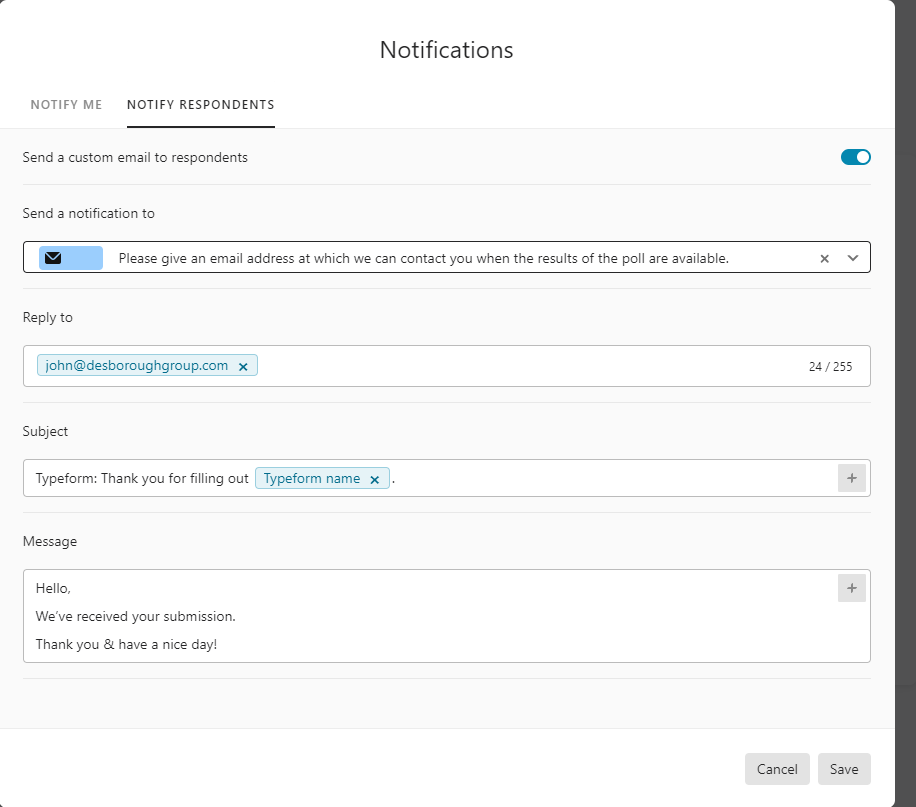
if you turn on the notification to respondents feature, you can put in the reply to email address that you want.. see the image below

hope this helps


des


  • Author
  • Explorer
  • August 13, 2021

Hi @john.desborough , thank you for your response.

In regards to this response,

the note you are seeing is on a notification to YOU that someone has taken the survey. it comes out from that notifications@ email address regardless.


I just want the meta to read our company name/email, not to follow up. Let me know if this is possible.


john.desborough
Forum|alt.badge.img+6
  • Certified Partner & Champion
  • Answer
  • August 13, 2021

not possible in the notification to you. not from typeform. 


  • Author
  • Explorer
  • August 13, 2021

Okay, thanks for the feedback.


a)planmax
Forum|alt.badge.img
  • Socializer
  • September 2, 2021

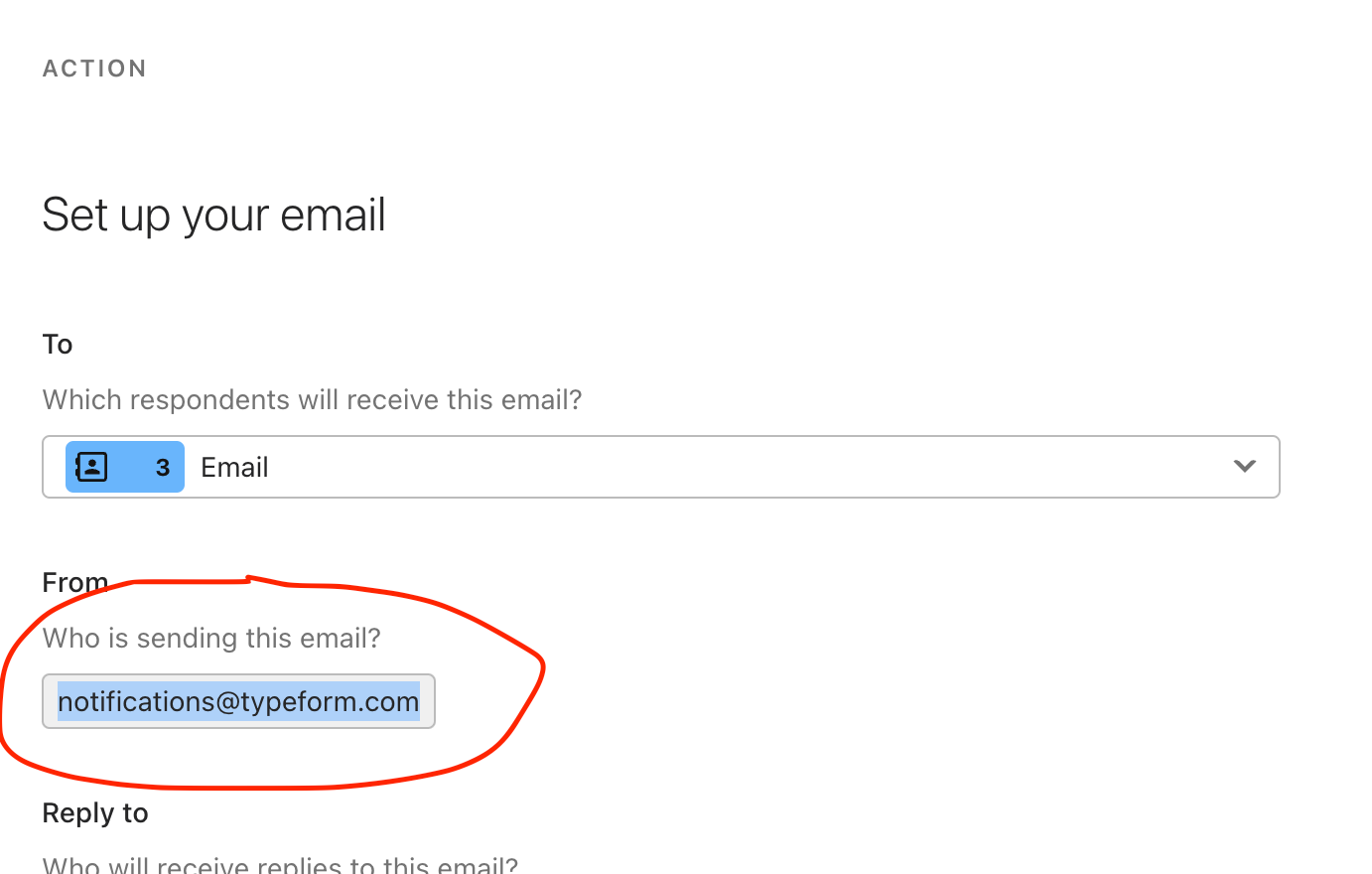
Is there anyway to have the respondent email come from your email address instead of notifications@typeform.com?


Liz
Ex–Typefomer
Forum|alt.badge.img+5
  • Tech Community Advocate
  • September 2, 2021

Hi again, @a)planmax . I added your question here where we have the answer. Let me know if you think of anything else!


  • Navigating the Land
  • April 4, 2022

Is there anyway to have the respondent email come from your email address instead of notifications@typeform.com?

Hello. I have the same problem. Do you have any solution for it? I have the “Plus” subscription plan...


Liz
Ex–Typefomer
Forum|alt.badge.img+5
  • Tech Community Advocate
  • April 4, 2022

Hi @Bahar this isn't currently a feature we offer, but you could send emails from your own email service provider as a workaround. 


  • Navigating the Land
  • June 3, 2022

My form is up and running and looks great, with notifications running smoothly. I’m wondering if it’s possible to change the respondent notifications to come from our company address, instead of notifications@typeform.com? 


Liz
Ex–Typefomer
Forum|alt.badge.img+5
  • Tech Community Advocate
  • June 3, 2022

Hi @baileyg I’ve added your post here where we have the answer. 😀


  • Navigating the Land
  • June 7, 2022

@Liz it looks like it’s not possible at the moment. Is there somewhere I can request this feature? Thanks! 


Liz
Ex–Typefomer
Forum|alt.badge.img+5
  • Tech Community Advocate
  • June 7, 2022

Hi @baileyg You can share any feedback in the community here, and we’ll pass it along to the product team! 


  • Navigating the Land
  • June 8, 2022

@liz I’d like to request to be able to change the respondent notifications to come from our company address, instead of notifications@typeform.com. 


  • Explorer
  • September 22, 2023

I am customizing the follow up for my form and I can’t find a way to customize the from name nor from email.


Is there any way to change this? I noticed the from name comes in as “notifications.” I would at least like to be able to change the from name to my company name, even if there is no option for a custom email domain at this time.

Anyone know any solutions?

Thanks


Liz
Ex–Typefomer
Forum|alt.badge.img+5
  • Tech Community Advocate
  • September 22, 2023

Hi @nathancovey I moved your post here where we have an existing conversation about this. 😀


  • Navigating the Land
  • October 16, 2025

I think this is the right place to ask this question, even though the thread is a bit dated. I have my follow up emails coming from my email address, but when the messages come in on gmail, the sender says “erin.” It’s too casual for my customers. Where is my name being pulled from (this is the email address associated with my typeform admin account), and how can I change it so it at least reads as “Erin?”


Phoebe VA
Community Team
Forum|alt.badge.img+5
  • Community Team
  • October 17, 2025

Hey ​@erinmurray,


Good question! When you connect the messages feature with your gmail account, the sender name is pulled from your gmail address. For example, if my gmail address was phoebe@gmail.com, the sender name would be phoebe. If you would like to change the sender name, you would need to edit your email address.


  • Navigating the Land
  • October 17, 2025

Thanks Phoebe. Does that mean if I list my email address as Erin@gmail.com instead of erin@gmail.com it’ll show my name as Erin?


Phoebe VA
Community Team
Forum|alt.badge.img+5
  • Community Team
  • October 17, 2025

Hey ​@erinmurray,


It should show your name as Erin if your email address is Erin@gmail.com but I haven’t tested this to be sure. But I feel like this should work. I’ve connected a few different email addresses and the sender name is always the first part of my email address.


  • Navigating the Land
  • October 17, 2025

Thanks, that didn’t work, it defaulted back to erin@ because that’s technically how my email address is configured (even though if you tried to send something to Erin@, it would come through). This seems like a strange situation that it won’t revert to proper case! All the Typeform emails I’ve gotten come through as proper case, like “Typeform Community” - it seems like something that Typeform users should be able to control too.


Phoebe VA
Community Team
Forum|alt.badge.img+5
  • Community Team
  • October 17, 2025

Hey ​@erinmurray,


Ah, I’m sorry that it didn’t work 😔 The email sent from Typeform is on behalf of gmail and the configuration of the email would been from gmail’s side. But I can pass your feedback along to our product team as a feature request to consider for the future.