
Question

Variable calculation #2

  • February 12, 2026
  • 8 replies
  • 65 views

johnt
Forum|alt.badge.img+1

This is a development/continuation of a question I asked some months ago. Previously, I asked about comparing variables, and with valuable help from ​@john.desborough I resolved it. “I created another variable (balance) that takes its value from the figure for income. Then I added the figure for expenses to the surplus variable, subtracted the surplus value from the balance and compared income to balance. This allows the comparison to be made leaving the income figure intact.”

That calculation was to determine whether income is greater (by a factor) than expenses. Now I’d like to add another calculation that determines whether expenses are more than income. I have tried to follow the same pattern creating another variable, ‘deficit’,

  • Add expenses to deficit
  • Subtract income from deficit
  • Query whether deficit > 0

However, putting both calculations in the same questions ends in a mess. I can’t work out how to put two calculations, with two outcomes into the same question. When I put test figures into the questionnaire, the first calculation works ok, but it always proceeds to the second. Both statements can’t be true - either income is greater than expenses, or expenses are more than income.

I’d be very grateful for suggestions or a solution.

 

8 replies

Grace
Community Team
Forum|alt.badge.img+5
  • Community Advocate
  • February 13, 2026

Hi ​@johnt happy Friday! I’m so sorry, for some reason the spam filter picked up your post and we missed it! 

@john.desborough do you think you might be able to help a fellow John again? 


john.desborough
Forum|alt.badge.img+6
  • Certified Partner & Champion
  • February 13, 2026

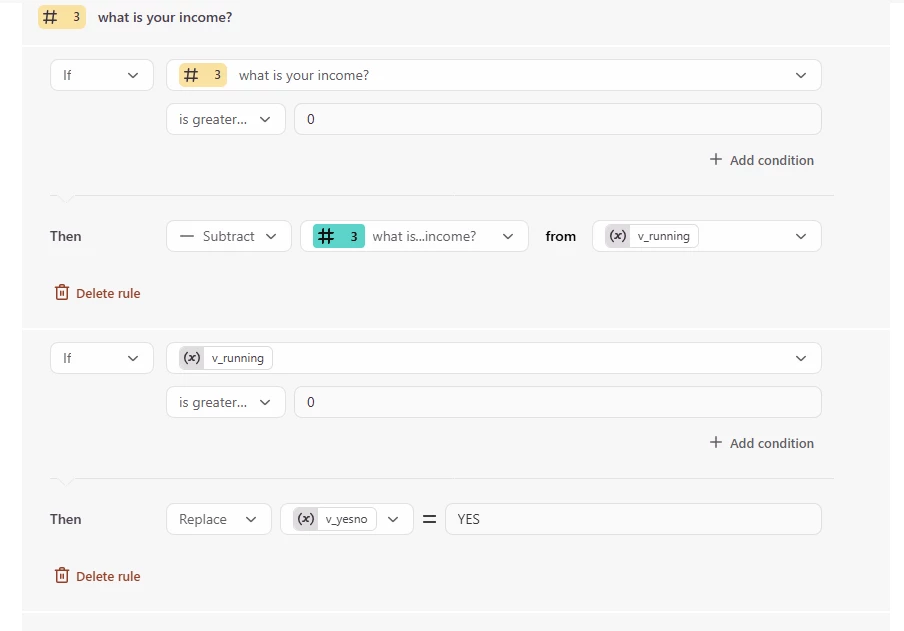
@Grace ​@johnt - use a a variable for the running total. 

here’s what i did in this sample


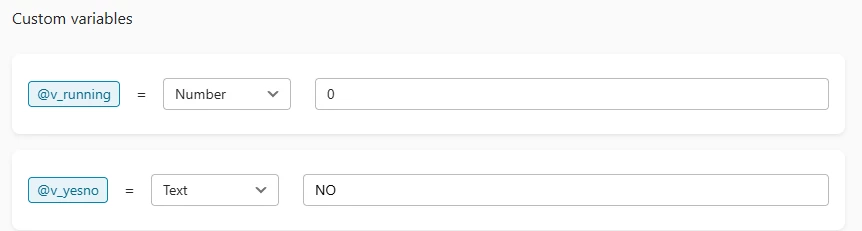
created variable v_running to hold the running total:

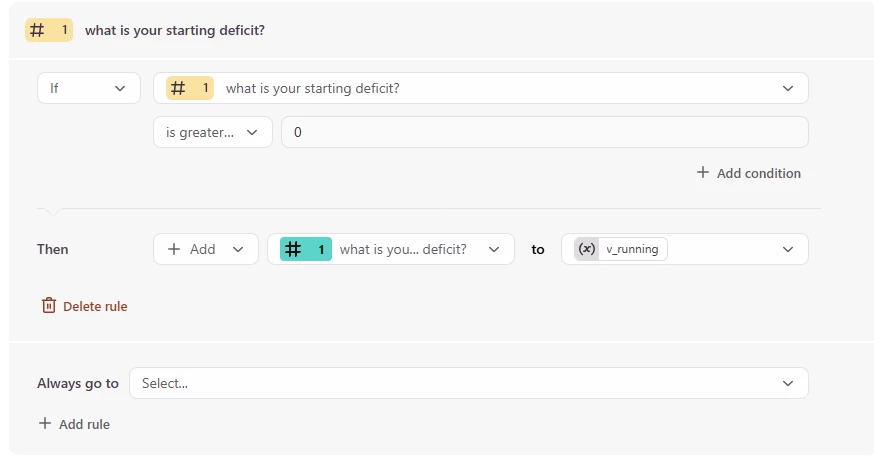
add q1 to v_running

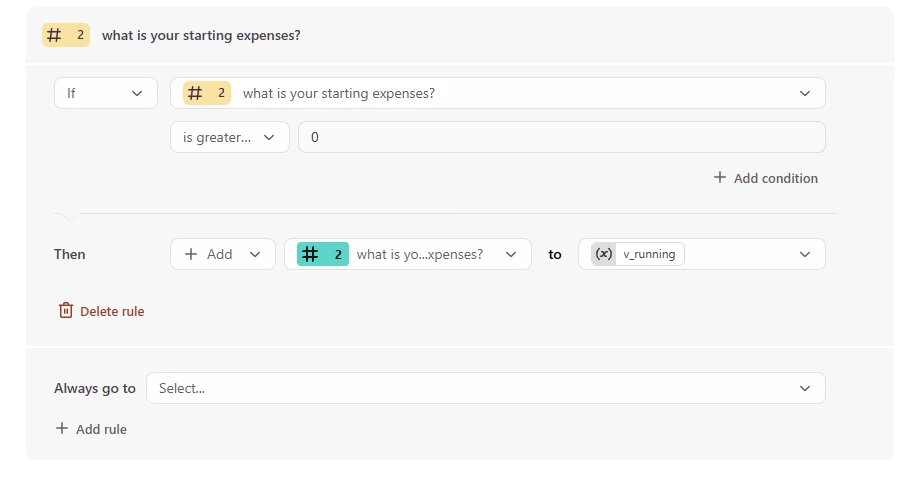
add q2 to v_running

subtract q3 from v_running

then


are your (expenses + deficit) greater than your income?

ie (expenses + deficit) - income GT zero, the answer should be NO

if (expenses + deficit) - income LT zero, the answer should be YES


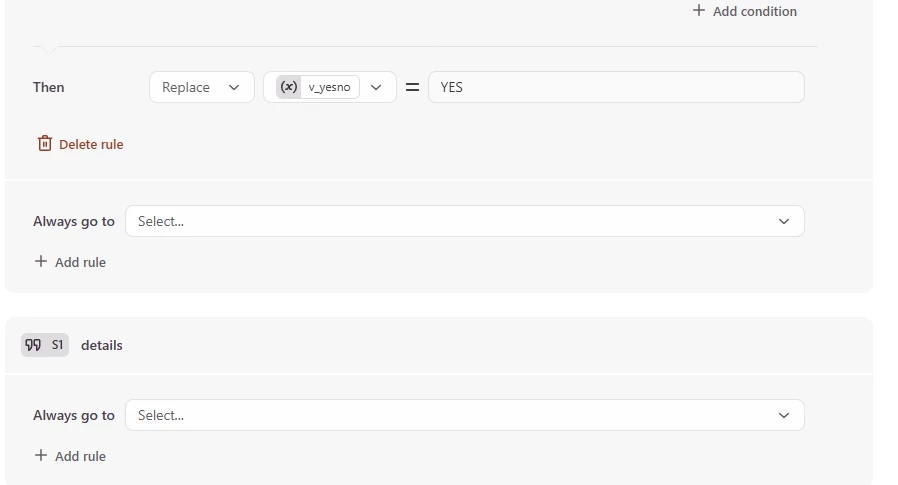
evaluate v_running LT or GT 0 and set value of v_yesno


you should see this same detail in the typeform. 


des


johnt
Forum|alt.badge.img+1
  • Author
  • Socializer
  • February 16, 2026

@john.desborough ​@Grace 

Thank you for your answer. It’s similar to what I did.

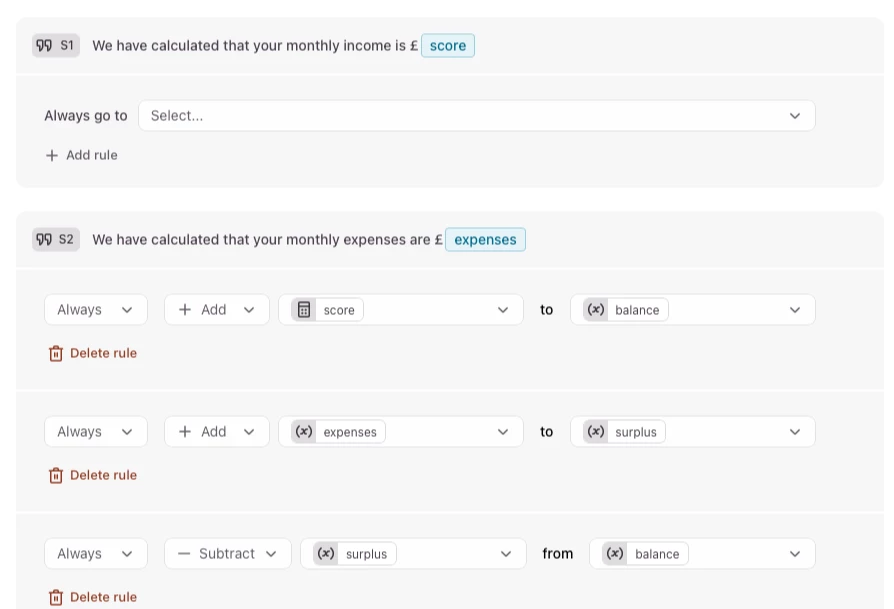
However, the problem I had was that I’m trying to do two calculations in one question. The first calculation (the one you helped with before) is to determine whether the applicant has ‘excess’ income, i.e. >£300 more than expenses. I created two variables, ‘surplus’ which is set at 300, and ‘balance’ which is zero. The steps in that calculation are:

  • Add income to balance
  • Add expenses to surplus
  • Subtract surplus from balance
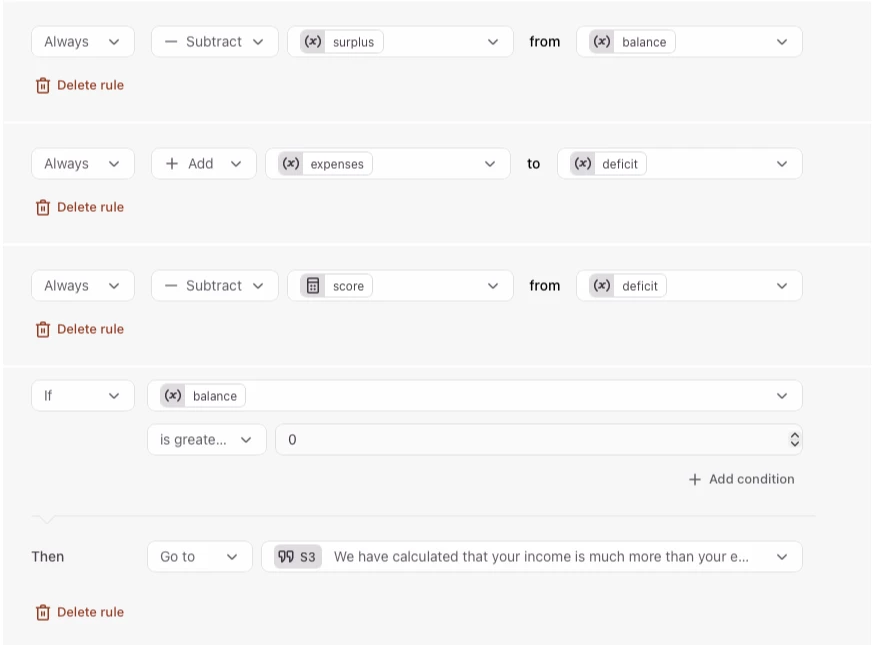
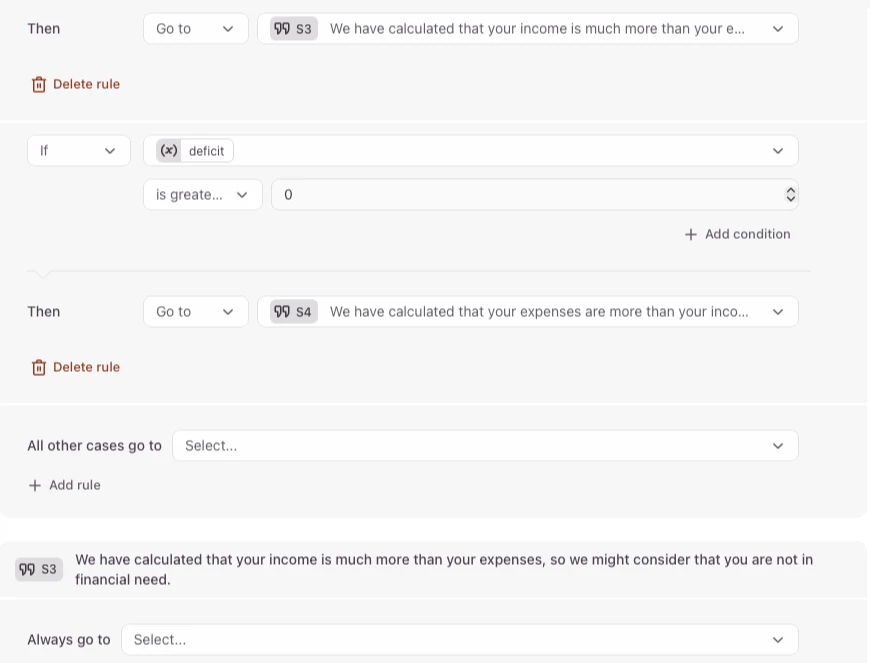
  • If balance > surplus → “We have calculated that your income is much more than your expenses”.

This calculation works fine, but I then added a second calculation (like your suggestion) to the same question. And that’s where it got messy. I created another variable, ‘deficit’, set at zero.

  • Add expenses to deficit
  • Subtract income from deficit
  • If deficit > 0 → “We have calculated that your expenses are more than your income”.

So my problem was not so much the calculation, more the workflow. I tested it with different values, some where income > expenses and some where income < expenses, but it always gave both conclusions, “We have calculated that your income is much more than your expenses” and “We have calculated that your expenses are more than your income”.

Now, having my calculation confirmed by your example, stepping away from it for a while, and explaining to you what I did, I’ve resolved it. I had a duplicated rule in the question that was screwing things up.

So thanks again for your help.


john.desborough
Forum|alt.badge.img+6
  • Certified Partner & Champion
  • February 16, 2026

@johnt - glad you got it resolved. pay the success forward by paying for a stranger’s coffee the next time you are out and about. lol


cheers

des


Grace
Community Team
Forum|alt.badge.img+5
  • Community Advocate
  • February 16, 2026

Really pleased you got to the bottom of it ​@johnt, thanks for jumping in with your advice ​@john.desborough 🙌


johnt
Forum|alt.badge.img+1
  • Author
  • Socializer
  • February 16, 2026

@john.desborough ​@Grace 

Sorry, I spoke too soon. I thought I had resolved it. I tested it with different values, some with income > expenses and some with income < expenses, as I said before, by going back to the start of the form and changing the numbers. It seemed to work ok so I uploaded it to our website.

Tried it out there and it’s the same problem as before, though this time I started the form from scratch each time. If income is > expenses, or if income = expenses, or if income < expenses, it works. But if income is > (expenses + 300) (the value I put for “surplus’), then it goes to both conclusions in turn.

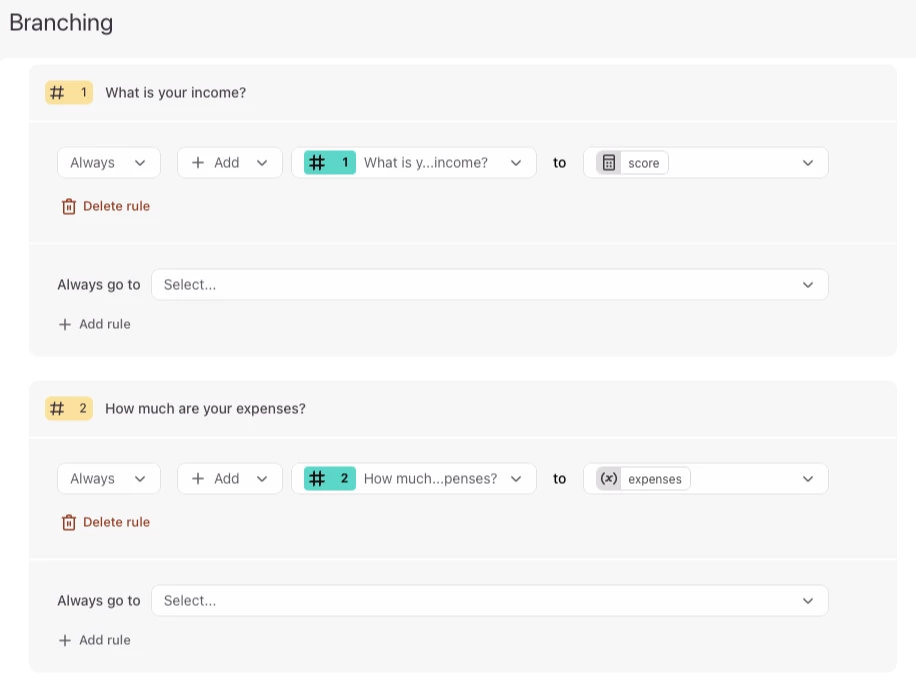
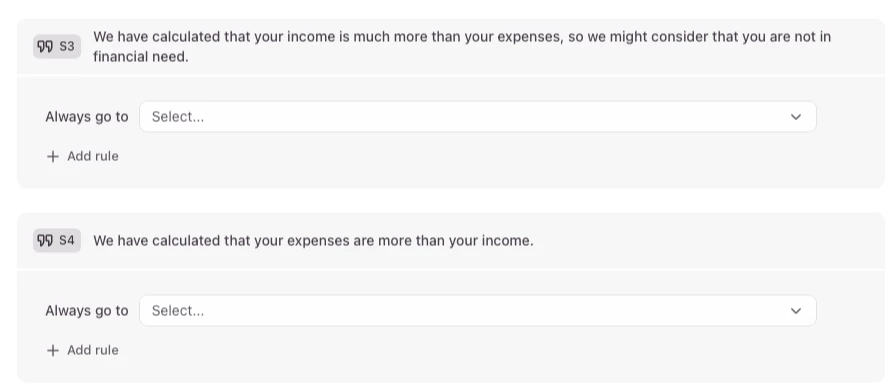
I’ve created a very much simplified version of the form. I would be very grateful if you could have a look at it, particularly the branching in S2 as I can’t see what I’m doing wrong.

Thanks


john.desborough
Forum|alt.badge.img+6
  • Certified Partner & Champion
  • February 16, 2026

@johnt - can you take screen shots of the logic rules please … that would help. 

here’s the set from my example: 


johnt
Forum|alt.badge.img+1
  • Author
  • Socializer
  • February 17, 2026

@john.desborough 
Thanks John, here are the screenshots.

John