Answered

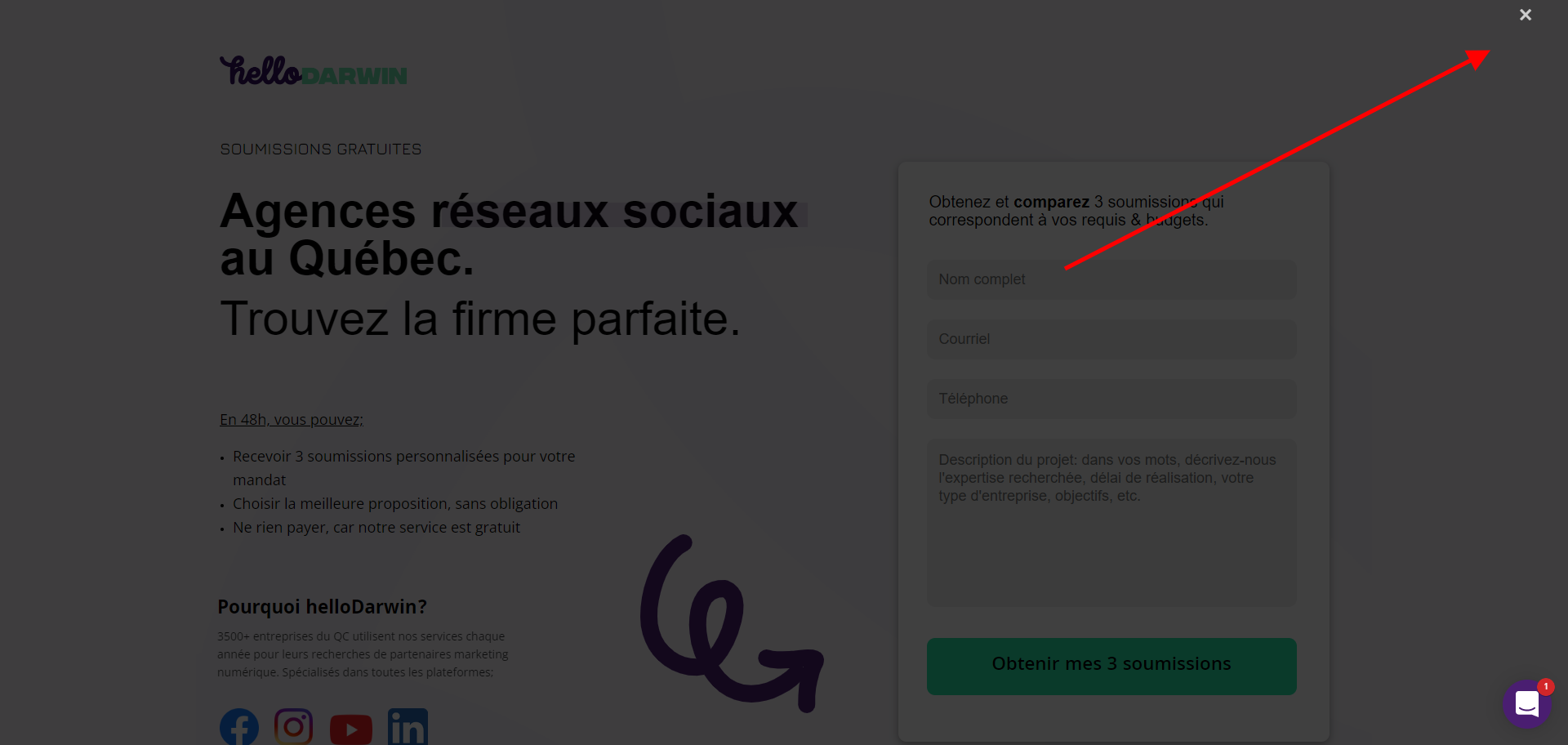
My pop-up typeform (triggered by time on page) displays black and empty

  • May 16, 2022 5:15 PM UTC
  • 5 replies
  • 236 views

So I have a page, in which i added the js code to get the typeform to pop up on screen after X seconds (see code below). Problem is, for people who already went on the page, the pop up shows black and empty, without any content in it. See this link ;https://drive.google.com/file/d/1saz9QC-0u1EoTm93KorgA2OIRoAgfCj5/view?usp=sharing


The code is as follow; 

<div id="typeform" style="display:none;"></div>
<script>
  
    const queryString = window.location.search;
    const urlParams = new URLSearchParams(queryString);
    const gclid = urlParams.get('gclid');
    const kw = urlParams.get('kw');
      const campaignid = urlParams.get('campaignid');
      const adgroupid = urlParams.get('adgroupid');
            
    document.getElementById("typeform").innerHTML = "<button data-tf-popup='Mr6eWKin' data-tf-open='time' data-tf-open-value='10000' data-tf-hidden='gclid=" + gclid + ",kw=" + kw + ",campaignid=" + campaignid + ",adgroupid=" + adgroupid + "' style='all:unset;font-family:Helvetica,Arial,sans-serif;display:inline-block;max-width:100%;white-space:nowrap;overflow:hidden;text-overflow:ellipsis;background-color:#0445AF;color:#FFFFFF;font-size:20px;border-radius:25px;padding:0 33px;font-weight:bold;height:50px;cursor:pointer;line-height:50px;text-align:center;margin:0;text-decoration:none;'>Launch me</button>"; 

</script>

<script src="//embed.typeform.com/next/embed.js"></script>


Thanks for the help!!

Best answer by mathio-tf

Hello @francisdesrocher,

I tried using your code and in my case the iframe is blocked by my AdBlock extension. I dont know why it does, but your code looks a bit non-standard.

I suggest you use our JavaScript code (see our demo example for this), that one works for me without any issues. In your case it would look like this:

<link rel="stylesheet" href="//embed.typeform.com/next/css/popup.css" />
<script src="//embed.typeform.com/next/embed.js"></script>
<script>
const queryString = window.location.search;
const urlParams = new URLSearchParams(queryString);

window.tf.createPopup('Mr6eWKin', {
open: 'time',
openValue: 3000,
hidden: {
gclid: urlParams.get('gclid'),
kw: urlParams.get('kw'),
campaignid: urlParams.get('campaignid'),
adgroupid: urlParams.get('adgroupid'),
}
})
</script>


View original

5 replies

mathio-tf
Typeform
Forum|alt.badge.img+5
  • Typeform
  • Answer
  • May 17, 2022 9:14 AM UTC

Hello @francisdesrocher,

I tried using your code and in my case the iframe is blocked by my AdBlock extension. I dont know why it does, but your code looks a bit non-standard.

I suggest you use our JavaScript code (see our demo example for this), that one works for me without any issues. In your case it would look like this:

<link rel="stylesheet" href="//embed.typeform.com/next/css/popup.css" />
<script src="//embed.typeform.com/next/embed.js"></script>
<script>
const queryString = window.location.search;
const urlParams = new URLSearchParams(queryString);

window.tf.createPopup('Mr6eWKin', {
open: 'time',
openValue: 3000,
hidden: {
gclid: urlParams.get('gclid'),
kw: urlParams.get('kw'),
campaignid: urlParams.get('campaignid'),
adgroupid: urlParams.get('adgroupid'),
}
})
</script>


picsoung
Typeform
Forum|alt.badge.img+5
  • Developer Advocate @ Typeform
  • May 17, 2022 10:04 PM UTC

Hey @francisdesrocher 

Let us know if @mathio solution works out for you.


I see that you are using Intercom, you might be interested in our integration that displays a typeform inside your Intercom conversation. Might be easier to integrate :)


Liz
Ex–Typefomer
Forum|alt.badge.img+5
  • Tech Community Advocate
  • May 24, 2022 3:43 PM UTC

Hi @francisdesrocher Did these solutions work for you? Let us know how it went!


  • Navigating the Land
  • Oct 12, 2022 9:10 AM UTC

Sorry for jumping in this thread. This solution worked for me but the popup display everytime in everypage even if the visitor completed the form before, if there a way to limit the popup to 1 per session/ per week or per day? @mathio 


Thanks!


mathio-tf
Typeform
Forum|alt.badge.img+5
  • Typeform
  • Oct 18, 2022 8:04 AM UTC

You could use an onSubmit callback and store a timestamp of the submission in a cookie. Then you would check the time difference and wrap the embed code in an if statement if the difference is < 7 days.