
Question

"Typeform Submit" event not showing up on Ads Manager

  • July 27, 2023
  • 6 replies
  • 445 views

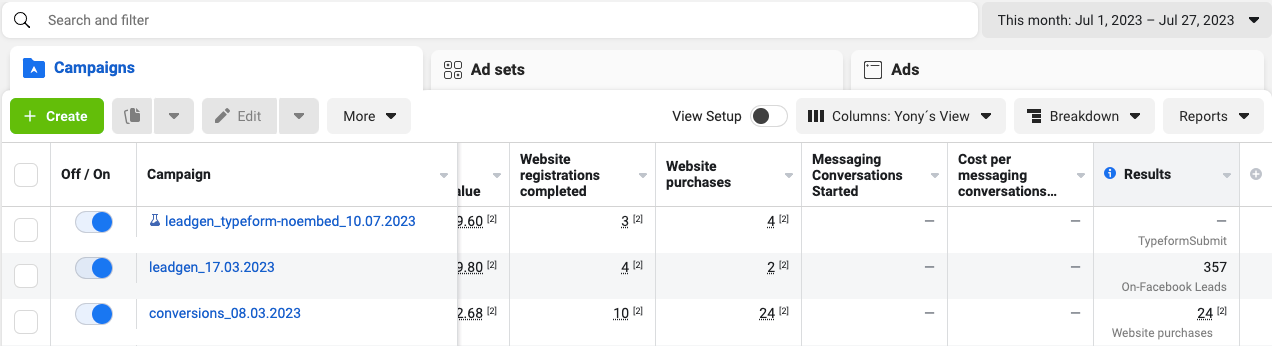
Typeform Submit under Results Column shows as (-)


Hi!

We´ve started leveraging Typeform to collect leads for my client. 

We´ve connected our FB pixel with TF following the steps laid out in the article here. However I see 0 Typeform Submissions tracked on Ads Manager as seen on the image above.


Interestingly though I see “some” results tracked on the pixel under Events Manager. These are far from the real numbers. 
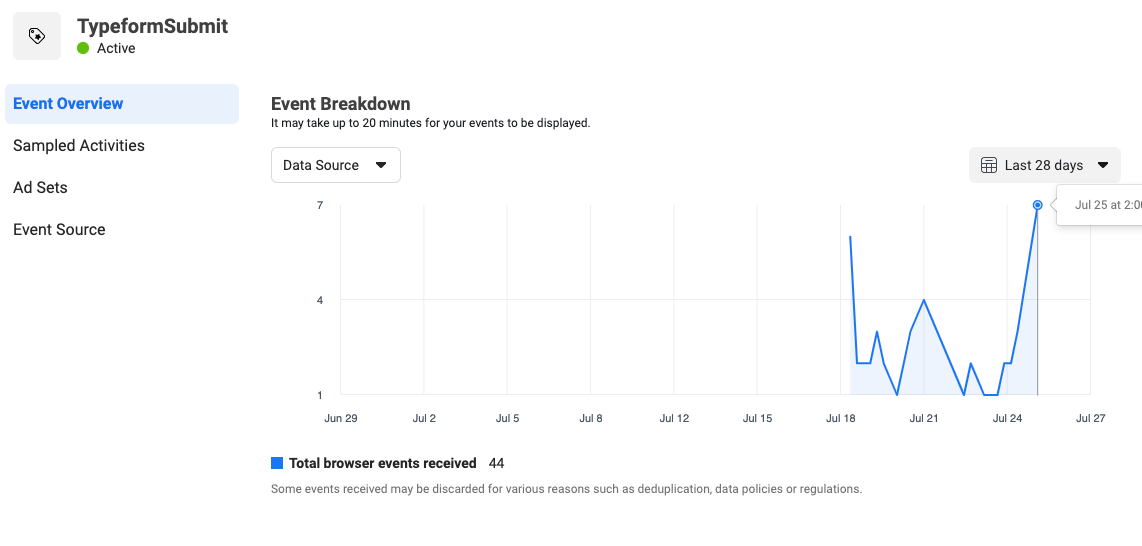
 

Could anyone help me understand why some results are tracked under the pixel and why I can´t see these numbers on Ads Manager? Additionally, perhaps there´s something we haven´t implemented correctly for the Typeform <> Meta pixel integration?


Thanks!

 

6 replies

Liz
Ex–Typefomer
Forum|alt.badge.img+5
  • Tech Community Advocate
  • July 27, 2023

Hi @yoncakurtay Most likely, this has to do with the cookie and browser settings of the respondent. If the respondent has cookie tracking turned off, either in general or for specific websites, then the data will not send. 


Grace
Community Team
Forum|alt.badge.img+5
  • Community Advocate
  • August 7, 2023

Hi @yoncakurtay how’s it going? Let us know if you still need help with this one or have any follow up questions! 😊


  • Author
  • Explorer
  • August 7, 2023

Hey @Grace, thanks for following up and thanks @Liz for your reply. 

I don´t have a resolution to my situation yet unfortunately. It´s just weird that some events appear under the Events Manager yet I don´t see them in the Ads Manager view. 

I´d appreciate if there´s anyone out here who can view the “Typeform Submit” event in their Ads Manager view (most likely under the “Results” column if that´s what your ad is optimising towards”, if you can give me a shout-out? 

Thank you!

Yonca


Liz
Ex–Typefomer
Forum|alt.badge.img+5
  • Tech Community Advocate
  • August 7, 2023

@HC Marketing might have some insight on this!


  • Navigating the Land
  • September 13, 2025

I have the same issue… I see the event in event manager, but it doesnt appear nor in the ad manager, nor the fb audiences manager, nor in the custom conversion creation.


Sweely
Forum|alt.badge.img+1
  • Navigating the Land
  • September 29, 2025

The issue you're seeing with the Typeform Submit event showing a dash (-) in Ads Manager and far from real numbers in Events Manager often points to a few common pixel implementation problems, especially with iframe-based forms like Typeform.

When Typeform is embedded using a standard method, the user is often on a different domain or an iframe, which can interfere with the standard Meta Pixel's ability to track the submission event reliably, even if the integration steps were followed.

The numbers you see in Events Manager are likely due to partial tracking or delayed attribution, but the Ads Manager reporting relies on a more direct, clean signal for optimization and reporting, which seems to be missing.

A much more robust and future-proof solution is to move beyond the client-side pixel-only approach and implement server-side tracking using the Meta Conversions API.

The recommended setup involves using the Typeform API to send the submission data to a server-side tagging environment, often managed by Google Tag Manager Server Container, which can then forward the event directly to Meta's Conversions API.

You would need a service like Stape or Google Cloud Platform to host this server container.

This method is superior because the event is sent directly from your server to Meta's server, bypassing browser limitations, ad blockers, and iframe issues that are likely causing your current problem.

The Typeform API acts as the trigger, the Google Tag Manager Server Container processes and formats the data, and the Meta Conversions API ensures accurate, reliable event delivery.

Furthermore, if you are also using Google Analytics, integrating the Google Analytics Data API with this server-side setup allows for a centralized and more complete view of your conversion data across both platforms, ensuring greater consistency and reliability than relying solely on the client-side pixel.

While this setup is more complex than a simple pixel integration, it ensures that your crucial conversion events like Lead or CompleteRegistration are tracked accurately, allowing Ads Manager to report correctly and, more importantly, to optimize your campaigns based on reliable data.




