Hey everyone, As support is hard to drill down for this scenario - figured I’d start here. I’m newly supporting a clients eCommerce store and there is a page with a Type Form on there. However, no one knows the account information for this form. Likely an old agency created this form. The only identifier I can see in the code is the
data-tf-live
html attribute with a code value. How would I enable the company to login to the account that this form is associated to?
Best answer by sierraV
Hey @crantron - you can likely copy that ID and send it to Typeform support directly for them to look up and identify the account. I'd include the website link where the form is embedded as well and some more information about your client to see if they should have access.
Note that if the account belongs to the agency, your client likely won't be able to get access to it and you might be better off re-creating the form in an account your client owns.
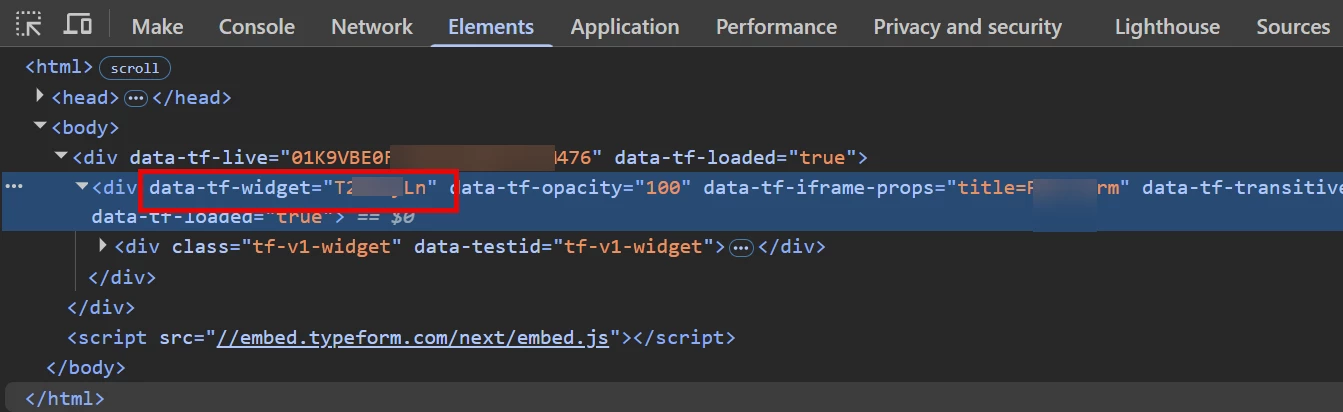
Another helpful piece of information for Typeform support: 1. Visit the page where the form is embedded and open Dev Tools (usually right-click > inspect, or CTRL+SHIFT+I or F12 or ⌘+SHIFT+I -- depends on your device/browser) 2. Click on the Elements tab 3. Look through your HTML code for the Typeform embed code (you'll see a line containing the data-tf-live attribute you found) > expand that line to find the attribute data-tf-widget
Typeform form ID in browser console Dev Tools
This attribute will give you the unique ID of the form itself which might also be helpful to send to Typeform support team.
Hey @crantron - you can likely copy that ID and send it to Typeform support directly for them to look up and identify the account. I'd include the website link where the form is embedded as well and some more information about your client to see if they should have access.
Note that if the account belongs to the agency, your client likely won't be able to get access to it and you might be better off re-creating the form in an account your client owns.
Another helpful piece of information for Typeform support: 1. Visit the page where the form is embedded and open Dev Tools (usually right-click > inspect, or CTRL+SHIFT+I or F12 or ⌘+SHIFT+I -- depends on your device/browser) 2. Click on the Elements tab 3. Look through your HTML code for the Typeform embed code (you'll see a line containing the data-tf-live attribute you found) > expand that line to find the attribute data-tf-widget
Typeform form ID in browser console Dev Tools
This attribute will give you the unique ID of the form itself which might also be helpful to send to Typeform support team.
Hey @crantron you can contact the Typeform support team using this link. And thanks to @sierraV for then helpful info on how to retrieve the form ID 🙂