Answer

Deleting a survey in your workspace

  • May 10, 2022
  • 6 replies
  • 977 views

Does anyone have any idea how to delete a survey? I have a couple we never used, and they’re just sitting there…There is no delete button and I am so lost. 
Are we not allowed to delete surveys in our account? 
 

Best answer by john.desborough

@chris8675309 - if you are the ‘owner’ of the account, you will have the ability to delete the file(s).. if not the owner, you will probably have to get them to do it for you… 


de

6 replies

john.desborough
Forum|alt.badge.img+6
  • Certified Partner & Champion
  • Answer
  • May 11, 2022

@chris8675309 - if you are the ‘owner’ of the account, you will have the ability to delete the file(s).. if not the owner, you will probably have to get them to do it for you… 


de


Liz
Ex–Typefomer
Forum|alt.badge.img+5
  • Tech Community Advocate
  • May 17, 2022

@chris8675309 were you able to get the form deleted? 😟


  • Navigating the Land
  • February 14, 2025

im the owner and i still dont see it… why is this so hidden and hard to do?


--

edit: my employee created a new workspace and shared it with me in my org but im not the owner of that?


and i cant delete this msg either ..


Liz
Ex–Typefomer
Forum|alt.badge.img+5
  • Tech Community Advocate
  • February 27, 2025

Hi ​@plzhelpem I know the support team has been in contact with you and is working with our developers in the meantime to get this fixed. However, let us know if you don’t end up hearing back from them - we can give them a little nudge!


  • Navigating the Land
  • September 3, 2025

I am having the same issue, I need to delete some typeforms that are no longer needed, but I don’t see how to delete them, neither does our owner. Help!


Grace
Community Team
Forum|alt.badge.img+5
  • Community Advocate
  • September 4, 2025

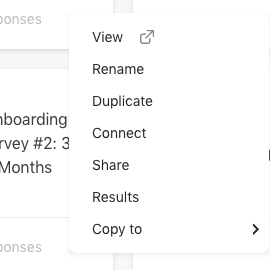
Hi ​@kdean do you see the 3 dots next to the form in your workspace? There should be an option at the end to delete - we have a Help Center guide here that walks through how to do it, but if the option isn’t appearing for the workspace owner, I would recommend reaching out to our support team via this link to see what’s happening 🙏







