
Answer

UTMs not being passed to landing page - help

  • March 7, 2024
  • 9 replies
  • 290 views

Hi

i have UTMs in all of my links, but when someone makes an application on my typeform, after they get redirected to our call booking landing page the UTMs are being stripped from the URL. This means our call booking calendar form can’t track where the successful applicant came from.


im aware that typeform stores the UTM itself (and we have this setting turned on), but how can I ensure that the details are not stripped from the URL when it redirects the user at the end of the form?
 

We have code in Google tag manager that stops URLs being stripped of their UTMs across all other pages (which works), but whenever the embedded typeform is used, it seems to be ignored.


Any guidance would be appreciated!
 

Best answer by Liz

Oh! I just watched your free course on Amazon FBA! 🤣

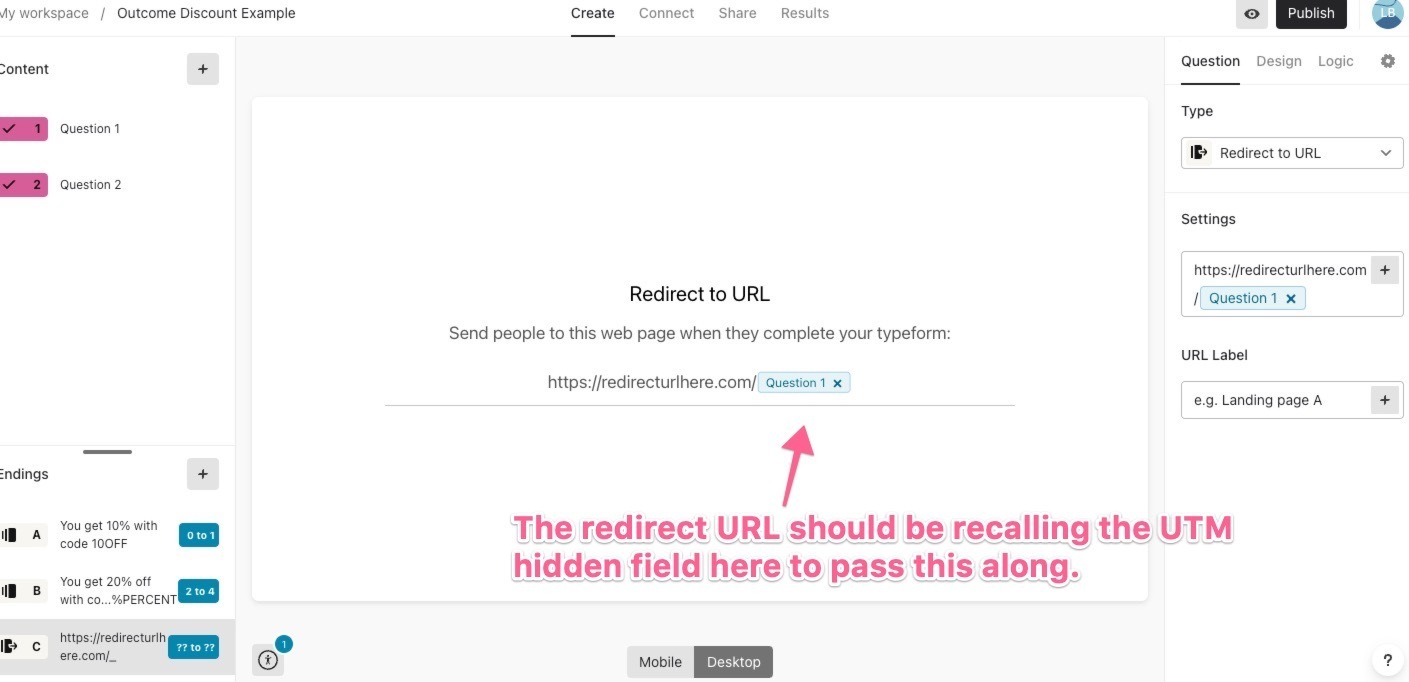
@Stanmoor In the redirect setting here in your form, do you have those UTM parameters passing out to the Calendly page? 


9 replies

Liz
Ex–Typefomer
Forum|alt.badge.img+5
  • Tech Community Advocate
  • March 7, 2024

Hi @Stanmoor Would you mind sharing how you have the redirect URL setup in your typeform?Any screenshots you could share would be helpful. Thanks in advance!


  • Author
  • Explorer
  • March 7, 2024

Hey Liz - I recorded you a video showing the issue here, thank you!


I wonder if it’s to do with the ‘urls to decorate’ bit, as typeform embed is in there?


Liz
Ex–Typefomer
Forum|alt.badge.img+5
  • Tech Community Advocate
  • Answer
  • March 7, 2024

Oh! I just watched your free course on Amazon FBA! 🤣

@Stanmoor In the redirect setting here in your form, do you have those UTM parameters passing out to the Calendly page? 


  • Author
  • Explorer
  • March 7, 2024

Haha that’s a coincidence - before I posted?!

How would I get the typeform to pick up the current UTM from the URL? Is that in a hidden field? Thanks a lot.

EDIT - I just tried what you said and it works perfectly. Thanks so much!!!


Liz
Ex–Typefomer
Forum|alt.badge.img+5
  • Tech Community Advocate
  • March 7, 2024

Yes! I think I watched it a week or so ago now, @Stanmoor . I’m on your email list! 😆

Glad to hear that worked! Let us know if there’s anything else we can help with. 😁


  • Author
  • Explorer
  • March 7, 2024

Haha mad! Thanks again :)


  • Navigating the Land
  • January 17, 2025

@Liz I’m trying to do the same thing but what is set up in Question 1 to pull that in to the redirect URL?


Liz
Ex–Typefomer
Forum|alt.badge.img+5
  • Tech Community Advocate
  • January 22, 2025

Hi ​@Blue Meta Thanks for stopping by the community! I’m afraid I don’t quite understand the question. Are you wondering what parameters you need in the URL in order to pass in data? If you don’t mind clarifying, that would be helpful!


Forum|alt.badge.img+1
  • Navigating the Land
  • November 7, 2025

Hey Stanmoor

It sounds like you essentially want the UTM parameters to persist across pageviews (I.e. from your initial Typeform to the Calendly booking).

You have two options here, and the best approach largely depends on whether the Typeform and Calendly widgets are embedded on your website or if you are using the hosted Typeform and hosted Calendly pages.

If you are using the hosted pages, then your only option is to do ‘link decoration’ as suggested earlier. This basically means that you capture the UTMs in hidden fields, and then append them to the redirect URL that you set in Typeform. It’s a bit confusing, but basically you are rebuilding the UTM tagged link on redirect.

If you have them both embedded on your website, the best option is to store the UTMs when the visitor initially lands on your site (likely in a first-party cookie) and then write them into hidden fields on whatever form they submit (I.e. the initial Typeform, the Calendly widget, etc). You can write this code yourself, or you can use tools like Attributer.io to handle this for you (disclosure: I am the founder). Attributer works with both Typeform and Calendly (and hundreds of other tools) so it should solve your issue easily. You also get the added benefit of being able to capture other data with Attributer as well, including attribution information on users who come from organic channels (like Organic Search, Organic Social, etc), as well as things like the Google CLick ID, Microsoft Click ID, time to convert, number of visits before converting, their initial landing page, the page they converted on, etc.

Hope this helps

Aaron



