Answer

Dynamic UTM Tracking on responses

  • April 21, 2022
  • 17 replies
  • 1246 views

Hi,

If i pass a dynamic value through the follow UTM parameters will they appear on the responses in Typeform? 

An example of a url that ill be using is “example.com/?utm_source=google-ads&utm_campaign={_campaignname}&utm_term={keyword}“


By enabling the UTM parameters on my form will they dynamically populate with the relevant info that is passed through in the url? utm_campaign & utm_term will change depending on each click and where it originates from. 


Thanks!

Best answer by Liz

Hi @Caldf Happy Friday! As long as the values are set correctly, yes! For example, if you’re sending respondents to a direct Typeform link from Google, that data should automatically populate. 

Though, if you have the form embedded, be sure to check out this article here on passing hidden fields into embedded forms so the UTM parameters pass in. 

17 replies

Liz
Ex–Typefomer
Forum|alt.badge.img+5
  • Tech Community Advocate
  • Answer
  • April 22, 2022

Hi @Caldf Happy Friday! As long as the values are set correctly, yes! For example, if you’re sending respondents to a direct Typeform link from Google, that data should automatically populate. 

Though, if you have the form embedded, be sure to check out this article here on passing hidden fields into embedded forms so the UTM parameters pass in. 


Forum|alt.badge.img
  • Navigating the Land
  • September 23, 2022

Hi! I want to add gclid (google click id) to hidden field. My typeform is mmbed in a web page (full screen).

I’ve created a field, also created a script which can write gclid to cookie and second one which can set it to “data-tf-hidden” attribute on page load.

I’ve try to make a test and I see that my scripts vorking properly, but I’ve received empty field in typeform.

May be you have some solution for me? Help pls!


Best regards!


Liz
Ex–Typefomer
Forum|alt.badge.img+5
  • Tech Community Advocate
  • September 23, 2022

Hi @Jerome Bstl Happy Friday! I added your post here where we have some resources that may help you. Let us know if this doesn’t solve the issue!


Forum|alt.badge.img
  • Navigating the Land
  • September 25, 2022

Hi @Liz Thanks. I’ve read this article before, but not sure if this working with all parameters in url or only utms - google click id passed in gclid= parameter


Liz
Ex–Typefomer
Forum|alt.badge.img+5
  • Tech Community Advocate
  • September 26, 2022

Hi @Jerome Bstl Could you send the URL where you have the form embedded so we can take a look at what you have setup? 


Forum|alt.badge.img
  • Navigating the Land
  • September 26, 2022

Liz
Ex–Typefomer
Forum|alt.badge.img+5
  • Tech Community Advocate
  • September 27, 2022

@mathio do you happen to know if anything in the code in the URL above might be affecting the issue? I notice, when clicking on the URL, it redirects to a different page. 


Forum|alt.badge.img
  • Navigating the Land
  • September 27, 2022

Hey Liz,
Thanks for the support, we managed to find the issue: we used the older version of typeform embed code, the newer solved the problem.


Liz
Ex–Typefomer
Forum|alt.badge.img+5
  • Tech Community Advocate
  • September 27, 2022

@Jerome Bstl ah! Glad to hear that solved the issue. Thanks for letting us know!


  • Navigating the Land
  • March 7, 2023

Hi @Liz, i’m a fan of your solutions and responses.

I too am facing similar issues with dynamically tracking the utm parameters from the responses. I have embedded the form into my website but am not able to capture the utm parameters as to where the responses came from.

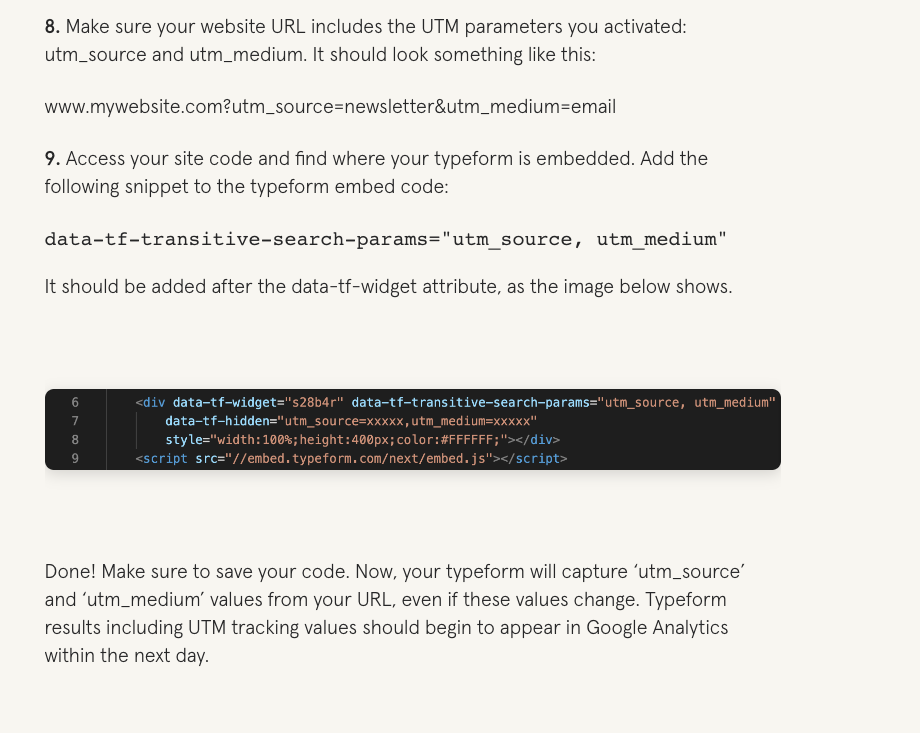
Have tried the below solution as in image but to no avail… In the data-tf-hidden attribute, I have followed the parameters and input "utm_source=xxxxx, utm_medium=xxxxx".  Could it be that this is the issue that I am not dynamically getting utm responses? 

Please advise thank you :)


Liz
Ex–Typefomer
Forum|alt.badge.img+5
  • Tech Community Advocate
  • March 7, 2023

HI @FrancoMLBB could you share the URL where you have the form embedded? 


  • Navigating the Land
  • March 10, 2023

HI @FrancoMLBB could you share the URL where you have the form embedded? 

Hi @Liz , Thank you so much for the quick response. I found out that my code included the ‘XXXXX’ as in the example and thus not returning dynamic responses as intended. Thank you so much!


Liz
Ex–Typefomer
Forum|alt.badge.img+5
  • Tech Community Advocate
  • March 10, 2023

Glad it was an easy fix, @FrancoMLBB !


Sun.Park
Typeform
Forum|alt.badge.img+1
  • Typeform
  • June 4, 2024

Hi @FrancoMLBB and @Jerome Bstl, I'm Sun and I'm a product manager here at Typeform working on Insights and I'd love to better understand how you use UTMs and hidden fields to track the success of your forms and customer outreach efforts. If you're free to chat, I'd love to talk - to make things easier, you can find time with me here.


Felixgolm
  • Navigating the Land
  • September 13, 2024

Hello!

I’m trying to find a way to add Dynamic UTMs to the Typeform link on my landing page to be able to not lose the information about from what ad does the users that land to the Typeform come.

Is there anyone that know how to set-up Dynamic UTMs in Typeform links (not embedded Typeforms)?

Thank you!


Liz
Ex–Typefomer
Forum|alt.badge.img+5
  • Tech Community Advocate
  • September 13, 2024

Hi @Felixgolm I added your post here where we have an existing conversation about this that may help!


Forum|alt.badge.img+1
  • Navigating the Land
  • November 7, 2025

Hey Caldf

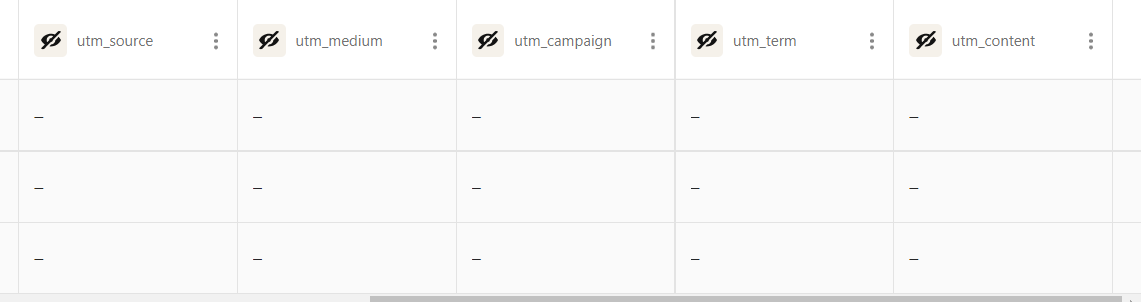
Yes, if the UTM parameters are being captured correctly by Typeform they should appear in the Responses table with each response.

One issue that often trips people up is that Typeform will only pull the UTM parameters in if the person completes the form on the exact same page they initially landed on. So if a person clicks you ad and lands on the homepage, and then clicks over to your Contact Us page to complete the form, the UTMs will no longer in the URL so therefore they won’t be captured.

The solution is to store the UTMs when the visitor initially lands on your site (ideally in a first-party cookie) and then write them into the hidden fields when the form is submitted. You can write this code yourself, or you can use tools like Attributer.io to handle this for you (disclosure: I am the founder). If you go the Attributer path, uou also get the added benefit of being able to capture other data as well, including attribution information on users who come from organic channels (like Organic Search, Organic Social, etc), as well as things like the Google CLick ID, Microsoft Click ID, time to convert, number of visits before converting, their initial landing page, the page they converted on, etc.

Hope this helps

Aaron