Question

How do I get the form fields to attach on the notification email

  • November 26, 2025
  • 6 replies
  • 67 views

I have successfully trialled the form builder and have created and submitted a form.  I am now testing the whole process before I sign up to the monthly paid plan.  We want to use the form as a credit application form. We therefore need a copy of the form fields to be attached to the email so we can save a copy in our ERP system.  Is that possible?  I’ve looked and looked and can’t work out how to do this.


Thanks

6 replies

Grace
Community Team
Forum|alt.badge.img+5
  • Community Advocate
  • November 27, 2025

Hi ​@Marketing at WW welcome to the community 😊

Are you looking to be emailed a copy of the responses when someone has filled out the form? 

You can set up a follow up email to be sent to yourself every time someone submits a form response, here’s a Help Center guide on how to set this up. 

You might also want to connect your typeform to something like Google Sheets to keep a record of the responses that come through. Here’s a guide on how to integrate Google Sheets.

Let me know if this isn’t what you’re looking for, or if you have any other questions!


James
Community Team
Forum|alt.badge.img+5
  • Community Team
  • December 12, 2025

Hey ​@Marketing at WW did you manage to figure this out in the end based on ​@Grace ‘s answer?


Hi, sadly I’m not sure this answered my question.  So I don’t think you have a way of emailing me the complete form unless I missed something in the help guide, it just emails me to tell me someone has sent the form and to login for the info. I just need an email to tell me someone has completed the form and include all the form fields.  Is that possible?


Thanks
Sarah


john.desborough
Forum|alt.badge.img+6
  • Certified Partner & Champion
  • December 22, 2025

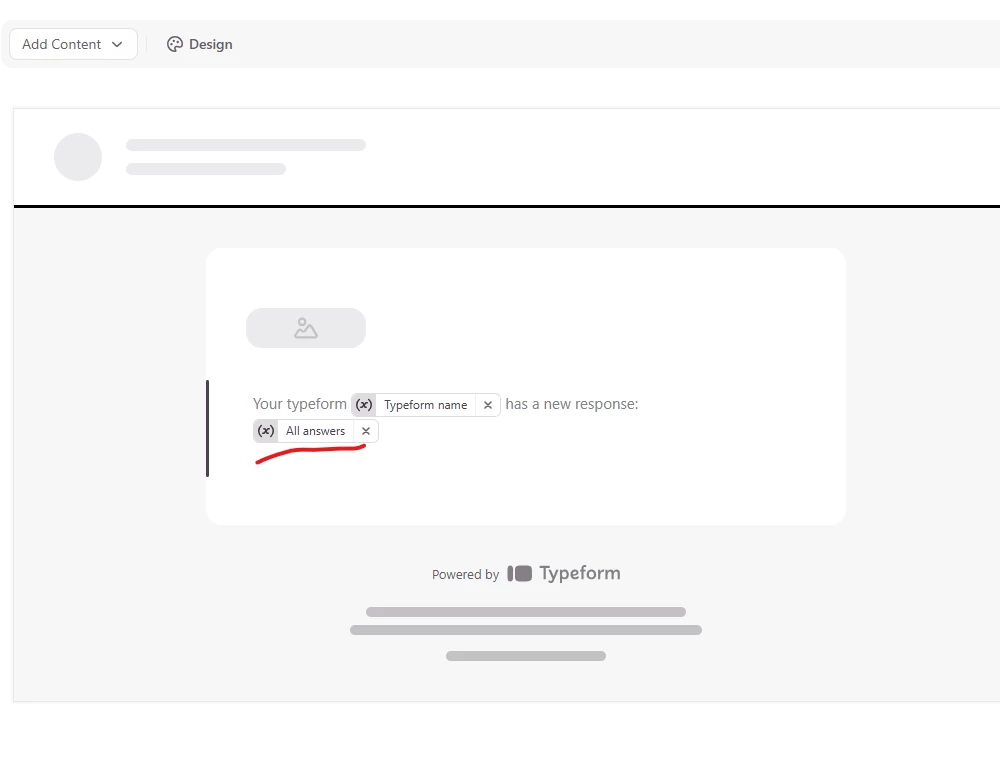
@Marketing at WW - you can get all the answers emailed back to in a response 

you still have to parse the fields of your email and into your ERP system. 

Depending on the ERP system you use there are a number of options to do this outside of  plain email messages: 

  • there may be a native Typeform integration to your ERP system - check in the Connect area
  • you can use Zapier (or similar) to connect your typeform to the ERP system
  • you could Connect your typeform to Google Sheets and import from the sheet into your ERP system 

all of these options exist to be able to drive field-level data into your ERP

if you want to create a pdf output, you can 1) connect your typeform to a google sheet, 2)  design a template in google slides or docs where you would have static text plus the location of the field data and use a tool like  Document Studio ($100 USD/year) to trigger the workflow to push the data into the google template and generate the pdf file and mail it to the end point for attachment in your ERP


all of these are well documented in the Help Center articles and in  posts within the Community. 

cheers


des


Hi, thanks for coming back to me so quickly.  I don’t need to connect to my ERP.  All I need is an email when someone has filled in the form, and a copy of all the form fields for that individual response.  Is that possible?


Thanks
Sarah


john.desborough
Forum|alt.badge.img+6
  • Certified Partner & Champion
  • December 23, 2025

yes it’s possible, ​@Marketing at WW - look at the image i posted earlier. it shows ‘all answers’ 

des