Answer

Time to complete for each respondent

  • April 8, 2021
  • 24 replies
  • 2129 views

Hello community! I know that there is a data about the average time to complete the form, but I need to know the time each person took to complete it, separately, not the average. It it possible? If yes, how?


Thank you so much!

Best answer by vickioneill

Hi @Alisa ,

Yes! You can see the response time by person by downloading the responses. I downloaded to Excel and you see the Start Date and Submit Date (which includes times). You would need to add a column to show the actual time (Submit - Start) to get the response time. 



In this case it’s 13:53:34 - 13:51:11 = 2:23. So it took this person 2 minutes and 23 seconds to complete the form. 

24 replies

vickioneill
Forum|alt.badge.img+5
  • Tastemaker
  • Answer
  • April 8, 2021

Hi @Alisa ,

Yes! You can see the response time by person by downloading the responses. I downloaded to Excel and you see the Start Date and Submit Date (which includes times). You would need to add a column to show the actual time (Submit - Start) to get the response time. 


In this case it’s 13:53:34 - 13:51:11 = 2:23. So it took this person 2 minutes and 23 seconds to complete the form. 


  • Navigating the Land
  • April 9, 2021

Hi @vickioneill !

Can you get the START DATE when you connect to Google Sheets (not download, the live connection)?

Thank you!


john.desborough
Forum|alt.badge.img+6
  • Certified Partner & Champion
  • April 9, 2021

@Diego - from another user here.. 

the only thing i have been able to see in Google Sheets connection data push is the submit time. not the start or completion time


des


  • Navigating the Land
  • April 9, 2021

@john.desborough - True! But in order to calculate the response time by user I need both...


john.desborough
Forum|alt.badge.img+6
  • Certified Partner & Champion
  • April 9, 2021

@john.desborough - True! But in order to calculate the response time by user I need both...

@john.desborough - True! But in order to calculate the response time by user I need both...

then, at the moment, it looks like you will need to download the response data from the dashboard and, if necessary, port it into a Google sheet/tab to be able to link to your survey data. 

hopefully, since it is something that is recorded into the results inside Typeform, that we can request it be put on the product drawing board to have it incorporated into the Connect capability. 


  • Navigating the Land
  • April 9, 2021

@john.desborough - Yes, it’s impossible right now to calculate that time live. The odd thing is that you can have that number in a download but not in a direct connection…

Thank you!


john.desborough
Forum|alt.badge.img+6
  • Certified Partner & Champion
  • April 9, 2021

@Liz @Mariana - can we have this added to the product enhancement list please, if it is not already there?? 

ie the ability to obtain the start date/time, as well as the submit data/time as @vickioneill has mentioned above, that is available in the results section of the typeform


thanks


des


Forum|alt.badge.img+2
  • Sharing wisdom
  • February 3, 2022

Has this issue been resolved and we can see the respone time per each individual in google sheets/airtable?


john.desborough
Forum|alt.badge.img+6
  • Certified Partner & Champion
  • February 3, 2022

@ValdemarQ - what i had to do for a client is split form into two separate sections/typeforms and push the data from both to a google sheet. I could then capture the timestamp of the submissions, and subtract the first from the second to get the duration. Works for my client this way


des


Forum|alt.badge.img+2
  • Sharing wisdom
  • February 3, 2022

@john.desborough how is that, one where he submit forms and is counted as start time, and second submition is counted as a end time? Well that is a solution but a clean one, especially when typeform saves the values star and end, strangly why arent they passed to google sheets :) 


john.desborough
Forum|alt.badge.img+6
  • Certified Partner & Champion
  • February 3, 2022

@ValdemarQ - what i do is have the user put in name and email in the first form and redirect on submission is set (the submit button text has been changed to “start the quiz now”

i connect that quiz to a google sheet. when the response is submitted i have the ‘time they started the quiz’ that is to be measured. 

the second form is connected to the same google sheet but sends data to a different tab. 

both have timestamps

i create a third tab for reporting and use the email address as the lookup value to pull data from both of the other tabs into the reporting tab… then i take the timestamp of the quiz submission and subtract the time of email/name submission form to get the duration. It is not Olympic timing accurate but is close enough for the needs of the client. 

the start time of loading a form is often irrelevant and impossible to accurately capture - ie i can load the quiz to my desktop, go get a coffee or a bio break, then start doing the responses. what is the appropriate start time?

I am currently working on a version of the client quiz that has 5 timed components in the entire quiz and we have 6 forms in the sequence.. it works


des


Forum|alt.badge.img+2
  • Sharing wisdom
  • March 1, 2022

I wonder is it possible to get this via API? Do API call to get start and submit time for a record? Then it could be solved?


Forum|alt.badge.img+2
  • Sharing wisdom
  • April 27, 2022

Right, if someone is still looking, how we are handling currently this issue.

We have created Hidden field start_time
and once users click on the link top open typeform, we simply add it to url
 

'start_time='+new Date().toISOString();


Though, given Typeform does store in Typeform logs start and end times, it should definitely export the start time, so users have less trouble. I believe this is probably due to this feature is available to premium users only, but if you have a premium plan, why is it not exporting start times? 


  • Navigating the Land
  • August 26, 2023

I would like to understand as how to check the time taken to complete the quiz by individual users?


Liz
Ex–Typefomer
Forum|alt.badge.img+5
  • Tech Community Advocate
  • August 28, 2023

Hi @monalisharma happy Monday! I’ve moved your post here where we have an existing conversation about this. 😀


Forum|alt.badge.img
  • Navigating the Land
  • November 21, 2023

Any news on the export of Start Date to Google Sheets? 


Grace
Community Team
Forum|alt.badge.img+5
  • Community Advocate
  • November 22, 2023

Hi @ReneNL I don’t believe there are any updates to this feature, but I will check with the product team and get back to you 😊


  • Navigating the Land
  • June 4, 2024

Hello


Where can I see how long a particular participant took to answer the survey? I want to filter out responses which are below a reasonable threshold. 


Greetings,
Marc


  • Navigating the Land
  • June 4, 2024

Hello


Where can I see how long a particular participant took to answer the survey? I want to filter out responses which are below a reasonable threshold. 


Greetings,
Marc


Liz
Ex–Typefomer
Forum|alt.badge.img+5
  • Tech Community Advocate
  • June 4, 2024

Hi @Blumi I added your post here where we have an existing conversation about this. 😀


  • Navigating the Land
  • June 10, 2024

Great @Liz , thanks for your support. It good to hear that at least on the detailed data level of the downloads, the responding times are measured and tracked. 


Greetings,
Marc


Liz
Ex–Typefomer
Forum|alt.badge.img+5
  • Tech Community Advocate
  • June 10, 2024

Not a problem, @Blumi ! Let us know if you have any other questions. 


barriebramley
Forum|alt.badge.img+2

Hi @Blumi I added your post here where we have an existing conversation about this. 😀

Hi ​@Liz Is there any movement on this? (I can’t find any change).

Ideally I’d like both start and submit date to pull through to Google Sheets or Excel integration. Currently I can only get both values by manually downloading the data from TypeForm.

Looking forward to hearing from you (and hopefully some good news)

BB


James
Community Team
Forum|alt.badge.img+5
  • Community Team
  • July 31, 2025

Hey ​@barriebramley thanks for the bump on this one. You’re right, the functionality for pushing start and end times to Sheets/Excel still isn’t available through the native Typeform integration (unless I’m missing something ​@ElsaH ?)

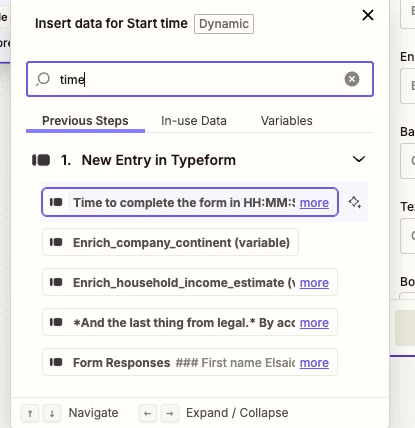
However, it does looks like this is possible via Zapier’s Typeform>GSheets integration, which can push through the form completion time for each response:


I’ll ping our product team now with your upvote for having this data pushed natively through the integration. Will keep you posted. In the meantime, let us know if you end up trying the Zapier solution and if this does the trick at least in the interim. Thanks again.

Cheers