Asterisk placement

  • October 21, 2022
  • 6 replies
  • 158 views

Forum|alt.badge.img

The asterisk placement from required questions acts a bit weird and this is especially noticable on mobile. We even removed the required mark from a question just to improve the styling.

The problem is that only the asterisk gets placed on the next line, like so:

In a crowded question on mobile it severely hurts the styling

6 replies

Liz
Ex–Typefomer
Forum|alt.badge.img+5
  • Tech Community Advocate
  • October 21, 2022

Hi @Jver Happy Friday! Thanks for stopping by and sharing this feedback. I’ll pass it along to our product team. 😁


Forum|alt.badge.img
  • Explorer
  • October 19, 2023

I have the same issue. How do we open a trouble ticket on this? We have multiple questions that the asterisk is in a random spot or on a line of its own. 


Liz
Ex–Typefomer
Forum|alt.badge.img+5
  • Tech Community Advocate
  • October 20, 2023

Hi @Momentors I can add your feedback to the suggestion already made to product. 😀


Experiencing the same issue, is there a workaround?  


Liz
Ex–Typefomer
Forum|alt.badge.img+5
  • Tech Community Advocate
  • April 18, 2024

Hi @Alfa-Omega_Saas_team I’m afraid not, but I’ll share the issue you’re having with it as well to the product team. 


Grace
Community Team
Forum|alt.badge.img+5
  • Community Advocate
  • July 29, 2026

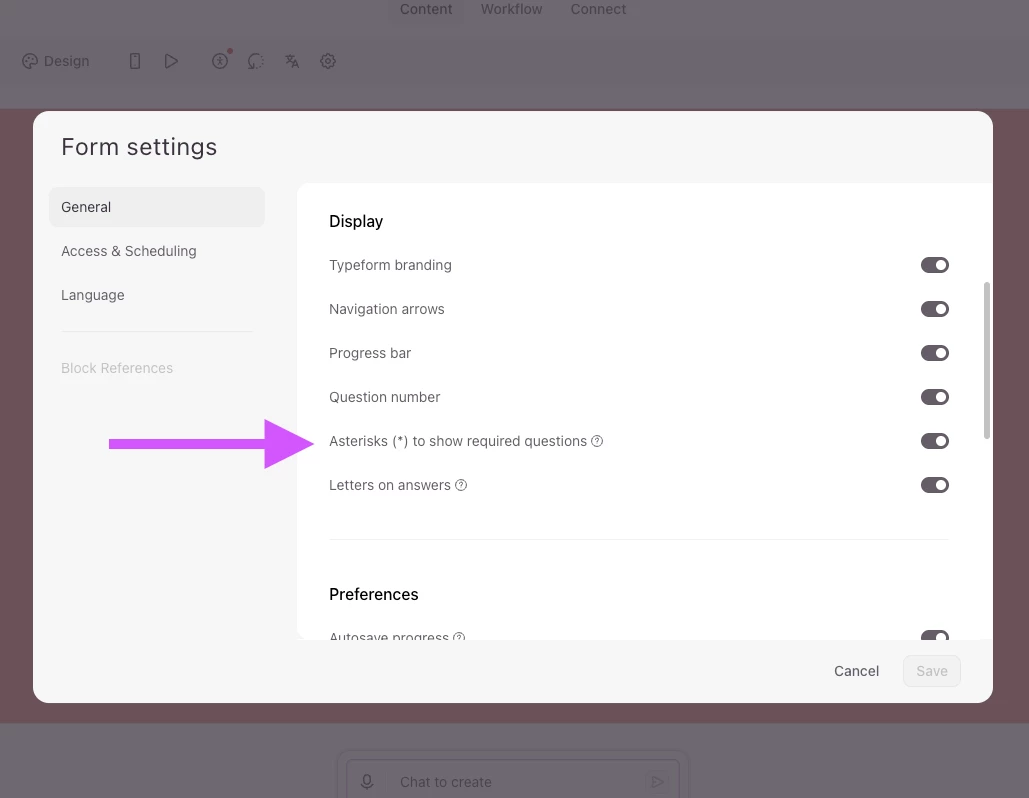
Hi everyone! I appreciate it’s been a few years since you were asking about the behaviour of the Asterisk on Required questions, but I wanted to drop in and let you know that Typeform has recently made updates to this feature, and you can now hide the asterisk when needed. 


Head to your form Settings, and you will see the option to toggle it on or off:


More info can be found in our Help Center. Hope this helps!