Answered

Automatic asterix next to questions

  • August 24, 2021
  • 2 replies
  • 312 views

I would like to know why Typeform automatically adds an asterix next to some questions?* And why they cannot be removed?

Best answer by Grace

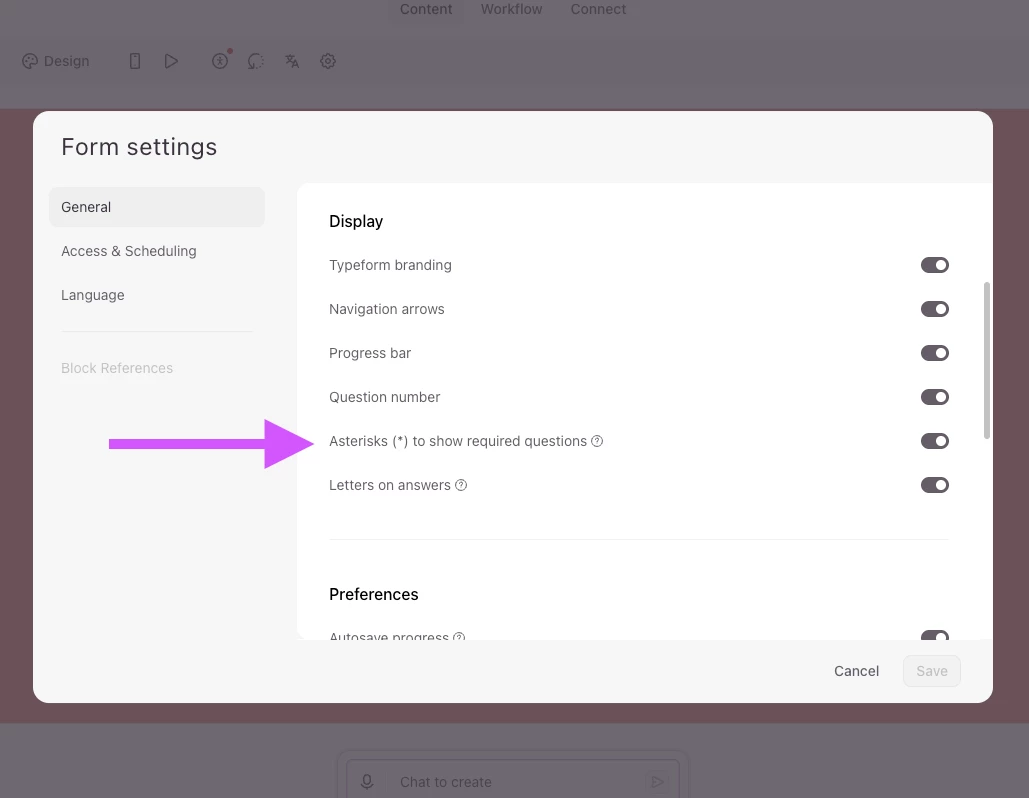
Hey ​@Laura A hope you’re doing well! I just wanted to stop by and say Typeform has recently updated the Required feature and you can now hide the asterisk from the end of the question.


Just head to your form Settings, and you will see the option to toggle the asterisk on and off:


More info on this can be found in our Help Center here.


Hope that helps!

2 replies

Gabi Amaral
Ex–Typefomer
Forum|alt.badge.img+5
  • Ex–Typefomer
  • August 24, 2021

Hello @Laura A! Welcome to our Community! :blue_heart:

The asterisk is displayed whenever a question is set to "Required" in your form. If your question is mandatory, then your respondent will see this asterisk.

You can refer to this article to understand more about required questions. 

Hope it helps! :wink:


Grace
Community Team
Forum|alt.badge.img+5
  • Community Advocate
  • Answer
  • July 29, 2026

Hey ​@Laura A hope you’re doing well! I just wanted to stop by and say Typeform has recently updated the Required feature and you can now hide the asterisk from the end of the question.


Just head to your form Settings, and you will see the option to toggle the asterisk on and off:


More info on this can be found in our Help Center here.


Hope that helps!



