Answer

Date field validation for specific days only

  • May 14, 2021
  • 4 replies
  • 803 views

Hi there,

I am building an order form wherein my delivery dates are only Thursdays.

Is there a way for me to limit the date field to allow selecting Thursdays only?

Thank you!

Best answer by john.desborough

@Jenna - this is from another user 

actually creating the list for the drop down is pretty simple and took me all of about 30 seconds to do this: 

  • in excel put tomorrow (Thursday) date in first cell and then using the Fill command for a series of dates 7 days a part i created a list of over 100 dates. 
  • then i copied them and pasted them into the dropdown question list (see image below) 

save and paste and la voila, you have your drop down list in under a minute. 
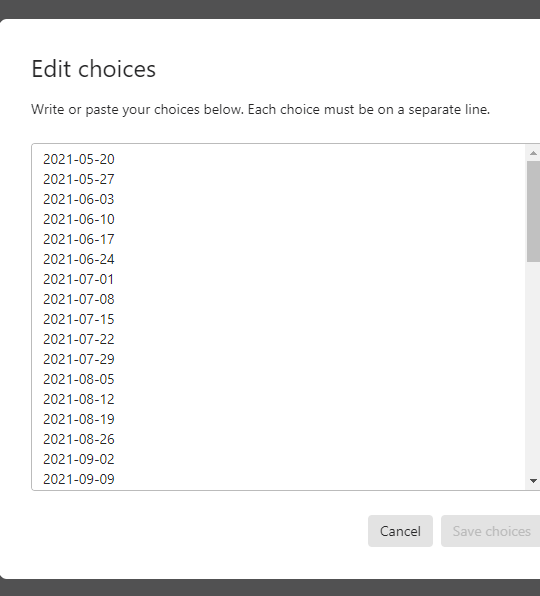
 

you can format the cells however you like in excel and then copy the field across. 


hope that helps make the list more palatable in the short term


cheers 


des

4 replies

Liz
Ex–Typefomer
Forum|alt.badge.img+5
  • Tech Community Advocate
  • May 14, 2021

Hi @Jenna thanks for stopping by the community! Glad you’re here. :grin:

We don’t currently offer a way to validate the day of a week within the date field, but it’s definitely an interesting idea! Could you use a dropdown field with the specific Thursdays on your form as a workaround by chance? 


  • Author
  • Explorer
  • May 19, 2021

Hi Liz,

Could you use a dropdown field with the specific Thursdays on your form as a workaround by chance? 


That sounds very tedious as I have to add every Thursday on the calendar every year.


Liz
Ex–Typefomer
Forum|alt.badge.img+5
  • Tech Community Advocate
  • May 19, 2021

Ah, got it. I sadly don’t have a better workaround for this, but if you think of any other questions, please let me know! 


john.desborough
Forum|alt.badge.img+6
  • Certified Partner & Champion
  • Answer
  • May 20, 2021

@Jenna - this is from another user 

actually creating the list for the drop down is pretty simple and took me all of about 30 seconds to do this: 

  • in excel put tomorrow (Thursday) date in first cell and then using the Fill command for a series of dates 7 days a part i created a list of over 100 dates. 
  • then i copied them and pasted them into the dropdown question list (see image below) 

save and paste and la voila, you have your drop down list in under a minute. 


you can format the cells however you like in excel and then copy the field across. 


hope that helps make the list more palatable in the short term


cheers 


des




