Answer

Highlighted answers

  • May 11, 2021
  • 4 replies
  • 123 views

Hi, Guys. 
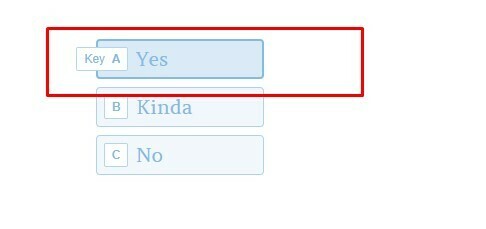
When I send the survey, one of the multiple choice answers appears highlighted (as shown in the picture). 
There’s an way to change that? 
We also see ‘key’ next to the option, can this be removed? 
 

Best answer by john.desborough

@ErikaP - welcome to the community from a fellow user

what you are seeing is the default result of hovering over a selection in the list. it is highlighted when you hover your cursor over it and the hint is provided as to what key on the keyboard you can press to select that option. 

you can change the message in your settings (the gear icon) under messages as in the image below
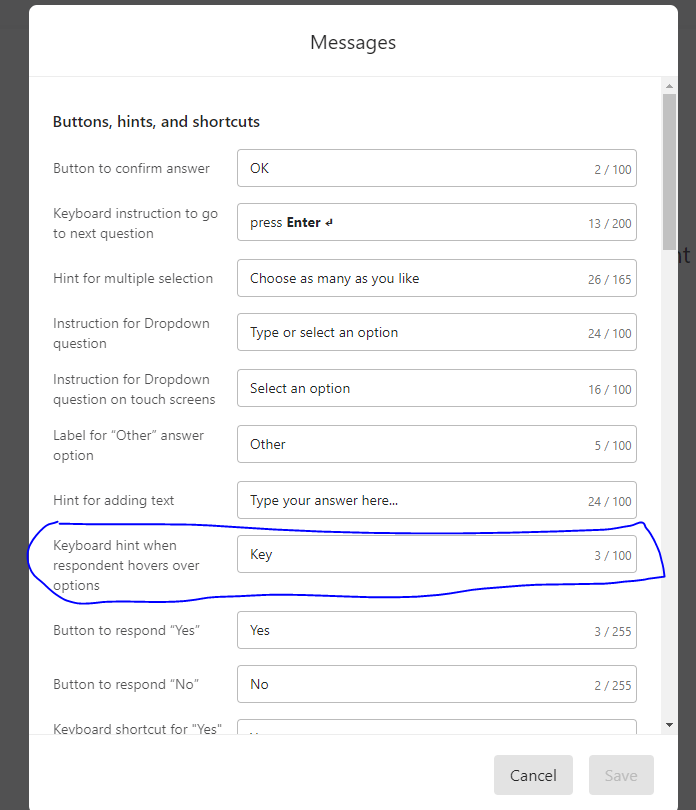
you could change the word Key (which for some folks means that you should press the key) to read “Press letter “

4 replies

john.desborough
Forum|alt.badge.img+6
  • Certified Partner & Champion
  • Answer
  • May 11, 2021

@ErikaP - welcome to the community from a fellow user

what you are seeing is the default result of hovering over a selection in the list. it is highlighted when you hover your cursor over it and the hint is provided as to what key on the keyboard you can press to select that option. 

you can change the message in your settings (the gear icon) under messages as in the image below

you could change the word Key (which for some folks means that you should press the key) to read “Press letter “


Liz
Ex–Typefomer
Forum|alt.badge.img+5
  • Tech Community Advocate
  • May 18, 2021

Hi @ErikaP how’s the form building going? Did this solution help? :smile:


  • Explorer
  • July 15, 2021

Hi - I am seeing the same issue and it’s not triggered by a hover over. It’s by default the first answer in a multiple choice and doesn’t affect yes/no responses. It does not appear in the preview, and only in the “published” or live typeform. Believe this is a bug.


Liz
Ex–Typefomer
Forum|alt.badge.img+5
  • Tech Community Advocate
  • July 15, 2021

Hi @andresp I’ve responded to your question in your post below. :)





