Question

misspelling

  • Apr 6, 2021 9:00 AM UTC
  • 5 replies
  • 93 views

Hi,

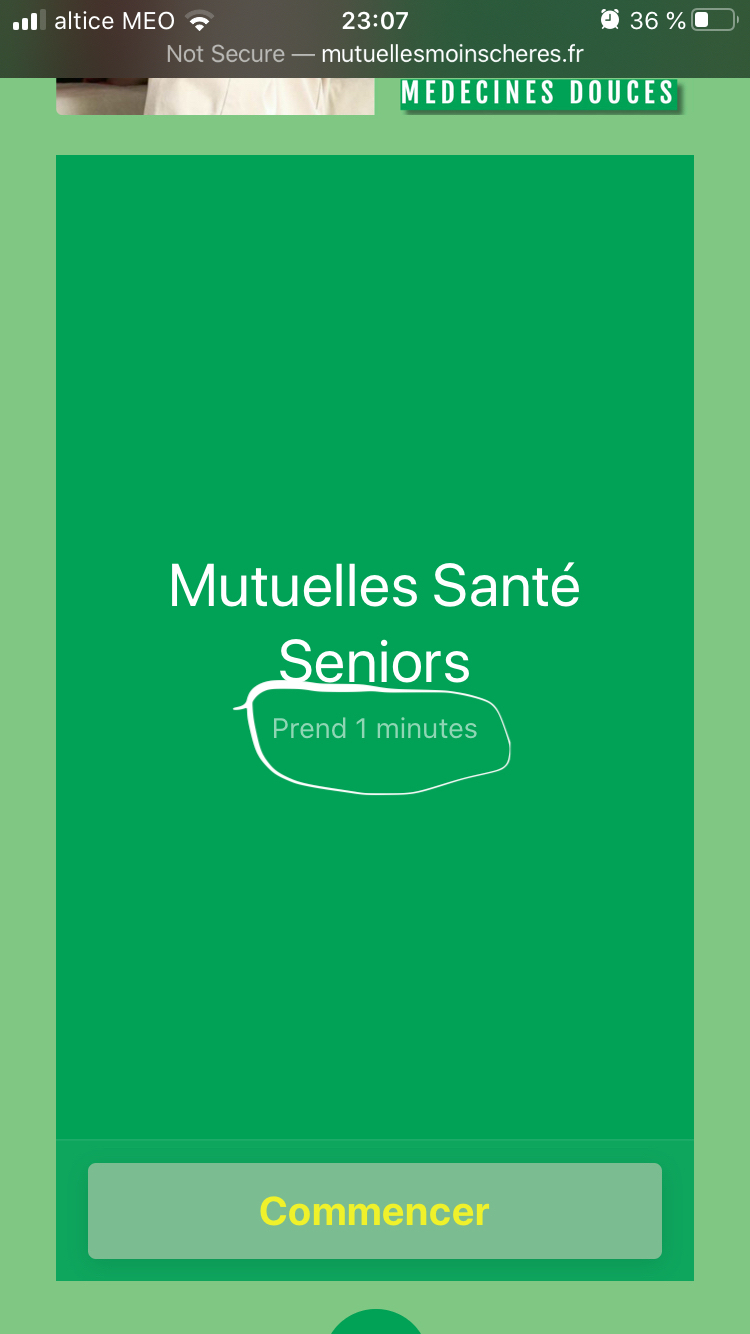
When checking on my phone I see first a “slide” with the name of my TypeForm with a text below that says: “Takes 1mn”

1- I have the french version and it’s misspelled; “Prend 1 minutes”: there is no “S” at minute… How can I remove it?

2- Also it literally takes 15 secondes for the lead to complete the form. How do I change it?


3- And lastly can I just get rid of that first “slide”?


Thanks for your time and help

5 replies

Liz
Ex–Typefomer
Forum|alt.badge.img+5
  • Tech Community Advocate
  • Apr 6, 2021 9:58 PM UTC

Hi @Algoritmo thanks for stopping by! Would you mind providing the URL of the form you’re referencing and screenshots/videos of the issue so we can help you? :grinning:


  • Author
  • Explorer
  • Apr 6, 2021 10:13 PM UTC

@Liz sure. Here is the link… But it only appears on the mobile… Basically I’d like to get ride of that “slide”. I don’t have when looking on my laptop:

http://mutuellesmoinscheres.fr/landing/


Liz
Ex–Typefomer
Forum|alt.badge.img+5
  • Tech Community Advocate
  • Apr 7, 2021 7:47 PM UTC

Hi @Algoritmo Thanks for sending that over! The screen you’re seeing appears when there isn’t a welcome screen added to the form, and you can read more about this here. 

To remove the screen, you’ll want to add ?typeform-welcome=0 after the URL in the embed code. As an example with your code, it would look like this: 


<div class="typeform-widget" data-url="https://form.typeform.com/to/QtzVv5h5?typeform-medium=embed-snippet?typeform-welcome=0" style="width: 100%; height: 563px;"></div>

Let me know if this doesn’t work!


  • Author
  • Explorer
  • Apr 7, 2021 9:06 PM UTC

...


Liz
Ex–Typefomer
Forum|alt.badge.img+5
  • Tech Community Advocate
  • Apr 9, 2021 7:46 PM UTC

@Algoritmo I can’t quite see your message, but I hope that worked! :)