Answer

multi-language forms

  • September 11, 2025
  • 4 replies
  • 41 views

I am new on this. Is there a way to create a multi-language form?
I need to create a survey in english and spanish, and i would like it to be just one form so I can get results of both answers in one place. Is it possible?

 

Best answer by Phoebe VA

Hi ​@maria_sierra,


Yes, you’re correct! You’ll need a Business or higher plan to use the multi language feature

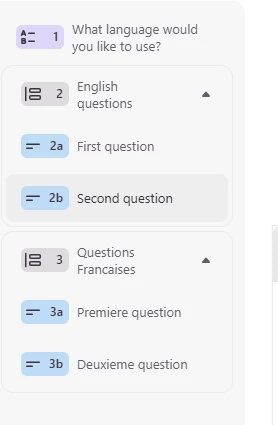
But as Des has mentioned, as a workaround, you could build one form with different question groups for each language and use logic to skip respondents to the question group of their selected language. We have this Help Center article that walks through the different workarounds for creating forms for multiple languages.

4 replies

john.desborough
Forum|alt.badge.img+6
  • Certified Partner & Champion
  • September 11, 2025

@maria_sierra - you could use a Question Group for each language. start with a ‘choose language’ multiple choice and use branching to send the user to the English or the Spanish forms.

drawback of this approach is that you have only one ‘system’ language for the form rather than being able to use the Language feature of the form itself for each language. 

if you started with a simple choose language form that redirected on completion to the appropriate language form then you can use the Language function. here’s a little example that i did several years ago

you can connect the form(s) to the same Google Sheet if you use a multi form approach and then all your data would be available in the Sheet by language on separate tabs


des


  • Author
  • Explorer
  • September 11, 2025

@maria_sierra - you could use a Question Group for each language. start with a ‘choose language’ multiple choice and use branching to send the user to the English or the Spanish forms.

drawback of this approach is that you have only one ‘system’ language for the form rather than being able to use the Language feature of the form itself for each language. 

if you started with a simple choose language form that redirected on completion to the appropriate language form then you can use the Language function. here’s a little example that i did several years ago

you can connect the form(s) to the same Google Sheet if you use a multi form approach and then all your data would be available in the Sheet by language on separate tabs


des

Thank you John!
I see there is a way for multi-language in a unique form if you have the Business plan. 

Thanks!


john.desborough
Forum|alt.badge.img+6
  • Certified Partner & Champion
  • September 11, 2025

@maria_sierra - as i mentioned above yes you can if you use question groups.the image below is a simple view of a multiple choice that would send the user to the English or French questions based on the option chosen in Q1


Phoebe VA
Community Team
Forum|alt.badge.img+5
  • Community Team
  • Answer
  • September 11, 2025

Hi ​@maria_sierra,


Yes, you’re correct! You’ll need a Business or higher plan to use the multi language feature

But as Des has mentioned, as a workaround, you could build one form with different question groups for each language and use logic to skip respondents to the question group of their selected language. We have this Help Center article that walks through the different workarounds for creating forms for multiple languages.