Answered

Multiple checkboxes in survey

  • April 18, 2025
  • 3 replies
  • 338 views

How do I add multiple checkboxes so that my survey-taker can CHECK ALL THAT APPLY??!?!?!?!?!?!?!?!!?


This seems like it should be a really obvious and ‘easy’ thing, so I’m not sure why it’s not??


There is work to be done here Typeform, sorry. This is my first time using this platform and I’m already so confused I am thinking of bailing back to SurveyMonkey.


Is it even an option, and if not….WHYYYYY?????

Best answer by Liz

Hi ​@BetsyA23 Happy Fri-yay! I hope you’re having a good one! We just released the checkbox feature, so while we don’t have any option to have multiple checkboxes within a question, you could use the multiple choice question to allow people to select as many as they would want!

3 replies

Liz
Ex–Typefomer
Forum|alt.badge.img+5
  • Tech Community Advocate
  • Answer
  • April 18, 2025

Hi ​@BetsyA23 Happy Fri-yay! I hope you’re having a good one! We just released the checkbox feature, so while we don’t have any option to have multiple checkboxes within a question, you could use the multiple choice question to allow people to select as many as they would want!


  • Navigating the Land
  • March 31, 2026

But multiple choice doesn’t allow to make each option mandatory to select, thereby it’s not a solution to multiple checkbox...


Phoebe VA
Community Team
Forum|alt.badge.img+5
  • Community Team
  • March 31, 2026

Hi ​@milldos,


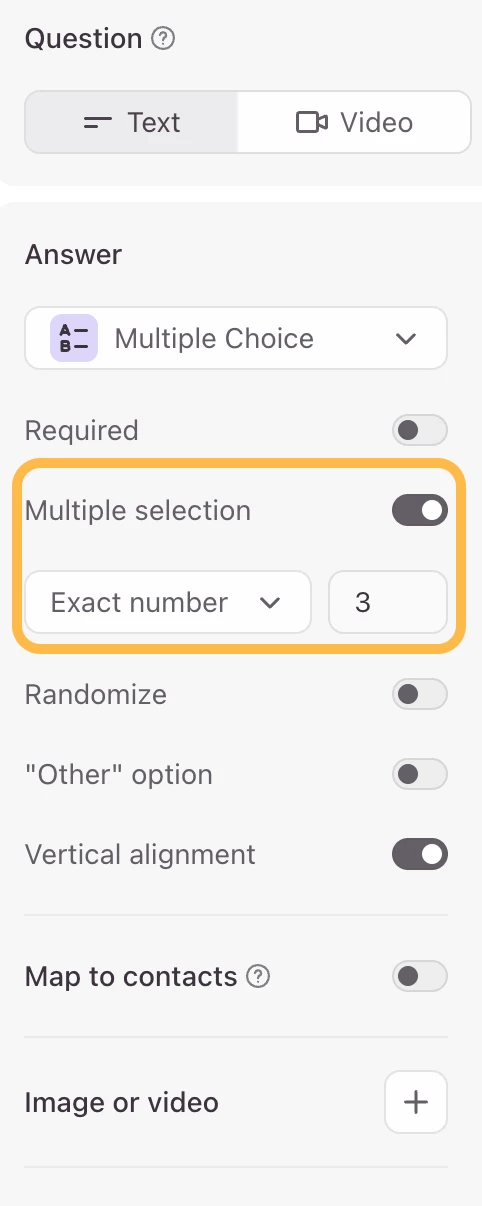
With the Multiple Choice question type, you can enable Multiple selection that will allow respondents to select more than one option. If you would like to make it mandatory to select all the options, you can set the exact number of options you want respondents to choose in the Multiple selection setting.


For example, if you have 3 answer options in your Multiple Choice question and you want respondents to select all 3, you can enable Multiple selection to the exact number 3. This will require respondents to select all 3 options before they can move on.


Hope this helps!