Answered

Thank You Page - Social Media Icons - How to link them?

  • September 13, 2022
  • 6 replies
  • 1968 views

How do I link my social media URL’s to the social icons at the end of a Typeform?

Best answer by jvh

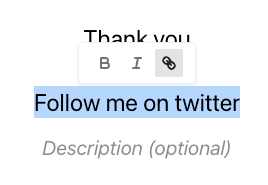
Hi @WeDeepen, the only way to do this at the moment is to add text links to your thank you screen. The social media icons available automatically create share links for your typeform.


Hope that helps

Joyce

6 replies

jvh
Typeform
Forum|alt.badge.img+5
  • Typeform
  • Answer
  • September 13, 2022

Hi @WeDeepen, the only way to do this at the moment is to add text links to your thank you screen. The social media icons available automatically create share links for your typeform.


Hope that helps

Joyce


  • Navigating the Land
  • February 2, 2024

Hi team,

Is this still the best answer one year later?

It seems to be something so easy to do technically from a backend perspective.

Let me know if there is something better now!


I agree, I’m not sure where these icons came from or how to choose which ones show up and how to link them: 


john.desborough
Forum|alt.badge.img+6
  • Certified Partner & Champion
  • June 4, 2024

@shake.n.bakers on the ending screen there are toggles to turn off the icons and button links


des


  • Navigating the Land
  • May 26, 2026

Hi all,

Is this still the best option another year on?

Is there any way I can choose which social icons are shown?

Can I add links to each social icon? Or any of them for that matter?

Thanks,


Grace
Community Team
Forum|alt.badge.img+5
  • Community Advocate
  • May 27, 2026

Hi ​@Henri_k the workaround ​@jvh shared is still the best option. The share on social toggle is currently not customizable. I will be sharing your feedback with our Product team, will keep everyone posted here if anything changes 🙏