Answer

Making buttons/answers appear at the end of the video

  • June 9, 2023
  • 3 replies
  • 96 views

Grant T. Larsen

Does anyone know how to manipulate the buttons and multiple choice answers so that they don’t show up until the end of the video? I have a “Continue” button on my very first video in my funnel but I don’t want people to be able to click it until I say everything I have to say. Same goes for every other video in my funnel.

Best answer by Grace

Hey @Grant T. Larsen welcome to the community!

If you want to delay the button from appearing too soon, you can use the delay interaction option in the step:
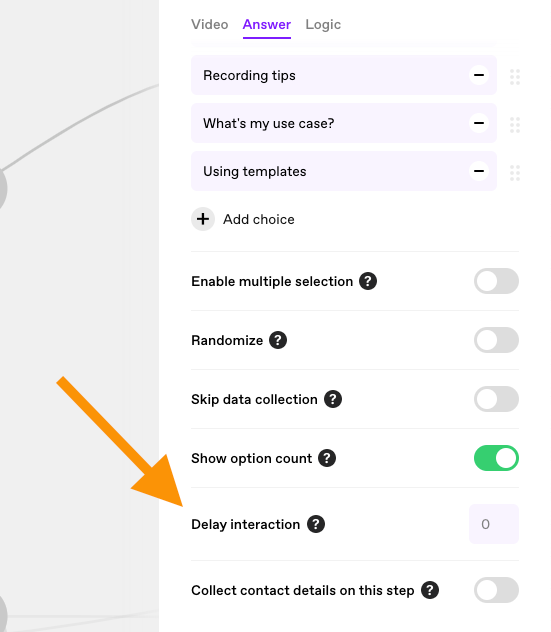
 

just add in there after how many seconds you want the button to appear 😊

Hope that helps but let us know if you have any other questions

3 replies

Grace
Community Team
Forum|alt.badge.img+5
  • Community Advocate
  • Answer
  • June 9, 2023

Hey @Grant T. Larsen welcome to the community!

If you want to delay the button from appearing too soon, you can use the delay interaction option in the step:


just add in there after how many seconds you want the button to appear 😊

Hope that helps but let us know if you have any other questions


Grant T. Larsen

Thank you so much! Do you happen to know if I can change the size of the button itself? Am I able to change the size, placement, rounded edges, etc etc? 


Grace
Community Team
Forum|alt.badge.img+5
  • Community Advocate
  • June 12, 2023

Hey @Grant T. Larsen hope you had a good weekend 😊

It’s not currently possible to customize the size/placement of the button but it is on our feature request board so I’ve added a +1 to the request. If it makes it into the road map I will let you know 🤞