Answer

How to track conversions in Google Analytics?

  • February 24, 2021
  • 6 replies
  • 617 views

Hi,

I would like to know how I can do to visualize typeform conversions in Google Analytics in such a way that they appear to me from the source of the page where the conversion was made. The typeform has Google Analytics integration enabled and it appears as a pop-up on my website when clicked.
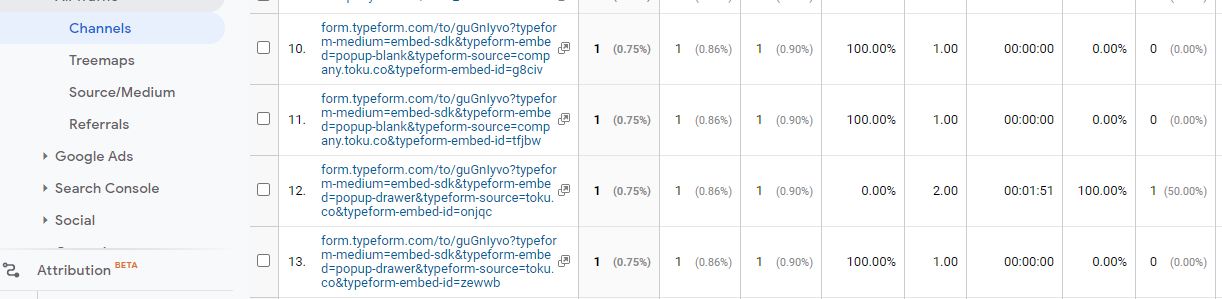
Right now what I see in Google Analytics is the entire Typeform URL but not that the conversion was made from the page where the typeform is.

See the image below for reference:


Thanks for the help you can provide me!

Best answer by Liz

Hi @Marketing Team ! In order to track the page where a respondent submitted the form, you’ll need to create an event within Google Analytics to track this and implement the code onto your site. 

So, the steps would look something like this: 

  1. Create an event in Google Analytics. There’s a great guide here to help you create an event depending on what you’d like to track and how you’ll be using the data in the future. 
  2. Add the event code to each page where the popup is. If this is every page, you could add the event code to the header/footer of your site. Depending on your comfortability level with Google Analytics and coding, you may or may not need to grab help with the code from a tech-savvy friend. 
  3. Next, you can view the event data by page by going to Behavior → Events → Pages
  4. Then, when viewing the events, be sure to sort the event by the Secondary Dimension, which would be the event you specifically created for your typeform. 

Then, you’ll be able to see which pages the form submissions happened on! :) Let me know how this goes for you, and I’ll work on creating an in-depth guide for this, too. 

View original

6 replies

Liz
Ex–Typefomer
Forum|alt.badge.img+5
  • Tech Community Advocate
  • 15035 replies
  • Answer
  • February 24, 2021

Hi @Marketing Team ! In order to track the page where a respondent submitted the form, you’ll need to create an event within Google Analytics to track this and implement the code onto your site. 

So, the steps would look something like this: 

  1. Create an event in Google Analytics. There’s a great guide here to help you create an event depending on what you’d like to track and how you’ll be using the data in the future. 
  2. Add the event code to each page where the popup is. If this is every page, you could add the event code to the header/footer of your site. Depending on your comfortability level with Google Analytics and coding, you may or may not need to grab help with the code from a tech-savvy friend. 
  3. Next, you can view the event data by page by going to Behavior → Events → Pages
  4. Then, when viewing the events, be sure to sort the event by the Secondary Dimension, which would be the event you specifically created for your typeform. 

Then, you’ll be able to see which pages the form submissions happened on! :) Let me know how this goes for you, and I’ll work on creating an in-depth guide for this, too. 

Hi Liz,

Thanks for your answer!. We have already created the events with Google Tag Manager, but the question would be how can I visualize the Typeform conversions that arrive from an specific page where the embedded Typeform is. Right now it shows me the source as a URL for each typeform submitted, as I show in the previous graphic. There’s a way to identify that?


Thank you,


Liz
Ex–Typefomer
Forum|alt.badge.img+5
  • Tech Community Advocate
  • 15035 replies
  • February 25, 2021

Hi @Marketing Team ah! glad to hear you have the events already setup. Are you able to see the specific page data when you go to Behavior → Events → Pages and then choose your event as the Secondary Dimension? From there, you should see the event and the pages the event occurred on as well as how many times, too. 


Okay, so we have a very similar question, however we want to know, does anyone else have problems with there Google Search Console accounts at the moment? For walsh and partners, plus for W&P designs, the keyword data, in terms of average position information, is way off where it is the serps, for example, sometimes we see  the average position set at say 25 when really the websites are the top 10 in the SERP’s, does any one else see this?


Forum|alt.badge.img+1
  • Socializer
  • 14 replies
  • September 20, 2025

To properly track Typeform conversions in Google Analytics, you’ll need to set up event tracking and pass the source page information along with the form submission. Since your Typeform is embedded as a pop-up, GA may only be capturing the Typeform URL instead of the parent page.

A good approach is to use Google Tag Manager to fire a conversion event when the Typeform is completed and include the parent page as a variable. You can then create a Goal in Google Analytics based on that event. This way, you’ll be able to see not just the Typeform completion, but also which page the conversion originated from.


Sweely
Forum|alt.badge.img+1
  • Navigating the Land
  • 11 replies
  • September 29, 2025

I see you've already implemented event tracking via Google Tag Manager (GTM), which is a great first step!

The core issue you're facing - seeing the Typeform URL instead of your page URL as the source - is very common because the Typeform pop-up acts as an iframe, essentially a separate domain, which breaks the standard way Google Analytics (GA) captures the page context.

The solution requires passing the source page information (the URL of your main website page where the pop-up appeared) along with the Typeform submission event you've already created in GTM.

While the simpler GTM setup usually involves creating a custom event trigger that fires when Typeform's built-in TypeformSubmit event is pushed to the data layer, that setup on its own often doesn't automatically include the parent page URL in a way that GA can attribute the conversion correctly.

A robust, modern approach for solving this - and for future-proofing your entire tracking setup - involves moving beyond just client-side tracking by combining the Typeform API, the Google Analytics Data API, Google Tag Manager (GTM), and a server-side tagging solution like Stape or Google Cloud Platform (GCP).

Here’s why this combination is a powerful solution:

Typeform API is used to fetch the submission data directly from Typeform’s servers when a form is completed.

This data is the most reliable source for conversion details.

Google Tag Manager (GTM) is still essential, but now in a server-side context.

You use GTM's web container to send a client-side signal (like an event with a unique user ID or a cookie value) to a server container.

A service like Stape (or a self-hosted GCP solution) provides a server environment to run the GTM server container.

This is where the real magic happens: you match the server-side Typeform submission data (fetched via API) with the client-side data (sent via GTM) using a common key.

This allows you to combine the full Typeform conversion details with the complete client context, including the accurate original source page URL, the user's Client ID, and any other cookies or user-specific data that might be blocked or lost in a standard iframe or client-side setup.

Google Analytics Data API can then be used, often through the server-side GTM setup, to send the final, enriched conversion data directly to GA.

This data now includes all the context you need - the conversion event and the precise originating page URL.

This server-side method is more resilient to browser restrictions (like Intelligent Tracking Prevention), ad blockers, and cross-domain issues like the one you're experiencing, ensuring your conversion data is accurate and correctly attributed to the source page on your website, not the Typeform domain.

While it is more complex to set up than a purely client-side GTM configuration, this API-driven, server-side method is the most reliable way to ensure you capture conversions accurately with full source page context, moving past the limitations of the embedded pop-up you’re using.


Reply





