I’m really having trouble figuring out how to connect the outcome of my quiz to Hubspot. I’ve tried multiple types (dropdown, checkbox, single line text) of properties using this article I saw on other posts from 4-5 years ago and still cannot get one specific property to sync.
I need someone to tell me exactly how to connect the Ending Outcome to a property in Hubpot.

Answered
Syncing Quiz Outcome to Hubspot Property
Best answer by Phoebe VA
Hi
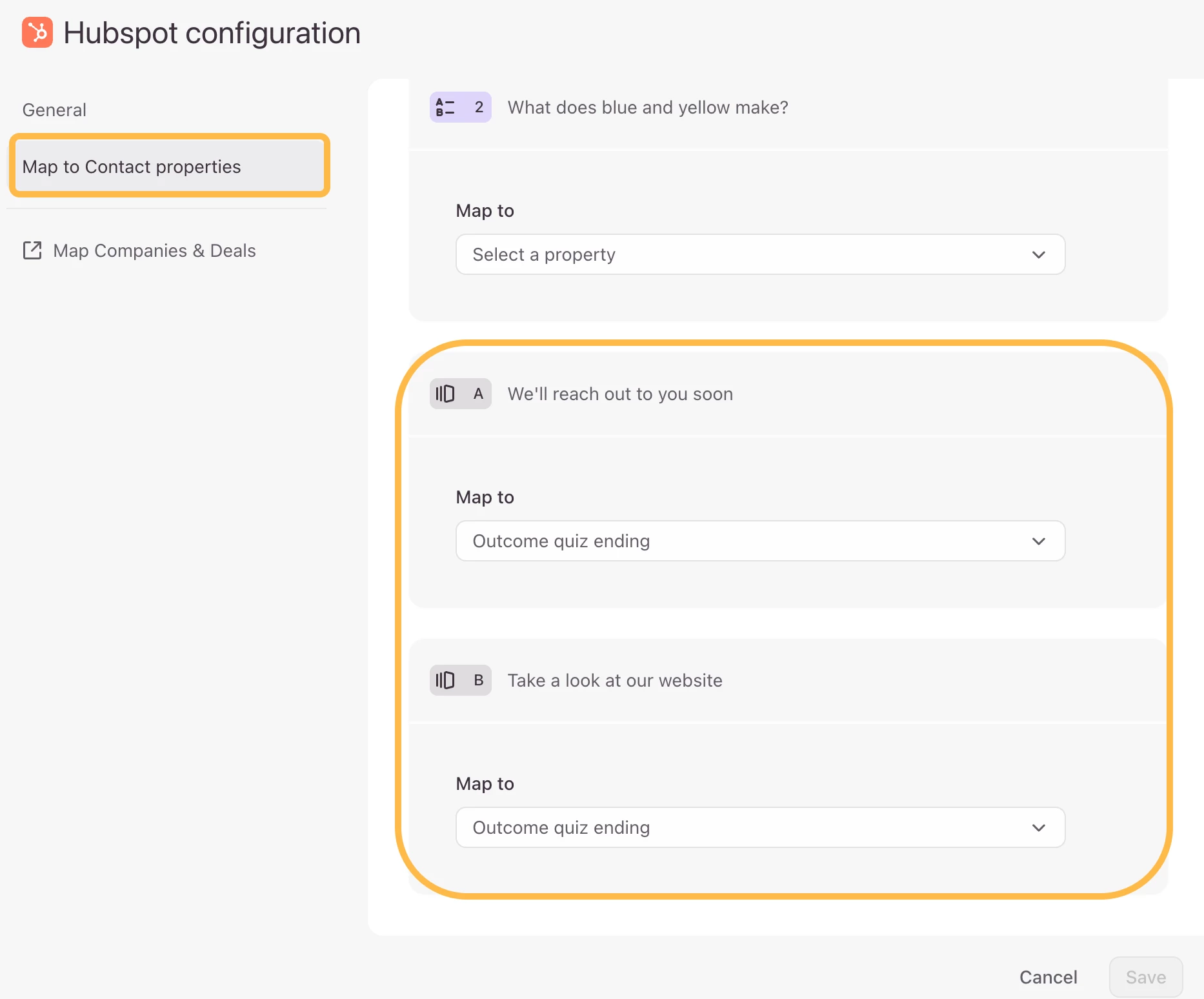
You can map the ending of an outcome quiz to single-line text or multi-line text. You’ll need to create the custom property with the single-line text or multi-line text property type in HubSpot first before you can map to it from Typeform.
Once you connect your Typeform account with your HubSpot account, you can map your outcome quiz endings in the HubSpot Configuration section. You’ll see the endings you’ve created and then you can select the custom property you created in HubSpot from the dropdowns. In the example below, I’m mapping the outcome quiz endings to contact properties.
Something I always forget to do in HubSpot is that when I create a custom property, I also need to edit the settings in my contact record to show the custom property I just created.
If you’re still having trouble syncing your outcome quiz endings, would you mind sharing screenshots of how you’ve mapped it?
I hope this helps!





Enter your E-mail address. We'll send you an e-mail with instructions to reset your password.