Answered

Typeform embedded in a WordPress page not displaying correctly in mobile

  • Dec 13, 2022 5:27 PM UTC
  • 8 replies
  • 389 views

Forum|alt.badge.img

My typeforms are not displaying correctly in the mobile version of my webpage, which is WordPress based. I already tried changing the z-index value, but it still does not display correctly.

 

Best answer by mathio-tf

Hello @jsaenz , this looks like a weird z-index issue I was not able to resolve in your site. It might be that your Wordpress CSS is incompatible with the embed code.

Maybe try making the embed inline on mobile, it might help. See the help article on this: https://www.typeform.com/help/a/embed-your-typeform-360029249212/#h_01FXN40V7DB2TVX1VBPXNA54MB

View original

8 replies

Liz
Ex–Typefomer
Forum|alt.badge.img+5
  • Tech Community Advocate
  • Dec 13, 2022 10:39 PM UTC

Hi @jsaenz Could you send the URL where you have the form embedded? Thanks!


Forum|alt.badge.img
  • Author
  • Explorer
  • Dec 13, 2022 11:05 PM UTC

Liz
Ex–Typefomer
Forum|alt.badge.img+5
  • Tech Community Advocate
  • Dec 14, 2022 3:23 PM UTC

Thanks, @jsaenz ! I believe this has something to do with the z-index in the code, but @mathio may be able to confirm this!


Forum|alt.badge.img
  • Author
  • Explorer
  • Dec 14, 2022 3:36 PM UTC

I did tried by adding a z-index to the code, but that is not resolving it. The strange thing is that this was not happening a couple of days ago, so either something change in Typeforms or something changed in WordPress. Has any one else reported having this issue?


mathio-tf
Typeform
Forum|alt.badge.img+5
  • Typeform
  • Answer
  • Dec 15, 2022 3:05 PM UTC

Hello @jsaenz , this looks like a weird z-index issue I was not able to resolve in your site. It might be that your Wordpress CSS is incompatible with the embed code.

Maybe try making the embed inline on mobile, it might help. See the help article on this: https://www.typeform.com/help/a/embed-your-typeform-360029249212/#h_01FXN40V7DB2TVX1VBPXNA54MB


Forum|alt.badge.img
  • Author
  • Explorer
  • Dec 15, 2022 4:47 PM UTC

Thanks @mathio!

This fix actually worked. However, I went back to some other forms and copied the embed code again, and in many cases, the code came with this fix into it. So I am wondering if there was any work done in the backend @Liz?


And related to this, why is that not every form has a similar code structure? Does it change between the different types of forms? I mean, does the code change if the form is a registration form or a survey?

Anyways, for now the problem is fixed, so thank you all for your help!


  • Navigating the Land
  • Oct 23, 2023 11:02 AM UTC

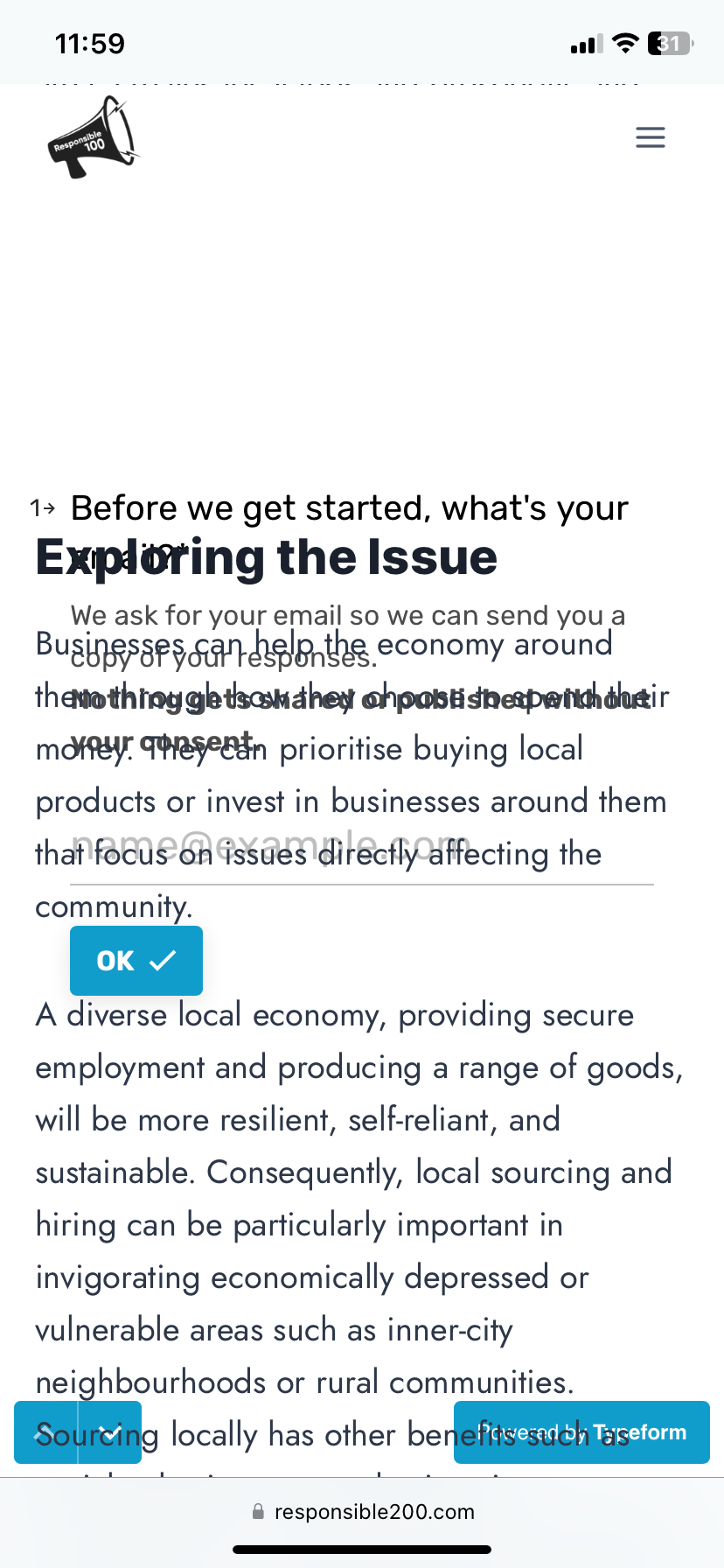
My Typeform is not displaying correctly on my Wordpress site on Mobile. How do I fix? I’m unfamiliar with what you mean by the Z-index issue above. Here is what the typeform looks like on mobile for me:


mathio-tf
Typeform
Forum|alt.badge.img+5
  • Typeform
  • Oct 23, 2023 3:15 PM UTC

Hi @Responsible100 

have you tried displaying the typeform inline on mobile devices?

If it does not help, please provide full URL to your website with your embedded typeform and I can have a look.