
Answer

Email Responses

  • June 29, 2021
  • 2 replies
  • 67 views

Can anyone please help me. I’ve previously been using the classic design but now my typeforms have automatically updated to the new format.

I now no longer have my the email button to turn on all the answers from my form to be sent to my email address.

I’ve been searching for ages and still can’t find anywhere in which I can turn these on. Any help would be much appreciated. 


Thanks, 

Ryan 
Best answer by john.desborough

@Ryan1 - welcome to the community from another user

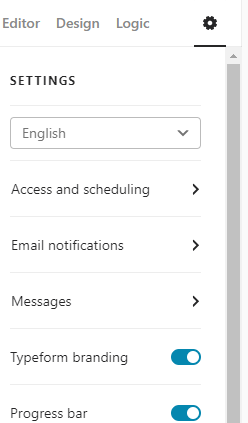
simply go to the gear icon, the settings icon and then down to email notifications. it will open up another window that allows you to toggle on notifications to YOU and another tab to toggle on the notification to respondents

cheers

des


2 replies

john.desborough
Forum|alt.badge.img+6
  • Certified Partner & Champion
  • Answer
  • June 30, 2021

@Ryan1 - welcome to the community from another user

simply go to the gear icon, the settings icon and then down to email notifications. it will open up another window that allows you to toggle on notifications to YOU and another tab to toggle on the notification to respondents

cheers

des


Liz
Ex–Typefomer
Forum|alt.badge.img+5
  • Tech Community Advocate
  • July 6, 2021

Hi @Ryan1 Were you able to get the notifications setup? :grinning:




