Answer

Changes in button settings are reflected at preview only but not on the live form

  • March 18, 2024
  • 3 replies
  • 92 views

I’ve made some changes to my typeform (color and shape of the answer buttons) and clicked the publish button. But when I check the live form after publishing there are no any chenges in the buttons.

Best answer by veronia

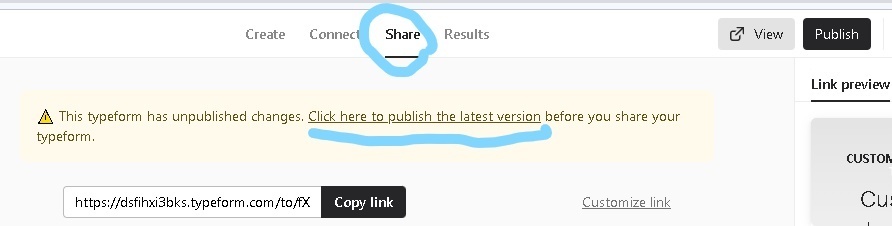
Hi Liz and Grace. Thank you for your support and attention. I can’t share my form but I fixed the problem and I can share the way I did it. When ‘publish’ button didn’t lead my typeform to update, I went to the tab ‘Share’ where was the notification ‘ This typeform has unpublished changes. Click here to publish the latest version before you share your typeform.’ And then I clicked to the suggested link to publish the latest version.

 

3 replies

Liz
Ex–Typefomer
Forum|alt.badge.img+5
  • Tech Community Advocate
  • March 19, 2024

Hi @veronia Thanks for stopping by the community. That’s odd - do you mind sharing the URL of your typeform and a screenshot of how it looks in the builder? Thanks in advance!


Grace
Community Team
Forum|alt.badge.img+5
  • Community Advocate
  • March 27, 2024

Hi @veronia did you manage to get your form to update? Let us know if you still need some help with this one 😊


  • Author
  • Explorer
  • Answer
  • March 28, 2024

Hi Liz and Grace. Thank you for your support and attention. I can’t share my form but I fixed the problem and I can share the way I did it. When ‘publish’ button didn’t lead my typeform to update, I went to the tab ‘Share’ where was the notification ‘ This typeform has unpublished changes. Click here to publish the latest version before you share your typeform.’ And then I clicked to the suggested link to publish the latest version.



