
Embeded forms - How to extract URL from main page

  • June 1, 2021
  • 8 replies
  • 580 views

1. Access your website code and go to the place where your form is embedded:
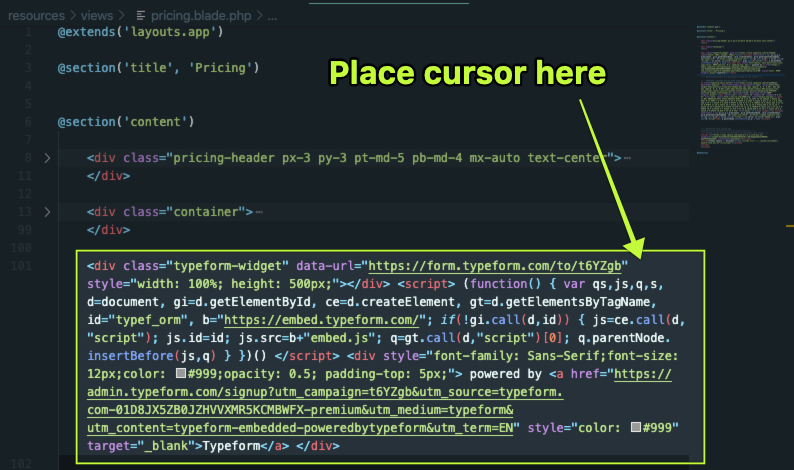
?name=inline522856659.png

2. Place the cursor after the URL text and add the following:
data-transferable-url-parameters="name-of-the-field"
3. Change the "name of the field part" for the name of your field. So if in your URL it shows as name like in this example:

?name=inline-3558246.png

4. Make sure you don't break the code. Pay attention to the syntax, every pair should be like this: name="value"
5. This is how the whole thing would look using our name=Tony example above:

Before: ---------- <div class="typeform-widget" data-url="https://form.typeform.com/to/t6YZgb" style="width: 100%; height: 500px;"></div> <script> (function() { var qs,js,q,s,d=document, gi=d.getElementById, ce=d.createElement, gt=d.getElementsByTagName, id="typef_orm", b="https://embed.typeform.com/"; if(!gi.call(d,id)) { js=ce.call(d,"script"); js.id=id; js.src=b+"embed.js"; q=gt.call(d,"script")[0]; q.parentNode.insertBefore(js,q) } })() </script> <div style="font-family: Sans-Serif;font-size: 12px;color: #999;opacity: 0.5; padding-top: 5px;"> powered by <a href="https://admin.typeform.com/signup?utm_campaign=t6YZgb&utm_source=typeform.com-01D8JX5ZB0JZHVVXMR5KCMBWFX-premium&utm_medium=typeform&utm_content=typeform-embedded-poweredbytypeform&utm_term=EN" style="color: #999" target="_blank">Typeform</a> </div>After------  <div class="typeform-widget" data-url="https://form.typeform.com/to/t6YZgb" data-transferable-url-parameters="name" style="width: 100%; height: 500px;"></div> <script> (function() { var qs,js,q,s,d=document, gi=d.getElementById, ce=d.createElement, gt=d.getElementsByTagName, id="typef_orm", b="https://embed.typeform.com/"; if(!gi.call(d,id)) { js=ce.call(d,"script"); js.id=id; js.src=b+"embed.js"; q=gt.call(d,"script")[0]; q.parentNode.insertBefore(js,q) } })() </script> <div style="font-family: Sans-Serif;font-size: 12px;color: #999;opacity: 0.5; padding-top: 5px;"> powered by <a href="https://admin.typeform.com/signup?utm_campaign=t6YZgb&utm_source=typeform.com-01D8JX5ZB0JZHVVXMR5KCMBWFX-premium&utm_medium=typeform&utm_content=typeform-embedded-poweredbytypeform&utm_term=EN" style="color: #999" target="_blank">Typeform</a> </div> 

8 replies

Liz
Ex–Typefomer
Forum|alt.badge.img+5
  • Tech Community Advocate
  • June 1, 2021

Hi @User22 Thanks for stopping by the community. I’m afraid I don’t quite understand the question - are you trying to find the URL of your form? The above post looks to be copied from one of our articles, so any further information you can provide would be great!


  • Author
  • Explorer
  • June 1, 2021

This is not a question. This is a solution to a challenge I had that was not covered in the help section. 


It shows you can get hidden fields values from website URL when you embed the form. The help section shows you have you can get hidden fields values if your going to the form directly, not if embedded . 


Liz
Ex–Typefomer
Forum|alt.badge.img+5
  • Tech Community Advocate
  • June 1, 2021

Got it - thanks for clarifying, @User22 !


  • Navigating the Land
  • June 1, 2022

Thanks User22!
Does anyone know how to do such in Webflow(.com)?

Regards,

VP


Liz
Ex–Typefomer
Forum|alt.badge.img+5
  • Tech Community Advocate
  • June 1, 2022

Hi @VP_Bob Are you looking to grab the URL on a typeform embedded there? Any further info you can tell us would be helpful!


  • Navigating the Land
  • April 10, 2023

I have a similar problem. I have embedded my Typeform form into Framer template. The form has a hidden field called “url.” I’d like to extract the url where the form submission occurred and place it into this hidden field. Is this possible? I’m having one heck of a time figuring it out. 


Liz
Ex–Typefomer
Forum|alt.badge.img+5
  • Tech Community Advocate
  • April 10, 2023

Hi @mtoering7 If you don’t want to write a code for this, you would need to do this manually by entering something into a hidden field in the embed code. One thing to note - it’s not possible to pass a URL in a URL, so you could instead have a keyword suggesting which page the form was embedded on. 


Forum|alt.badge.img+1
  • Explorer
  • March 9, 2026

This is a helpful walkthrough for passing URL parameters to embedded Typeforms using the `data-transferable-url-parameters` attribute.

One thing to keep in mind is that this approach only captures parameters that are currently in the URL when the form is submitted. So if someone clicks your ad with UTM parameters, lands on your homepage, then navigates to a different page before completing the embedded form, those UTM parameters will be lost since they're no longer in the URL.

To solve this, you'd need to store the parameters when the visitor first arrives and then pass them through regardless of which page they eventually submit the form on. You can write custom JavaScript to handle this, or there are tools like Attributer.io that automatically store UTM parameters (plus other attribution data like GCLID, organic channel info, etc.) in a cookie and write them into hidden fields when forms are submitted.

The benefit is that someone can browse around your site or even leave and come back later, and the original attribution data will still be captured when they eventually convert.


