


New feature

Under the Hood - A closer look at our new visual logic map πŸ”Ž πŸ§‘β€πŸ”§

  • April 25, 2022
  • 10 replies
  • 429 views
Under the Hood - A closer look at our new visual logic map πŸ”Ž πŸ§‘β€πŸ”§
Liz
Ex–Typefomer
Forum|alt.badge.img+5
  • Tech Community Advocate

The Typeform product team has just made it even easier to set up logic jumps in your form by introducing the new Visual Logic Map. Now, you can see a map of how logic is set throughout your form and make changes to it if you need to.

Β 

While this may seem like an easy feature to code right in, it took the product team some heavy lifting to find the perfect way to blend in editing features to the map. Watch the video below to learn more about this new feature and how it was built!

Β 

Β 

How to use the Visual Logic Map

Β 

Thankfully, it’s super easy to access the editor while viewing your map:Β 

Β 

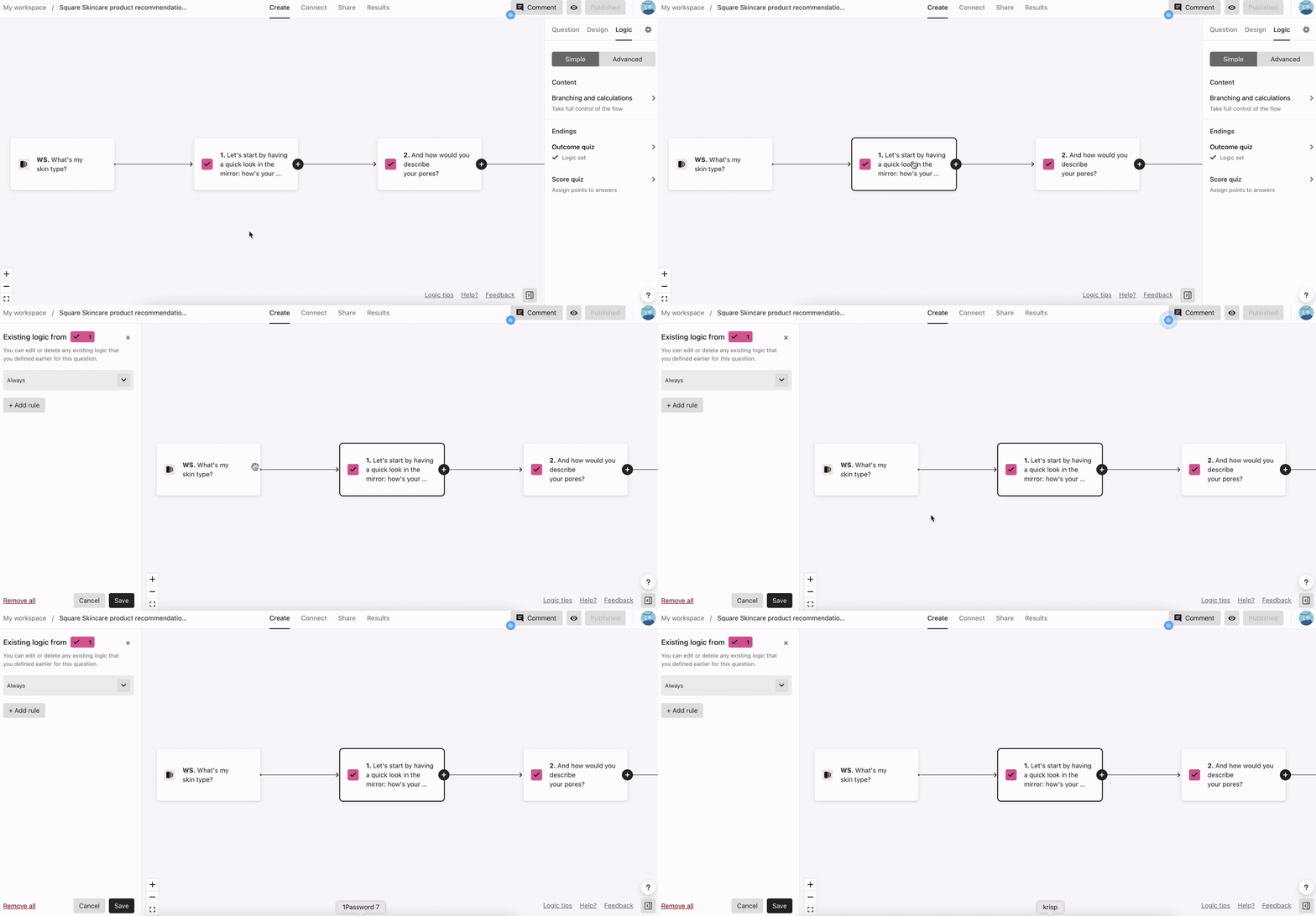
1. When you’re in the logic editor, click on any of the questions you want to edit.Β 


Β 

HjJ7utEEu3s5MiRXvM1k_ZjgfCEBuxq3HWsrWfljxC5THr0KEU4MGlkXEHoA7INvy9sTVzP71WFarCoiQKsaeWqaw7Xv-zAVGpg27ONCV9WT70zqAOMfObdCsutrHS36XPqwH_hM


Β 

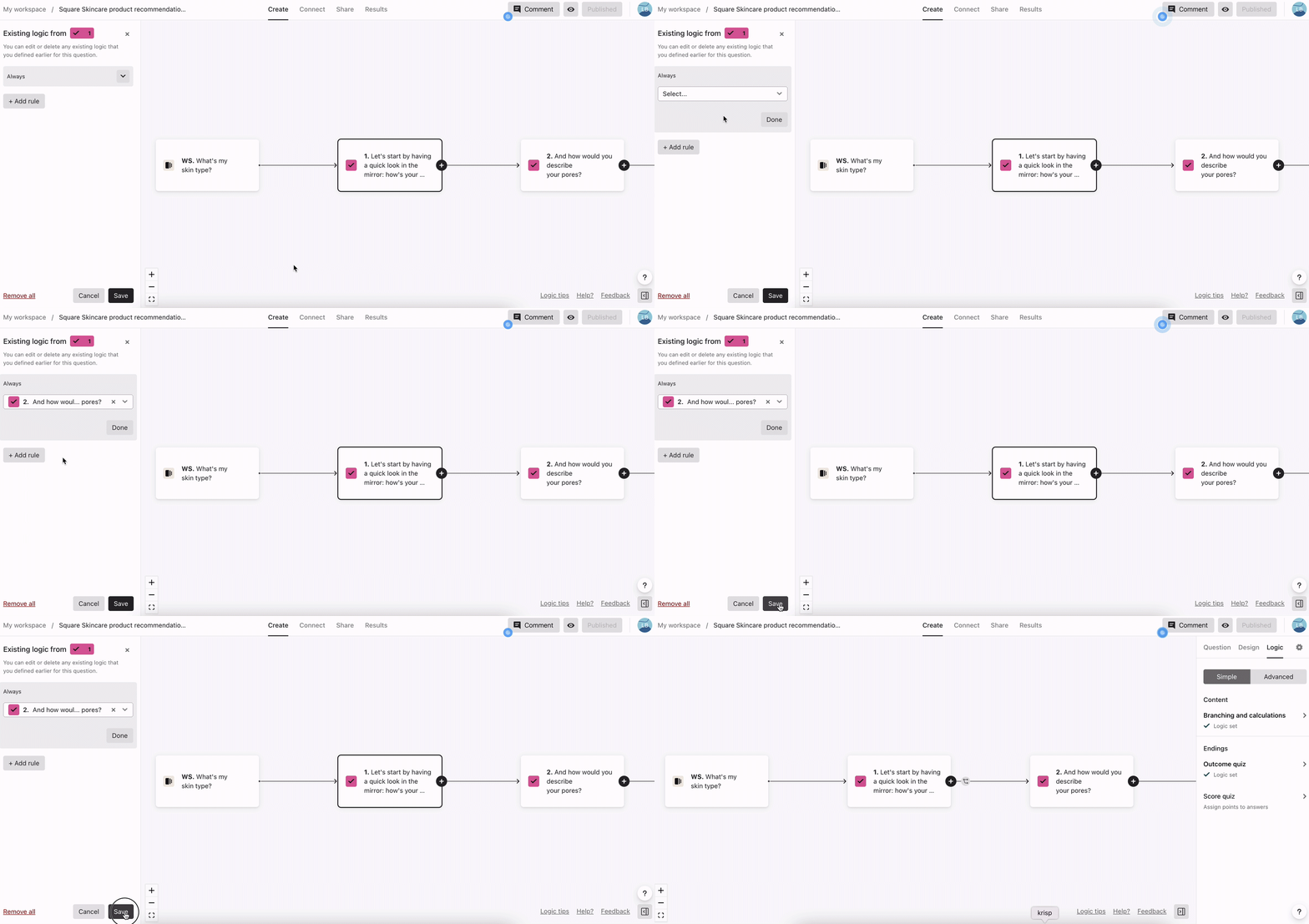
2. A panel will appear on the side of the builder and you can edit the logic as you see fit there. See a question that should connect to another one? You can click and drag the + button to connect two questions together.Β 

Β 

0XBzu5apcczLah1dPGA6LKXkVpb0kLtPRKR3nbICv6MeYsYtLAGenvCQio07JfC_0qiMz98j4RiJa4F4TXOKq3E0ZQ6TfFAGit2i4_YaY-q0a2vSAIBd3bN1VtHLWcxXRybWO0zC

Β 

3. Be sure to click the save button for your changes to go live!Β 

Β 

ryM7BPRy6TJ0S8nEA12PafAQGEegt0KcQLpeaYS0T4Zd2g6-FQF3xjOwViuPp0bG5jtth4i9fGgN61ZY7yhNZnPmUlz75mqVyU6S8OrZvSfzlAvZ_LN2Uswa05G94iL6kAWKuTFx

Β 

Learn more! Dive even further into logic jumps by checking out our article here.

What do you think of this new feature? Let us know in the comments!

10 replies

Ethan M.
Typeform
Forum|alt.badge.img+1
  • Typeform
  • April 25, 2022

Woohoo! Anything that makes Logic more user-friendly is a win for me! Thank you so much @Liz and Megan! Can’t wait to share this with our customers.


john.desborough
Forum|alt.badge.img+6
  • Certified Partner & Champion
  • April 25, 2022

@LizΒ - I am gonna have fun with this!

These are some of the basic things I have been hoping to find under the Christmas tree (yes we still have one up here at home for the heck of it!)

gonna play with these a lot this week..Β 

Β 

des


Liz
Ex–Typefomer
Forum|alt.badge.img+5
  • Author
  • Tech Community Advocate
  • April 25, 2022

@john.desboroughΒ pics of the tree or I don’t believe it!

And nothing like movin’ and groovin’ all the logics around now!Β πŸ‘»


Gabi Amaral
Ex–Typefomer
Forum|alt.badge.img+5
  • Ex–Typefomer
  • April 26, 2022

Wow, such a great news!! I love the Logic at Typeform but I got to confess this will make things way easier to me!Β 

Tagging some creators that might find this interesting:Β @DarnellΒ @Pako69Β @MichaelaΒ @Leslie MGBΒ @talon256Β @Silvio RibeiroΒ @TimWinklerΒ @kalleΒ 

Let us know what you think of this new feature! We'd love to hear your feedback about it!Β πŸ˜‰


Leslie MGB
Forum|alt.badge.img+1
  • Socializer
  • April 26, 2022

The video was very helpful for making the changes clearβ€”thanks, and congratulations! I look forward to playing around with this.


Darnell
Forum|alt.badge.img+3
  • Tastemaker
  • April 26, 2022

LOVE THIS FEATURE and thanks @Gabi AmaralΒ for tagging me so that I’d be sure to see this.πŸ™ŒπŸΎ


Olgasolo
Forum|alt.badge.img+2
  • Socializer
  • April 26, 2022
Π’hanks to the Typeform team for making it easy to set up boolean transitions on our form.

the conservative
Forum|alt.badge.img+2

Wow, @liz this is exactly what I needed, looks like you choose to post the important stuff...πŸ˜‰


Liz
Ex–Typefomer
Forum|alt.badge.img+5
  • Author
  • Tech Community Advocate
  • May 6, 2022

Don’t thank me, thank the product team, @the conservativeΒ !Β πŸ˜‚


the conservative
Forum|alt.badge.img+2

That's right@liz, but we do thank the good messenger too...πŸ‘§