
Answered

Broken answer in Korean

  • Oct 13, 2021 6:11 PM UTC
  • 52 replies
  • 1538 views

Forum|alt.badge.img

There was cutting off the new customer.

I’ve checked all the process and i found out the error in typeform.

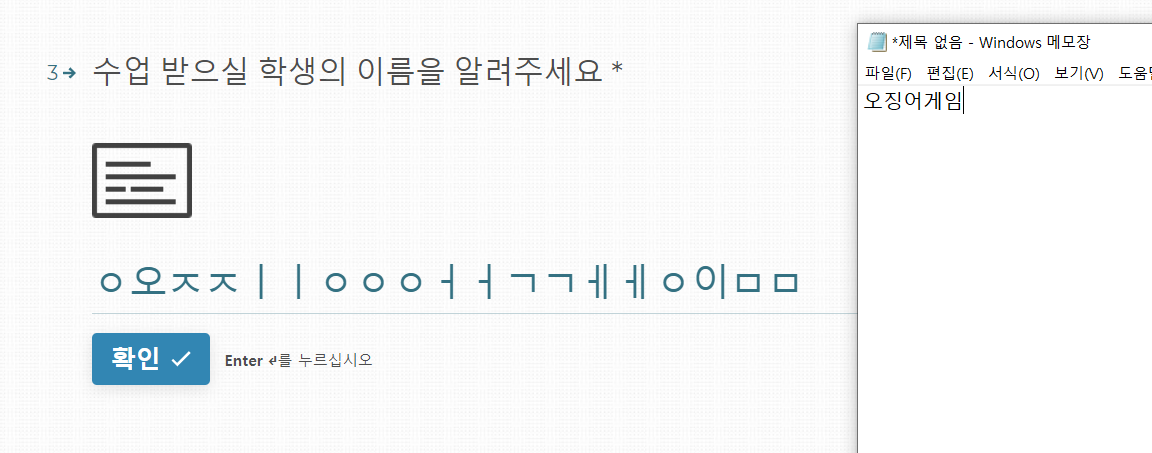
When a visitor tries to fill out the answer box in Korean, the words are broken mobile and desktop both.

It’s very serious problem because it’s the only channel for sales.

I have tried several times with other methods (Using explore, off Crome plug-in and so on) but nothing works.

 

Best answer by Liz

Hello, all! The developers have spotted a bug for this and released a fix. Please let us know if you’re still experiencing the issue. 

View original

52 replies

Liz
Ex–Typefomer
Forum|alt.badge.img+5
  • Tech Community Advocate
  • Oct 13, 2021 9:11 PM UTC

Hi @icatchu thanks for stopping by the community! Would you mind sharing the URL of your Typeform so we can test this? 


  • Navigating the Land
  • Oct 13, 2021 10:42 PM UTC

I have the same issue, please tell me if you solve this problem. :grinning:


  • Oct 14, 2021 12:13 AM UTC

@Liz It looks like a bug, our japanese forms are experiencing the same problem since this morning. The kanji conversion function is not working at all and customers are having to copy and paste text from a word document. I will also raise a ticket to Support for help.:thumbsup_tone2:

Here’s one form in japanese to test:


  • Oct 14, 2021 12:41 AM UTC

Hey @icatchu and @LeoBlack we’re having a similiar issue in our japanese forms. In our case, copying and pasting from a Word document is the fast workaround we found to deal with the issue until it’s fixed for good. Do you this can work with the Korean forms as well? I know it’s not ideal, but it’s at least one way to keep things going until we have this issue fixed definitely. 


Forum|alt.badge.img
  • Navigating the Land
  • Oct 14, 2021 1:05 AM UTC

Having same Issue on Japanese form here too. 

@Paulo 
Please let me know if there were any updates on ticket.


  • Explorer
  • Oct 14, 2021 2:32 AM UTC

I am also using it at a Korean company. I have the same issue, so please share it when you know how to solve it.


  • Oct 14, 2021 2:40 AM UTC

@t_shi_ma_da @activelife Now it’s a matter of time until people in the Western world wakes up.

I’m marking @picsoung @Liz and @Gabi Amaral for visibility.


  • Navigating the Land
  • Oct 14, 2021 2:51 AM UTC

I have the same issue 😥


Forum|alt.badge.img
  • Author
  • Socializer
  • Oct 14, 2021 3:15 AM UTC

Hi @icatchu thanks for stopping by the community! Would you mind sharing the URL of your Typeform so we can test this? 

https://ausidofp.typeform.com/icatchu-form

Including this form, other all forms typing in Korean are under the error.
I received feedback from technical support but still it’s been fixed..


  • Oct 14, 2021 4:36 AM UTC

@Liz I’m not sure why this topic was marked as ‘solved’, but in fact it still open.


  • Explorer
  • Oct 14, 2021 5:06 AM UTC

I also get the same error.
Hope it gets resolved as soon as possible.
Our company conducts many surveys every day.
Today, I replaced the paper questionnaire again. ㅜㅜ


  • Navigating the Land
  • Oct 14, 2021 5:11 AM UTC

I faced the same problem.
I have to produce a survey for tomorrow's event, but I don't know what to do. 
Please take quick action.


  • Explorer
  • Oct 14, 2021 5:48 AM UTC

I am also using it at a Korean company. I have the same issue, so please share it when you know how to solve it.

My company surveys 300 to 400 people every day. There is a big obstacle to work now.


  • Navigating the Land
  • Oct 14, 2021 6:00 AM UTC

Hi,

We are also having the same problem here with our Japanese-based form. Our survey respondents are unable to convert Hiragana to Kanjis. (Even Hiragana is just barely insertable. A word hit on keyboard will sometimes get recognized as multiple hits, and causes the same word appearing multiple times. See as attached.)


We will be using your service in our coming project on October 18th, so please kindly take actions on fixing this issue.


Sincerely


  • Navigating the Land
  • Oct 14, 2021 6:47 AM UTC

I think it doesn’t happened on iphone. 


  • Explorer
  • Oct 14, 2021 6:52 AM UTC

Currently, there is a problem with Korean and Japanese typing. iPhone has no problem, and problems occur on Android and PC.

I want to type [타입] in Korean, but I type [ㅌ타ㅏㅇ이ㅣㅂㅂ] twice.

In English, for example, I want to type the word [type], but it is typed [ttyyppee].

@Liz I don't know why it was treated as solved, but I hope the problem will be resolved soon.


  • Oct 14, 2021 7:09 AM UTC

@funkyts @activelife The Japanese forms are experiencing the same issue both in iPhone and PC. Even if you’re using the Roman alphabet Japanese keyboard the issue, trying to type plain alphabet, the letters are still duplicated as @VB_MikeL pointed out.


  • Navigating the Land
  • Oct 14, 2021 7:20 AM UTC

Hi, @Liz  I have same issue both PC and mobile, in this form.

Could you please tell me, if you solve, as soon as possible?


Gabriel
Ex–Typefomer
Forum|alt.badge.img+5
  • Community Team
  • Oct 14, 2021 7:23 AM UTC

@Liz I’m not sure why this topic was marked as ‘solved’, but in fact it still open.


Possibly someone pressed the button by mistake. Just removed the solved tag! 


  • Navigating the Land
  • Oct 14, 2021 7:36 AM UTC

This is a very serious issue.

I hope it gets fixed quickly.


  • Navigating the Land
  • Oct 14, 2021 8:00 AM UTC

Please let me know, when it’s fixed.


  • Navigating the Land
  • Oct 14, 2021 8:47 AM UTC

hurry up Typeform! work harder!!


Forum|alt.badge.img
  • Author
  • Socializer
  • Oct 14, 2021 8:52 AM UTC

Still waiting.. my business have shut down whole day long. :disappointed:


  • Explorer
  • Oct 14, 2021 9:40 AM UTC

my business have shut down whole day long too..:weary:


  • Navigating the Land
  • Oct 14, 2021 10:05 AM UTC

Same here. I guess this issue only occurs in chrome browser. it works fine in other browsers. Hopefully it gets fixed ASAP.