
Answered

Can't connect Typeform with Google Analytics

  • February 3, 2022
  • 7 replies
  • 103 views

Hello everyone,

I am running a registration form and would like to know how my registrants accessed my link. I recently discovered UTMs, which sounds like the best solution for what I need. I activated them in my Typeform "Create" menu, and I want to create a few, like utm_source=twitter, utm_source=direct, utm_source= emailing.

Accessing those results requires connecting my Typeform with Google Analytics, which is where things get complicated. As I am new to this, here are the steps I took:

- Creating an account

- Creating a UA property, with my Typeform's URL as the default URL

- Copy/pasting this UA property's tracking ID into Typeform's GA integration.


However, whenever I answer my Typeform with various UTM tags, nothing happens. No traffic shows up on my GA dashboard, and no data is registered. Did I miss anything ?

I keep finding descriptions of what UTMs are and stumbling upon the same Typeform Help Center page, but I really feel like I did everything in order and can't find info on the connexion between Typeform and GA. I also checked for filters on both the Account and Property levels, but didn't see any.

Thank you in advance for your help !
Best answer by Liz

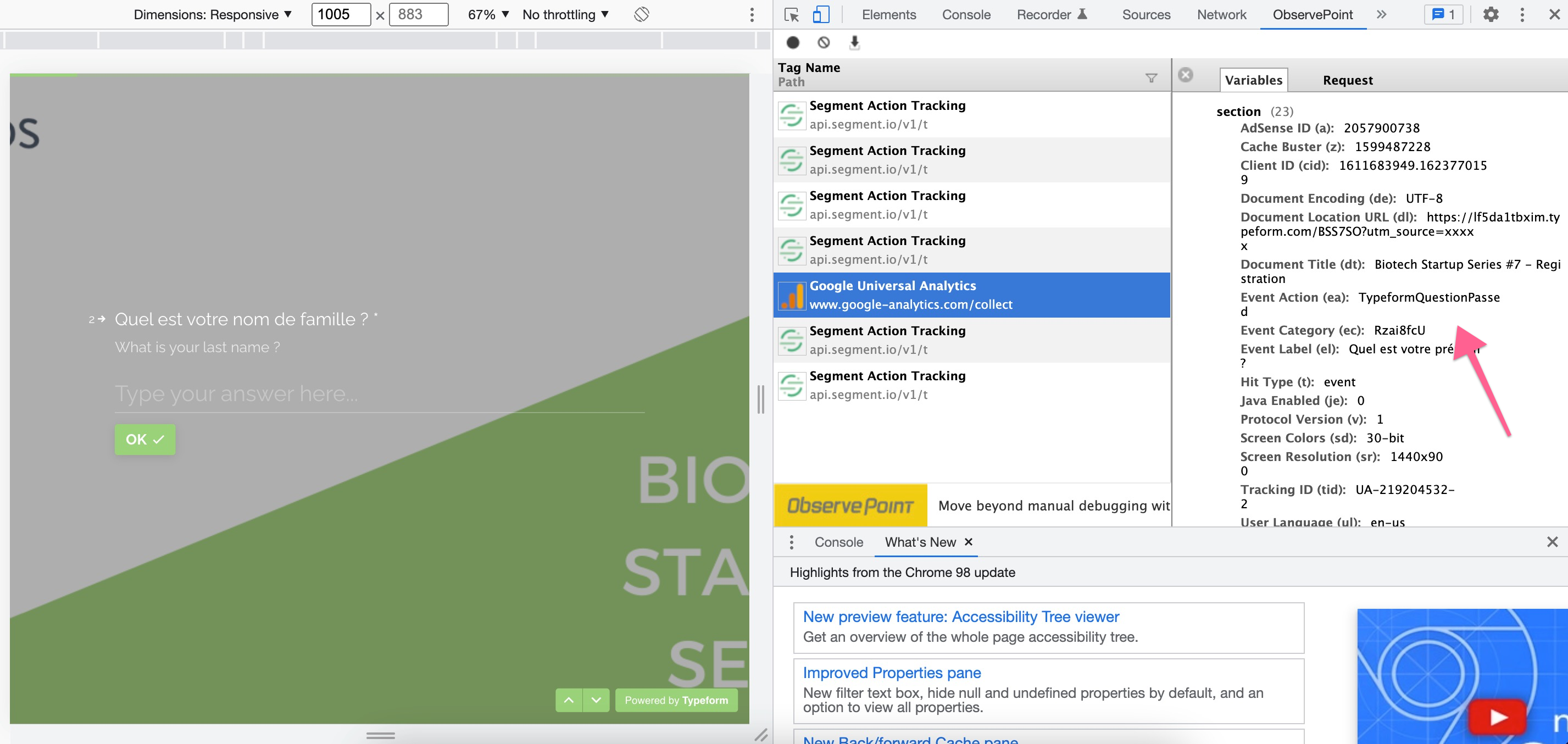
Thanks, @Piment ! I can see that the data is passing to Google Analytics here: 

If you’re filtering down the analytics and still not seeing the data appear, I would first suggest that the form is connected to the right GA account (if you have many - it’s happened to me!). If it is, then contacting Google Analytics to see why the data isn’t showing would be the next best step. 

7 replies

Liz
Ex–Typefomer
Forum|alt.badge.img+5
  • Tech Community Advocate
  • February 4, 2022

Hi @Piment Can you share the link to your Typeform? I can then take a peek to see if the events are firing to Google Analytics. Thanks!

Additionally, you’ll also want to double check that you have UTM tags turned on and your form is published. 


  • Author
  • Explorer
  • February 7, 2022

Hi @Piment Can you share the link to your Typeform? I can then take a peek to see if the events are firing to Google Analytics. Thanks!

Additionally, you’ll also want to double check that you have UTM tags turned on and your form is published. 

Hi Liz, Thanks for answering ! Here is an UTM-free link. I confirm that the UTMs are turned on !

Strangely enough, I connected my TypeForm to a Google Sheet and the UTM_sources are appearing there, so I at least have a backup plan.

Thanks for your help !

https://lf5da1tbxim.typeform.com/BSS7SO?utm_source=xxxxx


Liz
Ex–Typefomer
Forum|alt.badge.img+5
  • Tech Community Advocate
  • Answer
  • February 9, 2022

Thanks, @Piment ! I can see that the data is passing to Google Analytics here: 

If you’re filtering down the analytics and still not seeing the data appear, I would first suggest that the form is connected to the right GA account (if you have many - it’s happened to me!). If it is, then contacting Google Analytics to see why the data isn’t showing would be the next best step. 


Forum|alt.badge.img+1
  • Navigating the Land
  • March 4, 2026

So UTM parameters are definitely the way to go. You put them behind all links to your site that you can control (which is mostly paid ads like Google Ads, Meta Ads, etc).

However, I think if your goal is to know how registrants found your site/form then I think the Google Analytics approach is the wrong way to go. GA will just give you aggregate numbers like 4 people who submitted the form came from your Google Ads and 3 from your Meta Ads. You won't be able to actually see 'the registrant named John Smith from Ocean Drive found our site/form via our Google Ads, it was from XYZ campaign, etc).

If you want to see exactly how each person found your form, you're better off capturing that data directly in Typeform using hidden fields. Typeform has built-in UTM capturing that will grab the UTM parameters and store them with each response. The downside is it only works if someone completes the form on the exact same page they initially land on (if they browse around your site first, the UTMs get lost and won't be captured).

Tools like Attributer.io can solve that limitation. It captures the UTM data when someone first arrives, stores it in a cookie, and then writes it into hidden fields when they eventually submit your form. Plus it captures data on people who come from organic channels without UTMs (like Organic Search, Organic Social, Direct, etc.) which gives you a complete picture of where all your leads are coming from.

Hope this helps


john.desborough
Forum|alt.badge.img+6
  • Certified Partner & Champion
  • March 4, 2026

@azisbak - I see that you have posted many times (and usually against 3 and 4 year old posts) about how Attributor.io can do this in/withTypeform.

I also note that your the founder of Attributor.io (from other posts) and that your website highlights the integration with Typeform. What Isn’t very clear is exactly how you have done this in a working typeform ie the set up  etc. 

Could you please create a post that shows how your tool works with Typeform? The potential offered by your tool is wonderful but it’s hard to tell exactly how it integrates with a typeform. 


cheers

des


Forum|alt.badge.img+1
  • Navigating the Land
  • March 6, 2026

Hey Des

Thanks so much for asking about Attributer. It’s funny timing because I have actually been working with the Typeform team to do a ‘Members Tips’ post on how it all works, which should be out in a few days.

I made this video for the members tips post which shows how it all works:


Let me know if you have any questions!

Aaron


john.desborough
Forum|alt.badge.img+6
  • Certified Partner & Champion
  • March 6, 2026

@azisbak - thanks Aaron. looking forward to seeing the entire Members Tips post.. 

cheers


des





