Answer

Excel Download Option to be Removed

  • August 26, 2025
  • 13 replies
  • 212 views

Forum|alt.badge.img+1
  • Sharing wisdom

Hi,

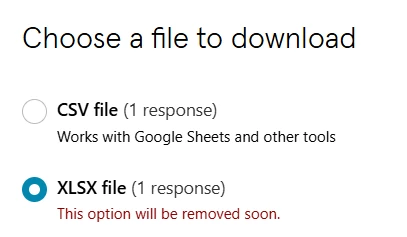
Curious as to why the Excel download option will be phased out?

See screenshot.

Thanks,

Andy


Best answer by victorwu

Hi there. Thanks for the feedback. I'm a product manager at Typeform and our team works on the download responses feature.

Since adding that warning message in the app, we've received feedback (such as the posts here) indicating why CSV doesn't fit into people's workflows or why it may be broken (such as the semicolon issue). We've captured these items one by one and will begin fixing them soon.

I don't have a clear date yet when we will remove the XLSX format option. But we are working on making the transition is as smooth as possible based on the feedback. When I have more to share with a more definite timeline, I'll definitely work with our team here to make sure it's communicated well in advance for folks to prepare for the change.

I'd love to jump on a Zoom to learn more about your use case, especially if you don't think it's already represented by one of the comments here. Feel free to contact me directly at victor.wu@typeform.com and let's chat.

13 replies

Phoebe VA
Community Team
Forum|alt.badge.img+5
  • Community Team
  • August 26, 2025

Hi ​@ATS,


We’re always looking for ways to simplify our product so that we can focus on features that target more people and cover more use cases. Modern spreadsheet software including Excel can open CSV files as well. Our response data doesn’t have anything Excel-specific, so the CSV file works as a great alternative. After opening the CSV file in Excel, you can save it in an Excel format if you’re interested in a more Excel-specific workflow. 


Hope this helps clarify a bit.


Grace
Community Team
Forum|alt.badge.img+5
  • Community Advocate
  • September 11, 2025

Hey ​@ATS hope you’re having a good week! 

Let us know if you’ve got any feedback about the excel download option phase out, it’s always good for us to share with the product team 😊


  • Socializer
  • September 15, 2025

Hi Phoebe,

1)

I strongly disagree with this change. You are already covering the most use cases by offering both options. By removing this feature you LESSEN your coverage.

CVS is available for everyone who wants it. For the people who want normal Excel, you are complicating matters. Why? To clean the interface up a bit for the CVS users?

2)

After opening the CSV file in Excel, you can save it in an Excel format if you’re interested in a more Excel-specific workflow. 

Please try this out yourself. You will notice all CVS data is put in the ‘A’ column. When you save it as XLSX, all the data is still in the A column. My workflow is still hindered.

To make it workable, you have to separate the content of the A column in ‘normal’ columns.

3)

This can be done in Excel, but you have to select what indicates a separation. And the Typeform CVS download uses a comma (,) as a separation indicator. However, if you have open questions in your Typeform a comma is often also used in text answers. This will create chaotic results when you try to separate the data into columns.  

In short, getting useable information will require a lot more micromanagement and time.

Don't make this change. And if you are dead set on this change, at least change the CVS separator indicator used in your downloads to a semicolon (;)

Regards, Navajo Broere


Forum|alt.badge.img+1
  • Author
  • Sharing wisdom
  • September 15, 2025

Hi ​@Phoebe VA and ​@Grace,

Thanks for your follow up on this topic.

I have to agree with Navajo that I don’t agree with this change.

Product development should be that, development - not taking away options.

Especially one that is so fundamental to using the response data from our forms.

I am fortunate that my processes will work with CSV or XLSX but my go to option for download is always XLSX.

Another issue that will definitely occur for users when downloading CSV is that they will open the file in Excel by default, do a load of analysis, data manipulation, charting etc. then hit save, close the application and it will have saved it as a CSV (with some prompts that are easily skipped past quickly without thinking) and then when that file is reopened all of that work will be lost as the CSV file type will not preserve it at all.

All the best,

Andy


Grace
Community Team
Forum|alt.badge.img+5
  • Community Advocate
  • September 16, 2025

Thanks so much ​@ATS and ​@Navajo Broere I’ve passed on your feedback and the team are reviewing it, will let you know if anything changes 🙏


Forum|alt.badge.img+1
  • Socializer
  • September 20, 2025

I can see why the removal of the Excel download option is concerning. Many teams depend on Excel for data analysis, reporting, and easy sharing, and while CSV is an alternative, it doesn’t always provide the same convenience or formatting. For users managing large datasets, Excel is still the most reliable option.

It might help to share this feedback directly with the Typeform team so they understand how important Excel export is to your workflow. If enough users raise this concern, they may reconsider or provide an improved alternative that better fits user needs.


  • Navigating the Land
  • September 22, 2025

What I don’t like is that no concrete incidation is available when the function will be removed. Can this be shared? (or decision reverted at all, even better).

We update BI dashboards with the use of the XLSX as input files. Removing the XLSX function would mean we must update and fix all worklows and queries, which is quite a nuisance. I agree that the XLSX download should not be removed. 


victorwu
Typeform
Forum|alt.badge.img+1
  • Typeform
  • Answer
  • September 22, 2025

Hi there. Thanks for the feedback. I'm a product manager at Typeform and our team works on the download responses feature.

Since adding that warning message in the app, we've received feedback (such as the posts here) indicating why CSV doesn't fit into people's workflows or why it may be broken (such as the semicolon issue). We've captured these items one by one and will begin fixing them soon.

I don't have a clear date yet when we will remove the XLSX format option. But we are working on making the transition is as smooth as possible based on the feedback. When I have more to share with a more definite timeline, I'll definitely work with our team here to make sure it's communicated well in advance for folks to prepare for the change.

I'd love to jump on a Zoom to learn more about your use case, especially if you don't think it's already represented by one of the comments here. Feel free to contact me directly at victor.wu@typeform.com and let's chat.


[...]
...indicating why CSV doesn't fit into people's workflows or why it may be broken (such as the semicolon issue).
[...]

Just to make it clear, the issue is dat the CSV export currently uses comma's to indicate columns. Changing that to using semicolons would actually be an improvement, not an issue ;-)

But in general, i am still disappointed that Excel will be removed as an option. Regards, Navajo


  • Navigating the Land
  • October 22, 2025

Hi there

CSV is for our workflow useless. In my view, there is no logical reason to switch off XLS.

How about switching off CSV instead of XLS?

Kind regards, Johannes


Forum|alt.badge.img+1
  • Author
  • Sharing wisdom
  • November 21, 2025

Hi,

It looks like the Excel download option will be staying now? Please can Typeform (​@victorwu ​@Grace) confirm this? The warning message has gone which is where my assumption is coming from.


Related though, files now download with a crazy long filename with random characters as part of the filename. Why has this been implemented? This makes automating the use of the download files far more complicated than is necessary, why has the usual “responses.xlsx” filename been done away with?


Thanks,


Andy


Grace
Community Team
Forum|alt.badge.img+5
  • Community Advocate
  • November 21, 2025

Hey ​@ATS thanks for checking back in on this one. Due to feedback and testing issues the excel download is staying, so we’ve removed the warning like you say.

I’ve just spoken to Victor, and he’s going to investigate what’s happened to the file name as that shouldn’t be happening! We’ll keep you posted with an update asap. 


victorwu
Typeform
Forum|alt.badge.img+1
  • Typeform
  • November 21, 2025

> files now download with a crazy long filename with random characters as part of the filename. Why has this been implemented? 

Hi ​@ATS: We made a recent change to make response downloads more reliable. This required us to generate a longer file name as you noted. We’ll consider making the filename shorter / different in the future.