Answer

Filtering results using a hidden field


Hi,

Is there any way I can filter results by hidden field?
I populate the hidden field with customer’s company name, and I have multiple customers.

in some cases I want to be able to analyse the responses made by a specific company.


Thanks!

Best answer by Phoebe VA

Hi ​@parkersweb and ​@carries,


Just wanted to follow up and let you know that you can now filter your Results Summary by URL parameters (aka Hidden Fields)! More information on how to filter your Results Summary can be found here.


Hope you can try it out soon and let us know what you think!

View original

26 replies

Liz
Ex–Typefomer
Forum|alt.badge.img+5
  • Tech Community Advocate
  • 15035 replies
  • March 1, 2022

Hi @Eladvolman It isn’t possible to filter by hidden fields yet, but I know the product team is working on improvements to the table. I don’t have any specifics as to when/if that might happen, but in the meantime, you could use the Google Sheets integration to narrow down by hidden fields. 


  • Author
  • Explorer
  • 2 replies
  • March 1, 2022

Got it.

Thanks.


Liz
Ex–Typefomer
Forum|alt.badge.img+5
  • Tech Community Advocate
  • 15035 replies
  • March 2, 2022

Not a problem, @Eladvolman ! Let us know if you think of any other questions. 


  • Navigating the Land
  • 1 reply
  • September 7, 2022

Hi @Liz , is the “filter results by hidden field” functionality available yet? thanks z


Liz
Ex–Typefomer
Forum|alt.badge.img+5
  • Tech Community Advocate
  • 15035 replies
  • September 8, 2022

I’m afraid not, but we’ll post any updates here, @zoetrickle . 😀


  • Navigating the Land
  • 1 reply
  • February 9, 2023

Hi @Liz is there any update/discussion on this feature?

Right now I’m planning to use the `query` parameter to filter on a specific hidden field value, but since it also looks for every answer I might get false positives that I would need to filter a second time on my side.


Thank you!


Liz
Ex–Typefomer
Forum|alt.badge.img+5
  • Tech Community Advocate
  • 15035 replies
  • February 9, 2023

@invoxiaaco Nothing yet, but as always, if there are any updates, I’ll post them here. 😁


  • Navigating the Land
  • 1 reply
  • March 27, 2024

Two years passed since original question and it is still not possible to filter by field?

Any suggestion for any workarounds? Like maybe there is some kind of way to set tags by hidden field provided?


Liz
Ex–Typefomer
Forum|alt.badge.img+5
  • Tech Community Advocate
  • 15035 replies
  • March 27, 2024

Hi @uniqusername While we haven’t built this feature, I’d definitely suggest integrating your forms with Google Sheets! This would allow you to filter your results exactly as you’d like for any field. 


Is this feature not implemented yet?

We want to send a single form to multiple customers and multiple events.

Since we can pass hidden field values to forms, why on earth are e not able to filter results using that same hidden field?


This is a no brainer feature!


john.desborough
Forum|alt.badge.img+6
  • Certified Partner & Champion
  • 5473 replies
  • June 20, 2024

@yiureiuyirueytre - have you considered connecting your form(s) to Google Sheet? that way the data is captured there as well as in Typeform and you have much more capability at your fingers to sort and filter the data in Sheets

just a thought


des


  • Navigating the Land
  • 4 replies
  • August 18, 2025

Nooooooo! Was hoping this was already available when I tried it this morning - the primary segmentation of responses in our use case is by client name, stored in a hidden field 😞 Google sheets isn’t a viable option for us sadly in this case.


Phoebe VA
Community Team
Forum|alt.badge.img+5
  • Community Team
  • 99 replies
  • August 18, 2025

Hi ​@parkersweb!


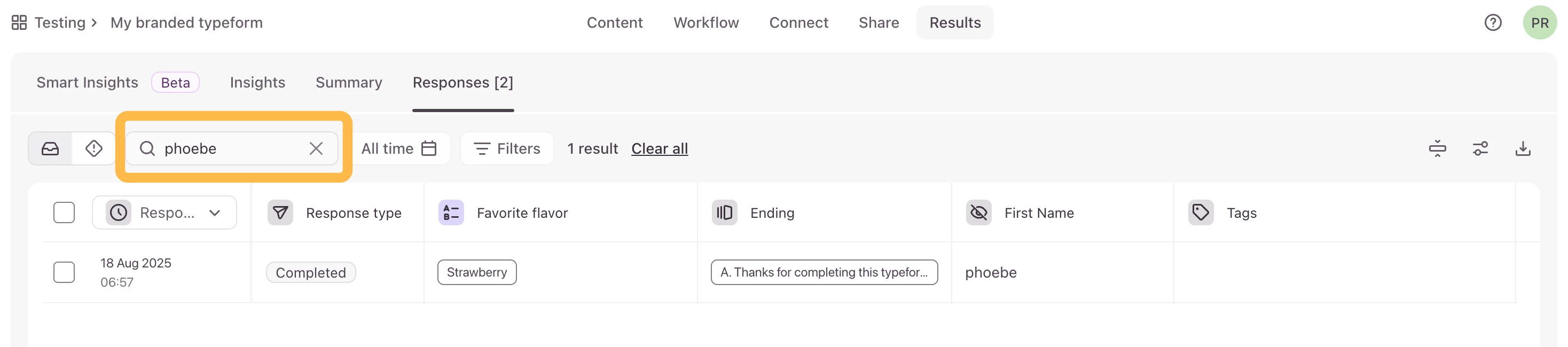
Unfortunately, filtering responses by URL parameters (hidden fields) isn’t supported. But you can use the search feature in your responses. In the screenshot below, I created a form with the hidden field First Name. Then I searched for phoebe in the responses and I’m able to see all my responses with that first name. You could try searching your responses by your client name.


  • Navigating the Land
  • 4 replies
  • August 19, 2025

Thanks ​@Phoebe VA  - unfortunately it’s the summary reporting that’s the essential part - filtering the response table only gives us the raw data. Thanks for the suggestion though and +100 to the feature request!


Phoebe VA
Community Team
Forum|alt.badge.img+5
  • Community Team
  • 99 replies
  • August 21, 2025

Thanks ​@parkersweb for the feedback! We’ve added this to the feature request board and hope this can be picked up in the future.


  • Navigating the Land
  • 3 replies
  • October 1, 2025

I’d also love to be able to filter by hidden fields in the summary! This would save me a lot of hassle of external analysis when I just want to quickly look at the survey responses broken out by segments that are only captured only in hidden fields. 


Grace
Community Team
Forum|alt.badge.img+5
  • Community Advocate
  • 3083 replies
  • October 3, 2025

Thanks for sharing your feedback ​@carries I’ve added your upvote to the feature request 🙏


Phoebe VA
Community Team
Forum|alt.badge.img+5
  • Community Team
  • 99 replies
  • Answer
  • October 28, 2025

Hi ​@parkersweb and ​@carries,


Just wanted to follow up and let you know that you can now filter your Results Summary by URL parameters (aka Hidden Fields)! More information on how to filter your Results Summary can be found here.


Hope you can try it out soon and let us know what you think!


Forum|alt.badge.img+1
  • Socializer
  • 14 replies
  • October 28, 2025

Thanks for sharing this. I’m running into the same limitation with hidden fields in Typeform — you can pass the value using URL parameters (aka hidden fields) and the data gets recorded. Typeform+2help.typeform.com+2

However, it appears that filtering the results or slicing the summary reports by hidden-field value isn’t supported yet. community.typeform.com+1

As a workaround:

  • If you’re comfortable using an integration (e.g., Google Sheets) you can export or sync the responses and then apply filters there.

  • Use the API’s query parameter to search for a specific hidden-field value. According to the docs it will match hidden fields too. Typeform+2Stack Overflow+2

  • If you embed the form, you can pass visible tags via hidden fields and then tag/segment responses externally (CRM/integration) for filtering.

If you like, I can check and share whether a roadmap item has been created for full hidden-field filtering (so you could up-vote it), and we can also look at a sample implementation of the API query method to make sure it works for you.


  • Navigating the Land
  • 4 replies
  • October 29, 2025

Thanks so much ​@Phoebe VA - that sounds great. Unfortunately I don’t seem to be able to see the URL parameters in the dropdown list of our existing survey. Am I missing something?


  • Navigating the Land
  • 3 replies
  • October 29, 2025

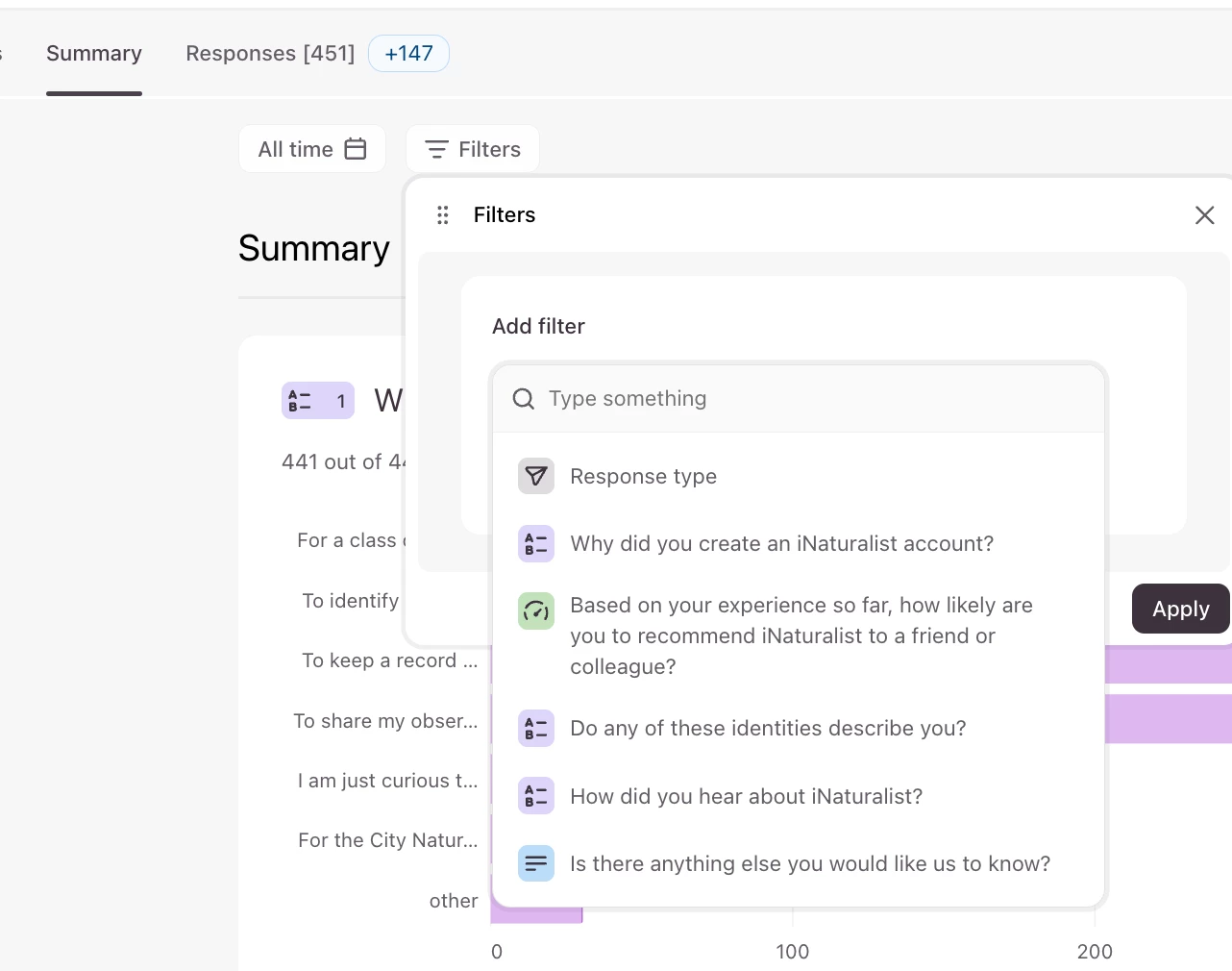
I can’t see the url parameters/hidden fields yet, either. Are you sure the feature has been fully deployed? 

Am I looking in the right place? Here’s what I see:


Phoebe VA
Community Team
Forum|alt.badge.img+5
  • Community Team
  • 99 replies
  • October 29, 2025

Hi ​@parkersweb and ​@carries,


I’m checking with our product team and will get back to you. I thought it was released but I might be mistaken.


Phoebe VA
Community Team
Forum|alt.badge.img+5
  • Community Team
  • 99 replies
  • October 30, 2025

Hi ​@parkersweb and ​@carries,


So sorry for the delay here. I just checked with one of our product managers and it was just released today. Could you try again and let us know if you see it?


  • Navigating the Land
  • 3 replies
  • October 30, 2025

Yes! I see the ability to filter by hidden fields now! Thank you! 🎉🎉🎉

Please give a big high five to the product team!


Phoebe VA
Community Team
Forum|alt.badge.img+5
  • Community Team
  • 99 replies
  • October 30, 2025

Hurray! I’m so happy you’re able to use it now. Let us know how you like using it!


Reply