Answered

gclid - Data Pulling in data for Zapier

  • October 4, 2021
  • 9 replies
  • 538 views

Hi there,

I read though some of the other posts, but I have an embedded form and the gclid doesn’t seem to be coming through as expected from an embedded form.

I have a hidden field called gclid, as per your instructions.

I have updated the link to the form, which now has data-tf-hidden="gclid=xxxxx" in the embed code.

I’ve also added in data-transferable-url-parameters="gclid" as per instructions.

But the variable isn’t passing through.

Here is the code on the page:

<div data-tf-widget="qU2shQYU" data-transferable-url-parameters="gclid" data-tf-hidden="gclid=xxxxx" style="width:100%;height:650px;"></div><script src="//embed.typeform.com/next/embed.js"></script>

Please can you help me to get this code right so I can start tracking via typeform.

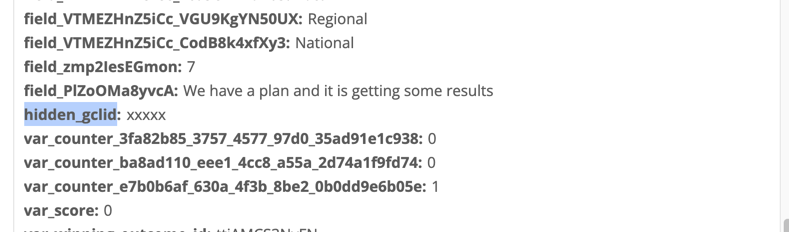
I’m using Zapier to pull the information from typeform, but all I ever get is this


Any help is appreciated.


Thanks,


Murray


Best answer by picsoung

Hey @Murray 
If I understand correctly you want to pass to the embedded typeform the unique gclid value, is that correct?

Because this value is generated by Google Analytics code for each visitor we would need a way to extract it and pass it to the embedded typeform.

To do so we can’t just use the embed code provided in the Share panel or the Typeform Wordpress Plugin, we would need to create something custom using the Typeform Embed SDK.

The code would look like this:

Before </head> add

<link rel="stylesheet" href=" https://embed.typeform.com/next/css/widget.css" />

Then, where do you need your form to be embedded add:

<div id="embeddedTypeform"></div>

<script src="//embed.typeform.com/next/embed.js"></script>

<script>
let gclid = ga.getAll()[0].get('clientId');
window.tf.createWidget('qU2shQYU', {
container: document.getElementById('embeddedTypeform'),
hidden: { gclid },
})
</script>

Let us know how if this works.

The alternative and probably easier solution would be to use the Google Analytics integration

9 replies

john.desborough
Forum|alt.badge.img+6
  • Certified Partner & Champion
  • October 4, 2021

@Murray - you will need to replace the ‘xxxxx’ string with the appropriate value …. the xxxxx is a placeholder only for what you need to put in place


  • Author
  • Explorer
  • October 4, 2021

Hi John, 

Thanks for getting back to me.

No problem, if the value is meant to be pulled through from google ads, my code should be:


<div data-tf-widget="qU2shQYU" data-transferable-url-parameters="gclid" data-tf-hidden="gclid=gclid" style="width:100%;height:650px;"></div><script src="//embed.typeform.com/next/embed.js"></script>


Or would this just replace my xxxxx with gclid?


I want the valuable from my google ad gclid as it passes through, so potentially I wouldn’t provide the value in here, otherwise it would be static (gclid - as per above)?


Could I leave it blank, would that pass through the dynamic valiable?

Been trying to work this out for about a week now but I haven’t found the instructions clear.

Thanks,

Murray


Liz
Ex–Typefomer
Forum|alt.badge.img+5
  • Tech Community Advocate
  • October 7, 2021

Hi @Murray You’ll want to leave that hidden field blank. Google Analytics and Google Ads should be filling in that data for you, so in this case, if you remove the “gclid” after the equals sign, it should automatically fill in the data for you. 

Let me know if this doesn’t work!


  • Author
  • Explorer
  • October 8, 2021

Hi Liz, 

Thanks for your response. Still getting nothing unfortunately.

Here is my code, can you tell me what is wrong?

<div data-tf-widget="qU2shQYU" data-transferable-url-parameters="gclid" data-tf-hidden="gclid=" style="width:100%;height:650px;"></div><script src="//embed.typeform.com/next/embed.js"></script>


Thanks,


Murray


Liz
Ex–Typefomer
Forum|alt.badge.img+5
  • Tech Community Advocate
  • October 8, 2021

Hm. Would you mind sharing the URL where you have the form embedded so I can test this, @Murray ?


  • Author
  • Explorer
  • October 9, 2021

Liz
Ex–Typefomer
Forum|alt.badge.img+5
  • Tech Community Advocate
  • October 11, 2021

Thank you, @Murray ! I see the issue now - there’s just one item you need to fix. 

If you grab the code directly from the builder, it looks like this: 

<div data-tf-widget="qU2shQYU" data-tf-hidden="gclid=xxxxx" style="width:100%;height:400px;"></div><script src="//embed.typeform.com/next/embed.js"></script>

Though, what you’re missing is the = sign after the “glicd.” You can remove the x’s, but you’ll need that equal sign to pass information. Let me know if that doesn’t work!


picsoung
Typeform
Forum|alt.badge.img+5
  • Developer Advocate @ Typeform
  • Answer
  • October 13, 2021

Hey @Murray 
If I understand correctly you want to pass to the embedded typeform the unique gclid value, is that correct?

Because this value is generated by Google Analytics code for each visitor we would need a way to extract it and pass it to the embedded typeform.

To do so we can’t just use the embed code provided in the Share panel or the Typeform Wordpress Plugin, we would need to create something custom using the Typeform Embed SDK.

The code would look like this:

Before </head> add

<link rel="stylesheet" href=" https://embed.typeform.com/next/css/widget.css" />

Then, where do you need your form to be embedded add:

<div id="embeddedTypeform"></div>

<script src="//embed.typeform.com/next/embed.js"></script>

<script>
let gclid = ga.getAll()[0].get('clientId');
window.tf.createWidget('qU2shQYU', {
container: document.getElementById('embeddedTypeform'),
hidden: { gclid },
})
</script>

Let us know how if this works.

The alternative and probably easier solution would be to use the Google Analytics integration


Forum|alt.badge.img+1
  • Navigating the Land
  • February 6, 2026

Reading through the comments above, there seems to be a misunderstanding. The GCLID is not generated by Google Analytics. It is generated by Google Ads when auto-tagging is turned on and then appended to the URL the user is directed to after they click the ad (in the same way UTM parameters are).

I suspect your issue is that the GCLID isn’t being stored as visitors browse around your site. So if someone clicks your ad, lands on your Homepage, and then clicks over to your Contact Us page and fills out a form there, the GCLID is no longer in the URL so would no longer be pulled in with Typeform’s standard hidden field functionality.

You need to either write some code to store the GCLID and then write it into the hidden fields, or use pre-built tools like Attributer.io which would handle it all for you. These tools grab the GCLID (and other data, liek if a user comes from organic search), store it in the user’s browser, and then write it into hidden fields on your Typeform for you. It is then captured with each submission and can be seen in the Results table, include din email notifications, sent to your CRM, etc.

And if you want (and I assume this is your ultimate goal), you can then use tools like Zapier to send it back to Google Ads as an offline conversion (I.e. when a lead finally becomes a customer)