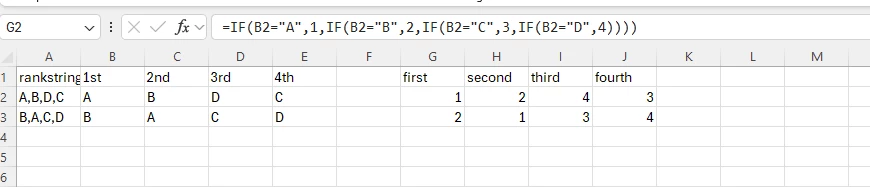
Hi, I’m keen for advice about ranking questions in the downloadable data spreadsheet for analysis purposes.
When I design the question to rank options A to F from 1 to 6, when the data is downloaded into excel or csv, it lists the responses in one column in a string. This is not an analysable format if I want to work out an average rank for each option for sub-groups in the survey.
I tried spliting the responses into columns usign the text to column function in excel however wthile this splits the responses into six columns (rank 1,2,3,4,5,6) the cell is filled with text (Option A to F) rather than a numerical value so this work around is also not analysable.
Is it possible to design the ranking question so that the columns in the data download are for the options A to F and that the cells for each response is the rank (1 to 6) which would then allow for averages to be calculated.
Of is there another way to achieve this?
Thanks in advance, Lisa