Answered

Ranking questions - how to get downloaded spreadsheet in numerical form?

  • May 20, 2026
  • 3 replies
  • 29 views

Hi, I’m keen for advice about ranking questions in the downloadable data spreadsheet for analysis purposes.

When I design the question to rank options A to F from 1 to 6, when the data is downloaded into excel or csv, it lists the responses in one column in a string. This is not an analysable format if I want to work out an average rank for each option for sub-groups in the survey.

I tried spliting the responses into columns usign the text to column function in excel however wthile this splits the responses into six columns (rank 1,2,3,4,5,6) the cell is filled with text (Option A to F) rather than a numerical value so this work around is also not analysable. 

Is it possible to design the ranking question so that the columns in the data download are for the options A to F and that the cells for each response is the rank (1 to 6) which would then allow for averages to be calculated.

Of is there another way to achieve this?

Thanks in advance, Lisa 

 

Best answer by James

Hi ​@LisaD  good question. At the moment, it’s not possible to do a Ranking question export into a raw CSV/Excel file as one column per option with the cell containing its numeric rank.
 

For Ranking questions, Typeform’s supported analysis route is the Results Summary. There, each option gets an average rank, and the lower the mean, the higher that option ranked overall. 
 

If you need respondent-level data in Excel with one numeric column per option, a more practical workaround for future surveys could be to avoid the Ranking question and instead ask separate numeric/rating questions for each item, so each item exports into its own analyzable column.

Would be interested to know if anyone else here in the Community has found a workaround 👀

3 replies

James
Community Team
Forum|alt.badge.img+5
  • Community Team
  • Answer
  • May 20, 2026

Hi ​@LisaD  good question. At the moment, it’s not possible to do a Ranking question export into a raw CSV/Excel file as one column per option with the cell containing its numeric rank.
 

For Ranking questions, Typeform’s supported analysis route is the Results Summary. There, each option gets an average rank, and the lower the mean, the higher that option ranked overall. 
 

If you need respondent-level data in Excel with one numeric column per option, a more practical workaround for future surveys could be to avoid the Ranking question and instead ask separate numeric/rating questions for each item, so each item exports into its own analyzable column.

Would be interested to know if anyone else here in the Community has found a workaround 👀


john.desborough
Forum|alt.badge.img+6
  • Certified Partner & Champion
  • May 20, 2026

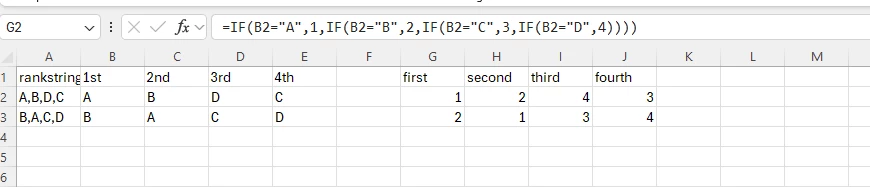
@LisaD - in your spreadsheet, you need to set up a separate set of columns ‘over to the right’ that correspond to the ranking ie first, second, etc. and then use logic like this

i used only four rankings but you should be able to see how the replacement works ...then you can do your analysis from the columns g-j.


hope that helps ​@James ​@LisaD 


des


  • Author
  • Explorer
  • May 21, 2026

thanks both.. I think i will opt for a different question type given that I would have to split column contents into columns and then apply logic for the another six columns. Won’t be able to compare options and determine which has highest rank by using question types though. Cheers for your prompt responses :-)