Question

Email notifications for completed surveys only

  • February 24, 2026
  • 6 replies
  • 54 views

NelsonCB

I’m getting email notifications every time someone starts a Videoask and inputs their contact details. I only want to get email notifications when someone completes the whole thing successfully. How do I do this?

6 replies

Phoebe VA
Community Team
Forum|alt.badge.img+5
  • Community Team
  • February 24, 2026

Hi ​@NelsonCB,


Good question! With VideoAsk, every time someone answers a step in your videoask, their response will be submitted and you’ll be able to view them. This will automatically send you an email notification. 


Unfortunately, there isn’t a setting to only receive email notifications for complete responses within VideoAsk, but there is a workaround!


You can turn off all email notifications for this specific videoask, then set up automatic tagging to tag only complete responses and then use Zapier or Make to send you an email notification when you received a response with the complete response tag.


Here are some resources that can help you set this up:


Hope this workaround helps! Let us know if you have any other questions. 


NelsonCB
  • Author
  • Explorer
  • February 25, 2026

Thanks Phoebe. 

  1. You all should definitely add this as a standard feature
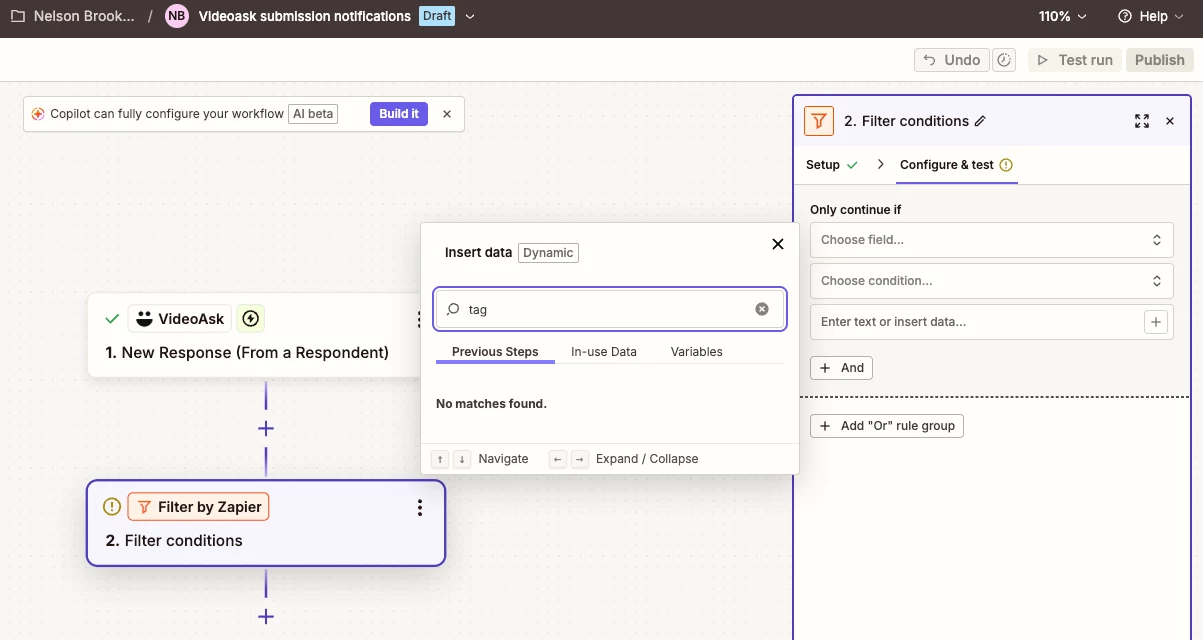
  2. There is no “tag” field being pulled through to Zapier. See screenshot. Any suggestions?


Phoebe VA
Community Team
Forum|alt.badge.img+5
  • Community Team
  • February 25, 2026

Hi ​@NelsonCB,


Yes, we can pass your feedback to our product team as a feature request!


Ah, I’m so sorry. I thought there was a filter for tags in Zapier. There might be a way to filter for only respondents who’ve answered the last question in the videoask? I was trying to test this out but unfortunately I can’t run a multi step zap with my free account 😅


john.desborough
Forum|alt.badge.img+6
  • Certified Partner & Champion
  • February 26, 2026

@NelsonCB ​@Phoebe VA - you might try using a custom variable with a logic rule to set the value in the typeform. The variables can be pulled across in a zap (it’s been about 6 month since built any zaps but that was how i used to do it)


des


NelsonCB
  • Author
  • Explorer
  • February 26, 2026

Thanks ​@john.desborough . Got it figured out! I used the filter “exists” if there is an answer ID to the final questions of my Videoask. The Zap would continue if there was an answer ID (they completed it) and would not continue if there wasn’t (they did not complete it)


Phoebe VA
Community Team
Forum|alt.badge.img+5
  • Community Team
  • February 26, 2026

Perfect ​@NelsonCB! So happy to hear you got it to work 🎉