Question

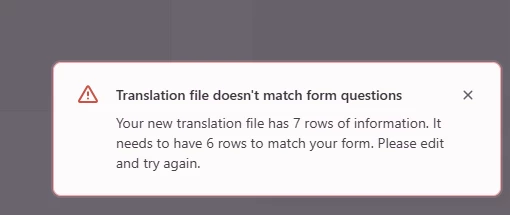
Has anyone else experience a recurring "Translation file doesn't match form questions"?


I’m trying to translate my very short form now, and the AI translation is partially wrong so I’m trying to do the few necessary tweaks myself via the template download and upload.

The problem is that no matter if I actually edit the downloaded file or not, when I re-upload it I systematically get the error message “Translation file doesn’t match form questions. Your new translation file has 7 rows of information. It needs to have 6 rows to match your form. Please edit and try again.”

Funny thing is that if I delete a row (which I shouldn’t do because the original file actually has 7 rows), I get the same message but now it talks about a file of 6 rows instead of 5, so the issue seems to adapt to how long my file is and never gets resolved.

 

2 replies

Precious_Navarro
Community Team
Forum|alt.badge.img+1

Hey there ​@Odlo 👋🏼 We may need to take a closer look into this in Support and access the form within your workspace, please reach out through the proper channel here. In the meantime, you can find some very useful tips and suggestions on AI translation here: FAQ


Laura Marco
Community Team
Forum|alt.badge.img+1
  • Community Team
  • October 19, 2026

Hi ​@Odlo !

I see that our Support team was able to help resolve the issue! That’s great news. 

I still wanted to add a few troubleshooting steps here in case anyone comes across the same problem in the future. Some of the are already covered in our Help Center article.

  • The CSV must contain exactly three columns: id, original, and translation.

  • The column headers must remain exactly as  id, original, and translation. Some external tools may rename the headers or add extra ones, such as Column 1, Column 2, or Column 3.

  • Edit only the translation column.

  • Make sure no cells in the translation column are empty.

  • Don’t add or remove rows. The number of rows must remain the same as in the downloaded template.

  • Save the file as CSV UTF-8 (Comma delimited) (*.csv). Depending on the tool you’re using, the file may be saved with a semicolon (;) as the separator. That isn’t valid for this upload, so please make sure the delimiter is a comma (,).

If you encounter any other errors, you can always reach out to our Support team for help.