Answered

How to create a form so people leave their email and then they automatically receive a link to my google drive

  • Oct 18, 2021 1:53 PM UTC
  • 12 replies
  • 584 views

Forum|alt.badge.img

Hi everyone! How can I create a form (like in jotforms) so people leave their email and then they automatically receive a letter with the link to my google drive (via their email.)
Is it possible using typeform? Please help!

Best answer by Liz

Hi @maria8 I made a video below which should hopefully help you build this form! Let me know if you have any other questions. :) 


View original

12 replies

Liz
Ex–Typefomer
Forum|alt.badge.img+5
  • Tech Community Advocate
  • Oct 18, 2021 3:16 PM UTC

Hi @maria8 Welcome to the community! You could set up respondent notifications on your form, which would send an email to your respondents after they submit the form. In the email notification itself, you can add your Google Drive link.

Would that work for you? :grin:


Forum|alt.badge.img
  • Author
  • Socializer
  • Oct 18, 2021 3:54 PM UTC

@Liz Thank you so much for your answer! I think it might work. Also is there any tutorial how to create a form? (very simple one, where people can just leave their names and emails) and then I’ll set up respondent notifications on that form.


Liz
Ex–Typefomer
Forum|alt.badge.img+5
  • Tech Community Advocate
  • Answer
  • Oct 18, 2021 5:02 PM UTC

Hi @maria8 I made a video below which should hopefully help you build this form! Let me know if you have any other questions. :) 


Forum|alt.badge.img
  • Author
  • Socializer
  • Oct 18, 2021 5:55 PM UTC

@Liz Thank you so much! It is so helpful and relevant! :)


Liz
Ex–Typefomer
Forum|alt.badge.img+5
  • Tech Community Advocate
  • Oct 18, 2021 6:40 PM UTC

Welcome, @maria8 ! Just be sure to mark those questions as required ha! :heart_eyes:


Forum|alt.badge.img
  • Author
  • Socializer
  • Oct 19, 2021 12:54 PM UTC

Hi @Liz! I was creating a typeform with notifications just as you kindly recorded in the video. But then I got a message “This typeform uses features that aren't in your plan (Respondent email notifications) To publish it, you can upgrade your plan or remove this feature” So it is not for free, right? And what about 2-week trial period? I just want to make sure that it works exactly as I want before purchasing any plans.


Forum|alt.badge.img
  • Author
  • Socializer
  • Oct 19, 2021 12:59 PM UTC

@Liz  oh and a small question - how to mark questions as required?


john.desborough
Forum|alt.badge.img+6
  • Certified Partner & Champion
  • Oct 19, 2021 1:14 PM UTC

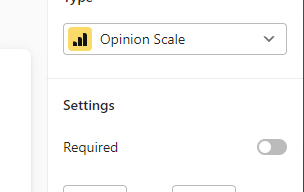
@maria8 - howdy from another user.. look in the settings of the question. you should see a toggle like the one in image below .. just slide it to on ie to the right.. in the image it is set to off. 


des


Forum|alt.badge.img
  • Author
  • Socializer
  • Oct 19, 2021 1:16 PM UTC

@john.desborough thank you!) 


Liz
Ex–Typefomer
Forum|alt.badge.img+5
  • Tech Community Advocate
  • Oct 19, 2021 10:29 PM UTC

Thanks @john.desborough ! @maria8 the respondent notification feature is a paid feature, so if you are on our free plan, it won’t allow you to send notifications. :\ 


Forum|alt.badge.img
  • Author
  • Socializer
  • Oct 20, 2021 5:19 AM UTC

@Liz ok, I understood! thank you)


Liz
Ex–Typefomer
Forum|alt.badge.img+5
  • Tech Community Advocate
  • Oct 20, 2021 2:22 PM UTC

Not a problem, @maria8 !