Answered

Inquiry about receiving the survey content to a designated email address

  • Oct 23, 2025 11:57 PM UTC
  • 3 replies
  • 67 views

이전에는 설문조사 내용을 지정된 이메일 주소로 첨부파일 형태로 받을 수 있었습니다.

현재 인터페이스에서는 지정된 이메일 주소로 설문조사 내용을 받는 방법에 대한 지침을 찾을 수 없습니다.

설문조사 내용을 지정된 이메일 주소로 받으려면 어떻게 해야 하나요?

Best answer by john.desborough
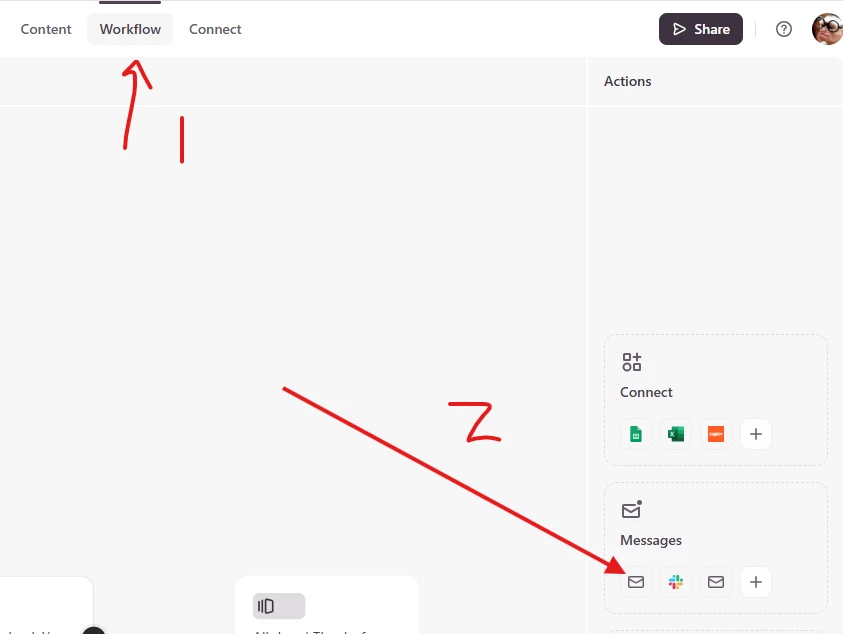
​@Jisung - go to the Workflow tab and then choose Messages. you can create the trigger and set up the email details.

des

View original

3 replies

john.desborough
Forum|alt.badge.img+6
  • Certified Partner & Champion
  • Answer
  • Oct 24, 2025 12:01 AM UTC

​@Jisung - go to the Workflow tab and then choose Messages. you can create the trigger and set up the email details.

des


  • Author
  • Explorer
  • Oct 24, 2025 12:20 AM UTC

Thank you for your reply.
The method you provided only sends an email notifying me that a new survey has been submitted, but the responses to the survey are missing.
Is there a way to receive an email containing the survey responses?


john.desborough
Forum|alt.badge.img+6
  • Certified Partner & Champion
  • Oct 24, 2025 2:50 AM UTC

​@Jisung - i know there was the ‘old style’ default message that included all the questions and the responses.. however, now what you would have to do is create the template with your questions and answers something like this: 

Q1 - What industry are you in?  (this would be a copy and paste of the question into the email) 

A1 - @q1 (use the @recall function to display the answer) 


etc… 


unfortunately.. 


des