Answered

Limit responses per person

  • Jan 20, 2021 12:44 PM UTC
  • 45 replies
  • 9850 views

Show first post

45 replies

olas
Forum|alt.badge.img+2
  • Sharing wisdom
  • Jul 13, 2023 5:53 AM UTC

It seems that the limitation to one answer per person is not just my concern and my insistence. When will typeform understand that this is necessary to be able to use it in political polls, for example? In the workplace too. I proposed in the past that part of the solution was to load the DNI or identification numbers to the respondents so that they can only respond once and only my target audience. This is even done by Googleforms when it only allows responses from the internal domain.


Liz
Ex–Typefomer
Forum|alt.badge.img+5
  • Tech Community Advocate
  • Jul 13, 2023 1:55 PM UTC

Hi @olas I added your post here where we have an existing conversation about this. If there are any updates, you’ll be notified about them in the post here!


Forum|alt.badge.img
  • Navigating the Land
  • Nov 21, 2023 8:24 AM UTC

The links for tutorials are not working!


Grace
Community Team
Forum|alt.badge.img+5
  • Community Advocate
  • Nov 21, 2023 9:03 AM UTC

Hi @Brand Manual can you try the tutorial link here  - let me know if that works!


Forum|alt.badge.img
  • Navigating the Land
  • Nov 21, 2023 10:08 AM UTC

Thanks! This link works.

Do I understand correctly that this api solution only works if you let your respondents insert their e-mail addresses? What if I need to create an anonymous questionnaire?


Grace
Community Team
Forum|alt.badge.img+5
  • Community Advocate
  • Nov 21, 2023 11:12 AM UTC

Ooh, good question! Maybe @picsoung could help here… 😊


picsoung
Typeform
Forum|alt.badge.img+5
  • Developer Advocate @ Typeform
  • Nov 22, 2023 11:37 AM UTC

If you conduct an anonymous survey, you must rely on a cookie solution. After submitting the form, a value is stored on a cookie in the user's computer. When the user revisits the website, the cookie's value is checked. Depending on the value, the form is either displayed or not.

Here you can find a project that demonstrates this feature.


Grace
Community Team
Forum|alt.badge.img+5
  • Community Advocate
  • Nov 22, 2023 11:53 AM UTC

Thanks @picsoung 🙌

Let us know if that helps @Brand Manual 


Forum|alt.badge.img
  • Navigating the Land
  • Nov 22, 2023 12:56 PM UTC

Hi!

Sorry but I’m not following… the link to a sample project to demonstrate the cookie feature only displays a page to contact @picsoung

How do I set up the cookie solution for my survey?


picsoung
Typeform
Forum|alt.badge.img+5
  • Developer Advocate @ Typeform
  • Nov 22, 2023 2:53 PM UTC

@Brand Manual if you click on the “View source” button you should see how this project is built.

index.html shows a sample HTML page, that is importing the script.js file

it also contains a div object with id wrapper where we will embed the form

in the script.js file we have all the logic to manipulate the cookie, and to display of not the form

getCookie function retrieves the value of the cookie
setCookie function sets the cookie value

showEmbed function is showing the embed typeform.

finally the following piece of code extracts the value of the cookie and displays the embed or displays another message

var displayed = getCookie("displayed_typeform"); //
if (displayed){
wrapperElement.innerHTML="<h2>Typeform already displayed once.</h2>"
} else if(!displayed && displayed === "") {
showEmbed();
}

You could copy all the different pieces in your own app to replicate this experience. And the form should only display once per visitor, unless they delete the cookie.


Liz
Ex–Typefomer
Forum|alt.badge.img+5
  • Tech Community Advocate
  • Dec 6, 2023 3:12 PM UTC

Hi @Brand Manual I hope you’re doing well! Were you able to try the solution above? 😀


Forum|alt.badge.img
  • Navigating the Land
  • Dec 7, 2023 3:44 PM UTC

Hi! We didn’t.

It’s too complicated for a simple function like this. It should be easily applied on your typeform, ie by checking a box.


Liz
Ex–Typefomer
Forum|alt.badge.img+5
  • Tech Community Advocate
  • Dec 7, 2023 5:16 PM UTC

Totally understand, @Brand Manual . I’ll share this feedback with the product team. 


  • Navigating the Land
  • Jan 24, 2024 11:56 AM UTC

Hello, I want to use Typeform for a vote but I have to limit one answer per person. How can I do that? Thanks


Liz
Ex–Typefomer
Forum|alt.badge.img+5
  • Tech Community Advocate
  • Jan 24, 2024 2:58 PM UTC

Hi @Promethea Thanks for stopping by the community! 😁 I added your post here where we have an existing discussion about this. 


  • Navigating the Land
  • Feb 16, 2024 3:52 AM UTC

Typeform needs to figure this out fast. Has someone mentioned it should be the simple issue of checking a box and that code should be added so that I can send out a link to my client and they can have their employees access the survey and only access it once, assuming they are using the same computer or phone or IP address.

Has this been discussed by your product development people?  If so it is certainly a game changer for me and diminishes the value of type form.


Liz
Ex–Typefomer
Forum|alt.badge.img+5
  • Tech Community Advocate
  • Feb 16, 2024 4:22 PM UTC

Hi @NMCONDOS While we don’t have any updates on this feature at the moment, the product team is aware of the request. They’re currently working on some bigger features such as adding a captcha and partial responses. 


  • Navigating the Land
  • Feb 16, 2024 4:30 PM UTC

I'm glad you're coming up with new features, however that doesn't tell me that there's any indication with regard to your team working on this feature with regard to anonymity and confidentiality where surveys are sent out via a URL. As a result I may have to switch to another platform.  


Liz
Ex–Typefomer
Forum|alt.badge.img+5
  • Tech Community Advocate
  • Feb 20, 2024 4:07 PM UTC

Hi @NMCONDOS I totally understand if you need to find another platform to meet your needs. 

We do now have the feature to prevent duplicate responses to reduce repeat submission from the same person, but at this stage it’s still not possible to set exact limits, for example if you wanted to let someone submit 5 times per form. 

Here’s the Help Center guide on duplicate responses for more information. As always, we’ll continue to share everyone’s feedback with the Product team and let you know if anything changes. 


carmentf
Community Team
  • Community Team
  • Answer
  • Oct 30, 2026 12:19 PM UTC

Hi there! 

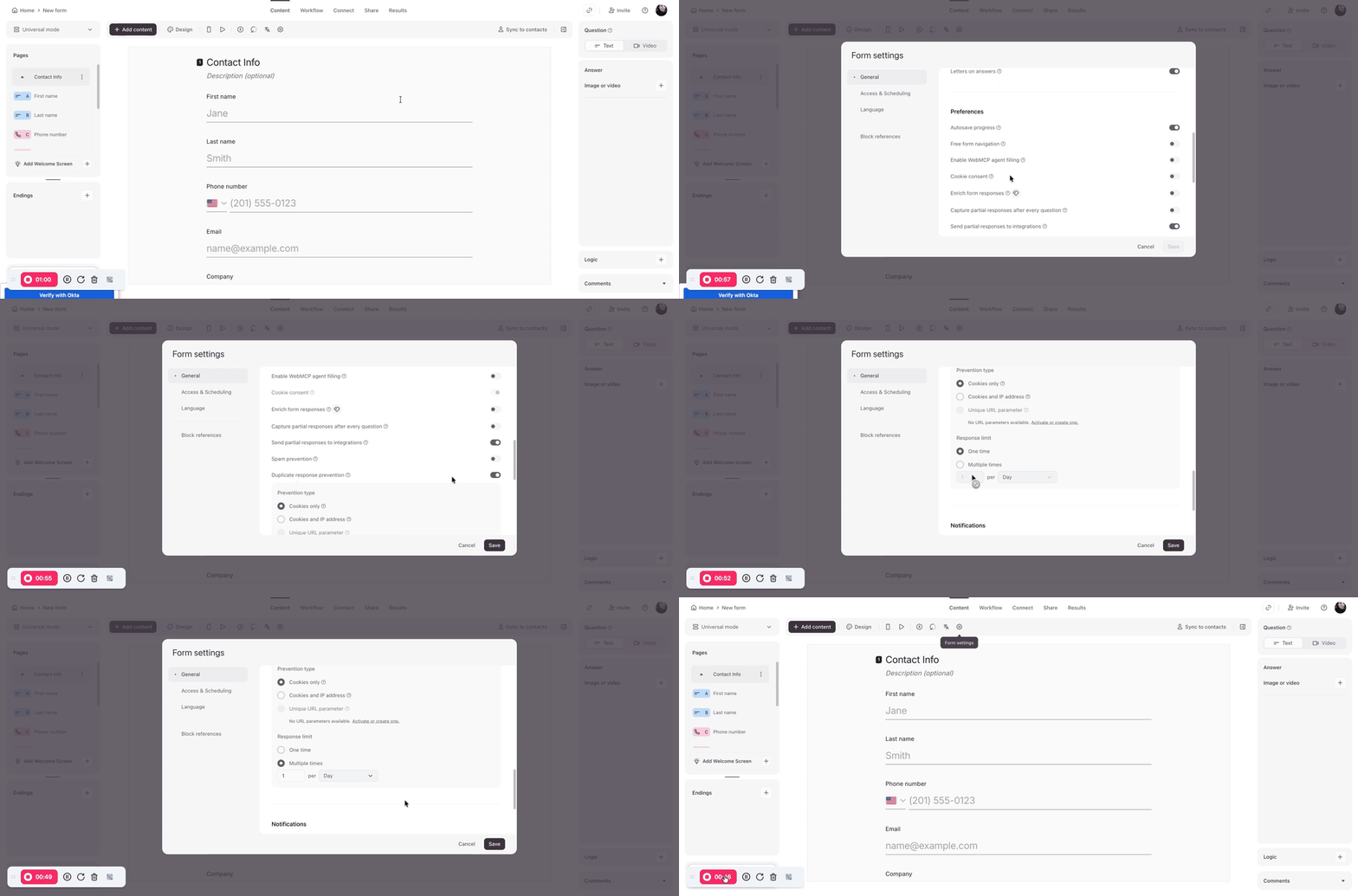
This is now possible with Typeform’s built-in Duplicate response prevention setting, so the custom-code workaround is no longer needed. This can be enabled in Settings → General and choose cookies, cookies + IP address, or a unique URL parameter (Growth Custom only), then set the response limit per respondent and time period. This feature is available on Business Pro, Growth Flow, and Growth Custom plans. 👍