Answered

Multiple Choice with "Other" option is automatically selecting "Other" whene someone selects any option

  • Nov 28, 2022 5:34 PM UTC
  • 5 replies
  • 167 views

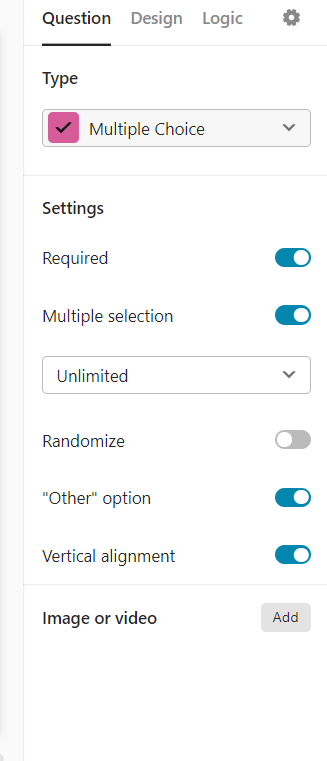
I have a few Multiple Choice questions with the following settings:


As soon as someone selects one of the options (not the “Other” option), the “Other” option automatically displays a checkmark as well. When you click to uncheck the original option, the “Other” option unchecks as well.

I’m realizing this is happening on other surveys as well. What is the logic behind this? Does anyone know a workaround?


Best answer by john.desborough

@Primacy - the check mark you see when someone clicks into the Other field to type in their info is what the user must click in order to save their entry in that field. 

it’s not all that intuitive, i agree. That’s why I always put a little instruction in the details area that reminds the user to click the check mark to lock in their answer. 


des

View original

5 replies

Liz
Ex–Typefomer
Forum|alt.badge.img+5
  • Tech Community Advocate
  • Nov 29, 2022 12:17 AM UTC

Hi @Primacy Do you mind sharing the URL of your form so I can test this? 😀


  • Author
  • Explorer
  • Nov 29, 2022 1:24 PM UTC

Here’s the link. Thanks!


Liz
Ex–Typefomer
Forum|alt.badge.img+5
  • Tech Community Advocate
  • Nov 29, 2022 2:44 PM UTC

Thanks, @Primacy ! I was able to see the issue. Have you published all of the changes to your form? It seems like the multiple-selection isn’t turned on on the question, which might be the case if the form changes weren’t published. 


  • Author
  • Explorer
  • Nov 29, 2022 4:45 PM UTC

Thanks for taking a look. Yes, all my changes are published and these are the settings on the questions. 


john.desborough
Forum|alt.badge.img+6
  • Certified Partner & Champion
  • Answer
  • Nov 29, 2022 4:53 PM UTC

@Primacy - the check mark you see when someone clicks into the Other field to type in their info is what the user must click in order to save their entry in that field. 

it’s not all that intuitive, i agree. That’s why I always put a little instruction in the details area that reminds the user to click the check mark to lock in their answer. 


des