Answered

Why Can't I Hide Address Fields in the Address "Question"?

  • Jul 5, 2023 8:23 AM UTC
  • 15 replies
  • 764 views

I’m looking to gather addresses from a local village. I really don’t want State or Country fields but the usual  “eye” toggle to hide fields is missing.

Best answer by James

Hey ​@Meredith_K Thanks for following up on this. I’m reliably informed that our product team are currently working on a solution for creators to more easily make their own flexible versions of Contact Info and Address blocks, addressing the ability to hide different fields within the address block, and to edit the names of the address fields.

This is currently projected for release in the coming weeks. I can’t give a precise timescale but we’ll ping this post once the new functionality is ready. 

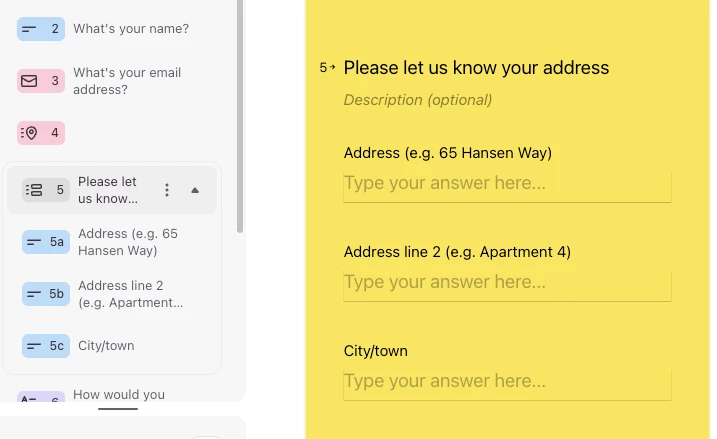
In the meantime, a simple workaround could be to use a Multi-question page and add a separate short text question for each line of the address that you want to capture. Something like this…


Cheers!

James

View original

15 replies

Liz
Ex–Typefomer
Forum|alt.badge.img+5
  • Tech Community Advocate
  • Jul 5, 2023 1:59 PM UTC

Hi @Aldercar Hiding these fields isn’t a feature we currently offer, but we have shared this feedback with the product team. 


  • Author
  • Explorer
  • Jul 5, 2023 3:21 PM UTC

@Liz 

I only signed up today but that seems a bizarre decision, given that most other question fields can be hidden. As it stands it makes the product unusable for me so I’m out.


Liz
Ex–Typefomer
Forum|alt.badge.img+5
  • Tech Community Advocate
  • Jul 5, 2023 8:17 PM UTC

Hi @Aldercar I believe it has to do something with integrations we have setup (and not wanting to break them), but I totally get the frustration. We’ve shared the feedback with product, so hopefully they’ll be able to figure something out!


  • Author
  • Explorer
  • Jul 11, 2023 2:13 PM UTC

I worked around this by creating my own address questions. But then I discovered the ludicrous limit of 10 responses on the free account. So my account is now deleted & I won’t be back.


Liz
Ex–Typefomer
Forum|alt.badge.img+5
  • Tech Community Advocate
  • Jul 12, 2023 1:52 PM UTC

Hi @Aldercar Sorry to hear that typeform wasn’t exactly what you were looking for, but hopefully you were able to find a service that was! If you ever do find yourself returning to Typeform and have questions, you know where to find us. 


  • Navigating the Land
  • Nov 28, 2023 12:45 PM UTC

Hi! 
Noticed that this function still is not implemented - would be great if it was fixed soon. 


Grace
Community Team
Forum|alt.badge.img+5
  • Community Advocate
  • Nov 28, 2023 2:51 PM UTC

Hi @OLB welcoming to the community and thank you for adding your vote for this feature 😊

We will definitely add it to our feature request board and update the product team and if it makes it onto the roadmap we will let you know here!


  • Navigating the Land
  • Jan 18, 2024 3:26 PM UTC

I also am expressing frustration here as well. Our CRM is incapable of importing Address 2 and the state field must be in the two letter format. Being unable to edit these fields makes Typeform not compatible with our other systems and we are discussing alternatives at this point. 


Liz
Ex–Typefomer
Forum|alt.badge.img+5
  • Tech Community Advocate
  • Jan 19, 2024 2:19 AM UTC

Thanks for sharing that, @Wanderwoman . Do you also mind sharing which CRM you’re using? 


  • Navigating the Land
  • Mar 22, 2024 9:54 AM UTC

same problem, its not professional !


  • Navigating the Land
  • Oct 31, 2024 8:45 AM UTC

Same problem for me, is there a timeline for when will this be fixed?


Liz
Ex–Typefomer
Forum|alt.badge.img+5
  • Tech Community Advocate
  • Oct 31, 2024 3:36 PM UTC

Hi @Junibacken I don’t have the specific timeline yet, but you’ll hear about it first here when I do!


  • Navigating the Land
  • Jan 7, 2026 4:50 PM UTC

AS this has been 2 years since the original question, I am assuming this is no longer on the roadmap?  This feels like it should be a very simple fix!


James
Community Team
Forum|alt.badge.img+5
  • Community Team
  • Answer
  • Jan 8, 2026 12:08 PM UTC

Hey ​@Meredith_K Thanks for following up on this. I’m reliably informed that our product team are currently working on a solution for creators to more easily make their own flexible versions of Contact Info and Address blocks, addressing the ability to hide different fields within the address block, and to edit the names of the address fields.

This is currently projected for release in the coming weeks. I can’t give a precise timescale but we’ll ping this post once the new functionality is ready. 

In the meantime, a simple workaround could be to use a Multi-question page and add a separate short text question for each line of the address that you want to capture. Something like this…


Cheers!

James


  • Author
  • Explorer
  • Jan 8, 2026 3:18 PM UTC

Laughable that this is only just being looked at. For anyone wanting a sensible alternative, before it gets deleted, I’ve been happily using kobotoolbox.org since posting all that time ago.



