
Answered

Broken Mailchimp Integration (showing bits of code)

  • Dec 23, 2022 4:20 PM UTC
  • 5 replies
  • 97 views

Hi there, I”m running into an issue where when connecting Mailchimp to a form, little bits of code are showing up instead of text. Additionally, I’m not able to get to the option where I can apply a Tag for the entire form submission + add a GDPR step.


Here is just 1 example of what it looks like when it shows snippets of code:
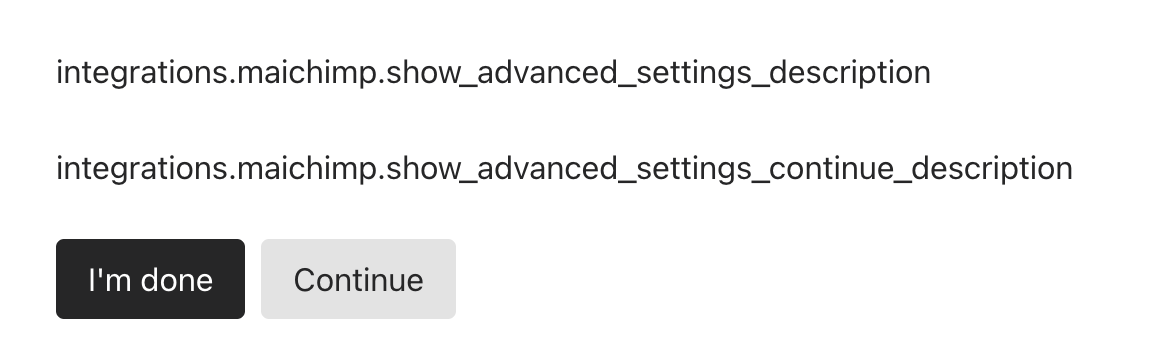
Any thoughts on what this is and how to fix it? I’ve tried disconnecting the Mailchimp account on MCs end but there doesn’t seem to be a way to do that in Typeform. I’ve also tried connecting to different forms but I always get code.


Best answer by Liz

@mattif  I’m asking our support team if there is a known outage - will report back shortly. I’m not aware of one, but there might be a bug I’m missing. 

View original

5 replies

Liz
Ex–Typefomer
Forum|alt.badge.img+5
  • Tech Community Advocate
  • Dec 27, 2022 3:25 PM UTC

Hi @mattif I don’t believe we had any Mailchimp outages the last few days, so the integration should be working. What browser/device are you editing your form on? 


  • Author
  • Explorer
  • Dec 27, 2022 9:16 PM UTC

Macbook + Chrome. It seems like a freak occurance that may have happened with connecting the apps, haven’t heard/seen anything like this anywhere else


Liz
Ex–Typefomer
Forum|alt.badge.img+5
  • Tech Community Advocate
  • Dec 27, 2022 10:28 PM UTC

Are you still experiencing the issue, @mattif ? 


  • Author
  • Explorer
  • Dec 28, 2022 4:26 PM UTC

Hey Liz, yeah the issue is persisting. Same little bits of code displaying where there should be text.


Liz
Ex–Typefomer
Forum|alt.badge.img+5
  • Tech Community Advocate
  • Answer
  • Dec 28, 2022 8:48 PM UTC

@mattif  I’m asking our support team if there is a known outage - will report back shortly. I’m not aware of one, but there might be a bug I’m missing.
