Answered

How do I Add Pop-up Embed on an Existing Button on WordPress Divi Builder?

  • Dec 19, 2021 9:23 PM UTC
  • 4 replies
  • 773 views

I have existing buttons on my WordPress website. I want to be able to click one of the buttons and a Typeform Popup will open. How do I go about it?

Best answer by ossai

Thank you for your responses! It has been sorted. 

Instead of using the Button Module on Divi Builder, I just used a Code Module:
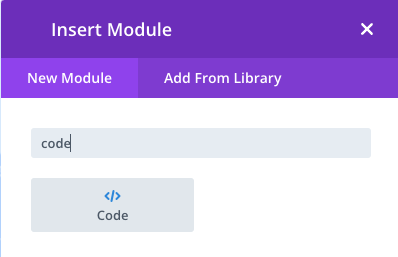
Then I inputted the Embed Code from Typeform:
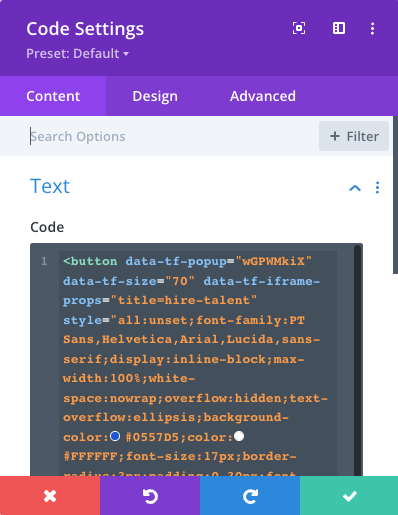
And styled directly on the code. This was the result:


 

View original

4 replies

Liz
Ex–Typefomer
Forum|alt.badge.img+5
  • Tech Community Advocate
  • Dec 20, 2021 11:33 AM UTC

HI @ossai Thanks for stopping by the community! You would need to use custom code to add the typeform code to an existing button on Divi. 

One thing I did on my own personal website when I was being lazy was to use a plugin, like this one, to easily add the popup to my Divi site. I will say that it wasn’t always the best user experience, but it got the job done, especially since I didn’t want to create custom code. 

@mathio might have a custom code option for you. 


mathio-tf
Typeform
Forum|alt.badge.img+5
  • Typeform
  • Dec 20, 2021 11:40 AM UTC

Hello @ossai and @Liz . You dont need any custom code, you need to embed your typeform.


  • Author
  • Explorer
  • Answer
  • Dec 20, 2021 11:53 AM UTC

Thank you for your responses! It has been sorted. 

Instead of using the Button Module on Divi Builder, I just used a Code Module:

Then I inputted the Embed Code from Typeform:

And styled directly on the code. This was the result:



Liz
Ex–Typefomer
Forum|alt.badge.img+5
  • Tech Community Advocate
  • Dec 20, 2021 12:08 PM UTC

Ah perfect, glad to hear that worked in-line with your existing buttons, @ossai !