Answered

Ending not showing up in embedded form

  • Apr 18, 2023 9:01 PM UTC
  • 8 replies
  • 305 views

I’m using an embedded typeform on my site, but the ending doesn’t appear. Can someone help? My site is this: https://trypastel.com/ 


There’s another thread on this topic that was resolved by using the latest embed code (which I’m using), so I think this might be a different issue. 


More context -- I’m using a Carrd site, and the button is created with an embedded script. 


Thanks, Typeform community!

Best answer by Liz

Hi @amanda2point0 Oh gosh, I’m the problem. I believe it’s this line in your code, now that I’m looking at the logic: 

data-tf-auto-close

This is auto-closing the form before the respondent sees the ending. Try removing that bit!

View original

8 replies

Liz
Ex–Typefomer
Forum|alt.badge.img+5
  • Tech Community Advocate
  • Apr 19, 2023 1:57 PM UTC

Hi @amanda2point0 Oh this is a cute website and what a neat product! 

Can you try embedding the code only using our embed code to see if that solves the issue? My guess is that the form is closing before the ending can even be shown. 


Grace
Community Team
Forum|alt.badge.img+5
  • Community Advocate
  • Apr 26, 2023 7:57 AM UTC

Hey @amanda2point0 hope you’re doing well! Did you manage to get the embed working? Let us know if you still need help with this one 😊


Hey @Grace thank you so much for checking in! I didn’t unfortunately 😞 I tried copying and pasting the embed code directly from typeform into the embed widget that Carrd has, and it still skipped the ending page. 

<button data-tf-popup="pKx4BEFw" data-tf-opacity="100" data-tf-hide-headers data-tf-size="100" data-tf-iframe-props="title=Schedule an Appointment" data-tf-auto-close data-tf-transitive-search-params data-tf-medium="snippet" data-tf-hidden="utm_source=,utm_medium=,utm_campaign=,utm_term=,utm_content=" style="all:unset;font-family:Helvetica,Arial,sans-serif;display:inline-block;max-width:100%;white-space:nowrap;overflow:hidden;text-overflow:ellipsis;background-color:#513186;color:#fff;font-size:20px;border-radius:25px;padding:0 33px;font-weight:bold;height:50px;cursor:pointer;line-height:50px;text-align:center;margin:0;text-decoration:none;">Get started</button><script src="//embed.typeform.com/next/embed.js"></script>


Liz
Ex–Typefomer
Forum|alt.badge.img+5
  • Tech Community Advocate
  • Apr 27, 2023 4:31 PM UTC

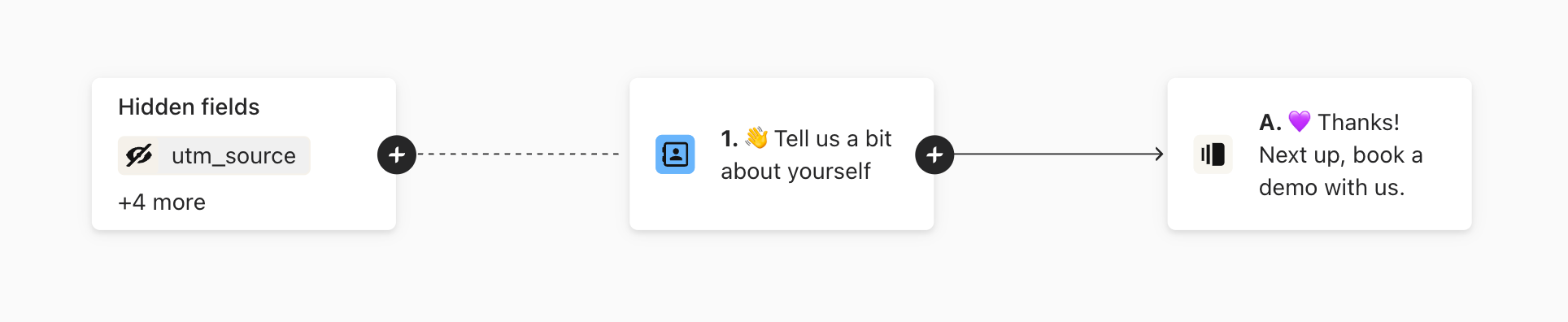
Hi @amanda2point0 Do you mind sending a screenshot of any logic jumps you have setup in the form? That might be the issue versus the embed. 


Hey Liz, sure see below. I don’t think I added any logic:


Liz
Ex–Typefomer
Forum|alt.badge.img+5
  • Tech Community Advocate
  • Answer
  • Apr 28, 2023 4:39 PM UTC

Hi @amanda2point0 Oh gosh, I’m the problem. I believe it’s this line in your code, now that I’m looking at the logic: 

data-tf-auto-close

This is auto-closing the form before the respondent sees the ending. Try removing that bit!


  • Author
  • Explorer
  • Apr 28, 2023 10:19 PM UTC

@Liz that worked!! Thank you so much 🙏🙏🙏


Liz
Ex–Typefomer
Forum|alt.badge.img+5
  • Tech Community Advocate
  • May 1, 2023 2:10 PM UTC

Yay! Glad it was an easy fix. Let us know if we can help with anything else, @amanda2point0 ! Apologies for missing that previously.