Answered

Full screen embed at Landingi

  • May 18, 2021 11:33 AM UTC
  • 8 replies
  • 741 views

Hi Typeform-community!

I hope you can help me out here. Previously, we have exploited Paperform which I successfully have embedded to our Landingi-page, which you can see here: https://lp.barry.energy/signup


However, when I try to implement my typeform HMTL code in the same manner the full-screen embed does not occur, which it does when I only embed the form in a standard mode. 


Here is the LP that currently doesn’t work: https://lp.barry.energy/signup2


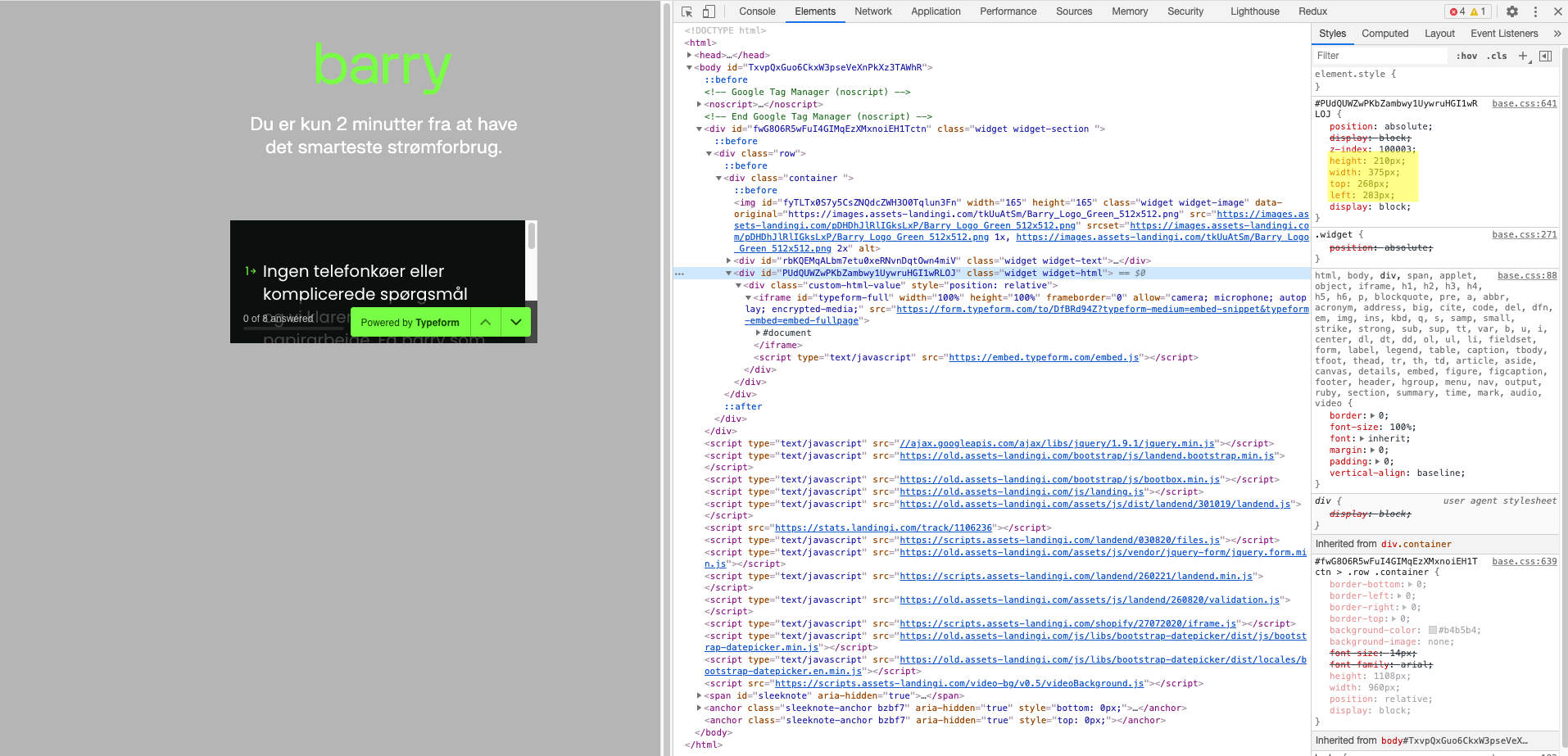
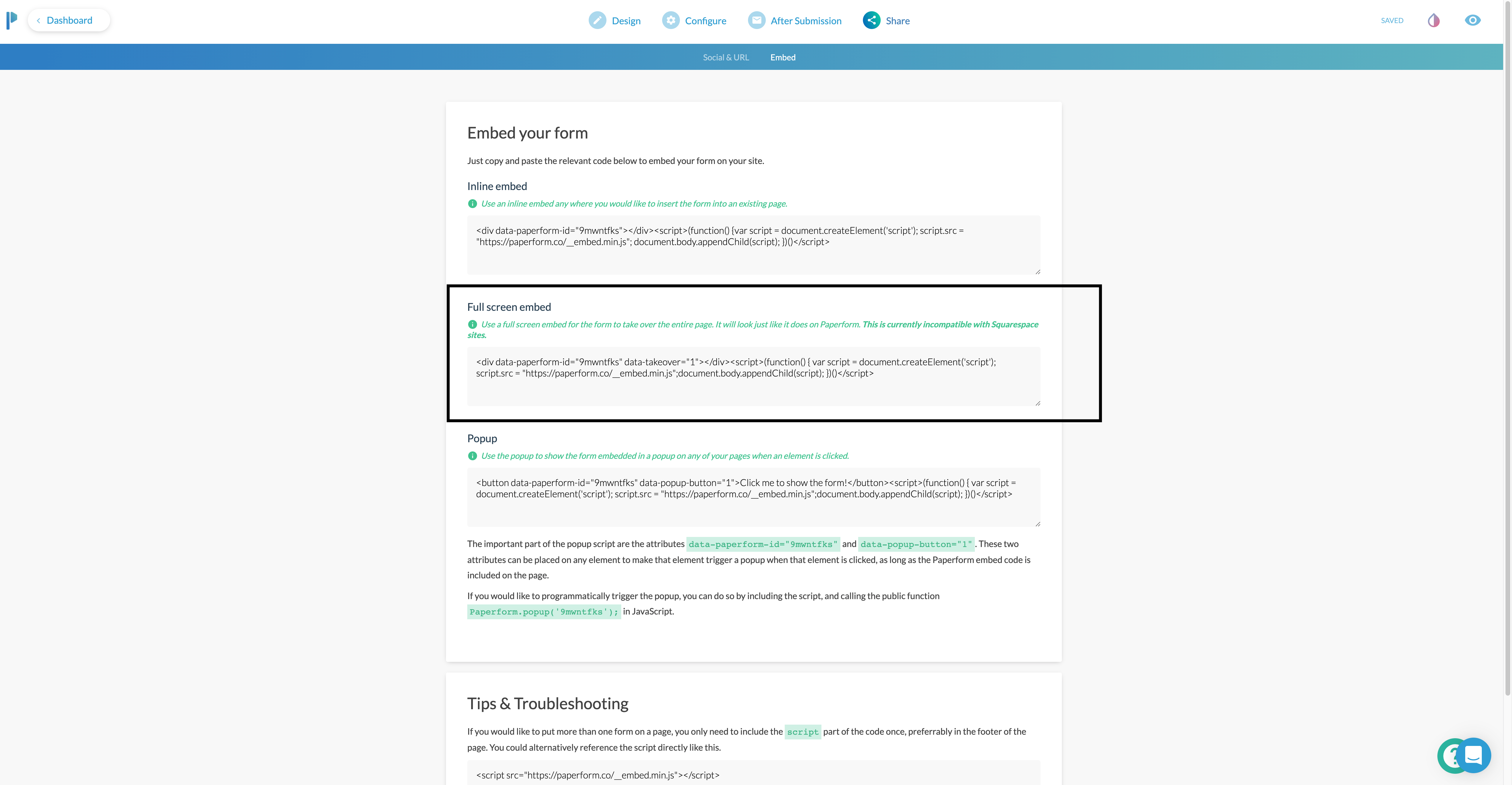
Attached is screendumps for the LP and how the code looks at Paperform - below is the code for Typeform full screen:

<html> <head> <meta name="viewport" content="width=device-width, initial-scale=1.0, maximum-scale=1.0, user-scalable=0"> <title>Sign-up flow_DK</title> <style type="text/css"> html{ margin: 0; height: 100%; overflow: hidden; } iframe{ position: absolute; left:0; right:0; bottom:0; top:0; border:0; } </style> </head> <body> <iframe id="typeform-full" width="100%" height="100%" frameborder="0" allow="camera; microphone; autoplay; encrypted-media;" src="https://form.typeform.com/to/DfBRd94Z?typeform-medium=embed-snippet"></iframe> <script type="text/javascript" src="https://embed.typeform.com/embed.js"></script> </body> </html>


 

Best answer by mathio-tf

Hello @Viktor, Marketing at Barry 

when i use the embed code you provided it renders the page nicely:
https://glitch.com/edit/#!/likeable-lumpy-parakeet

The code for full-page embed is intended to be the only content of the page. Maybe a widget embed would be better for your use case?

If you need full screen embed you could use widget with custom CSS or just the body part of fullscreen embed:

<iframe id="typeform-full" width="100%" height="100%" frameborder="0" allow="camera; microphone; autoplay; encrypted-media;" src="https://form.typeform.com/to/DfBRd94Z?typeform-medium=embed-snippet"></iframe> <script type="text/javascript" src="https://embed.typeform.com/embed.js"></script>
View original

8 replies

mathio-tf
Typeform
Forum|alt.badge.img+5
  • Typeform
  • Answer
  • May 18, 2021 11:45 AM UTC

Hello @Viktor, Marketing at Barry 

when i use the embed code you provided it renders the page nicely:
https://glitch.com/edit/#!/likeable-lumpy-parakeet

The code for full-page embed is intended to be the only content of the page. Maybe a widget embed would be better for your use case?

If you need full screen embed you could use widget with custom CSS or just the body part of fullscreen embed:

<iframe id="typeform-full" width="100%" height="100%" frameborder="0" allow="camera; microphone; autoplay; encrypted-media;" src="https://form.typeform.com/to/DfBRd94Z?typeform-medium=embed-snippet"></iframe> <script type="text/javascript" src="https://embed.typeform.com/embed.js"></script>

Hi Mathio,

Thanks for reaching out!


Hmm. The widget embed is not what I am looking for as you can see here: https://lp.barry.energy/signup2

How would you recommend me to use the CSS to get a full screen embed? thanks


mathio-tf
Typeform
Forum|alt.badge.img+5
  • Typeform
  • May 18, 2021 11:59 AM UTC

The iframe is configured to take 100% with and height available to it. However there are 2 parent divs in your page that limit the size:

<div id="PUdQUWZwPKbZambwy1UywruHGI1wRLOJ" class="widget widget-html">
<div class="custom-html-value" style="position: relative;">
<!-- you embed code is here -->
</div>
</div>


The div with id=PUdQUWZwPKbZambwy1UywruHGI1wRLOJ needs the following CSS:

height: 100%;
width: 100%;
top: 0;
left: 0;

Inner div with class=custom-html-value needs the following CSS:

height: 100%

I hope this helps.


Okay, so how should the code exactly look? 


And should I “inspect” the LP and then change the code here?


mathio-tf
Typeform
Forum|alt.badge.img+5
  • Typeform
  • May 18, 2021 12:17 PM UTC

You need to apply that CSS to your elements in the tool you are using to build your landing page. 

If you can replace the parent div with id=PUdQUWZwPKbZambwy1UywruHGI1wRLOJ you could use inline styles and replace it with this:

<div id="PUdQUWZwPKbZambwy1UywruHGI1wRLOJ" class="widget widget-html" style="width:100%;height:100%;top:0;left:0;">
<div class="custom-html-value" style="position:relative;height:100%;">
<iframe id="typeform-full" width="100%" height="100%" frameborder="0" allow="camera; microphone; autoplay; encrypted-media;" src="https://form.typeform.com/to/DfBRd94Z?typeform-medium=embed-snippet&amp;typeform-embed=embed-fullpage"></iframe>
<script type="text/javascript" src="https://embed.typeform.com/embed.js"></script>
</div>
</div>


Okay, so as for now I have inserted the embed code in the custom CSS and the LP looks like this: https://lp.barry.energy/signup2 - Once I click away from the field and can return. 


Do you want me to add the code you sent above in the CSS or what?


Your help is much appreciated. Thanks :)


mathio-tf
Typeform
Forum|alt.badge.img+5
  • Typeform
  • May 18, 2021 12:56 PM UTC

Your div id=fwG8O6R5wFuI4GIMqEzXMxnoiEH1Tctn has a ::before pseudo element that covers your entire page and also the form which makes it non-interactive.

I think you might be limited by the tool you are using to build the website or maybe you are not using it correctly?