Answered

Start button issue with Widget react

  • Jun 13, 2023 6:01 PM UTC
  • 15 replies
  • 399 views

Forum|alt.badge.img

Hello everyone,

I have a issue with the start button of my typeform but only on mobile view.
On desktop view, the start button is not here and i don’t want it on the mobile view too.

There is my code in react / typescript:

import { Widget } from "@typeform/embed-react"
 

<Widget

id={myId}

style={mobileView ? { width: "100%", height: "100%", margin: 0, padding: 0 } : { width: "100%", height: "700px" }}

className="my-form"

onSubmit={() => {

setTypeformSubmitted(true))

}} />

If someone can help me … 😅
Big thanks.

Best answer by mathio-tf

Hello @BenjaminP 

it looks like you are referring to the welcome screen being displayed on mobile. This is to make sure the typeform opens in fullscreen modal window to provide better user experience to your respondents.

However if you would like to disable it, in React you can add inlineOnMobile prop to your Widget component like this:

<Widget
id={"HX82QV9G"}
style={{ width: "100%", height: "700px" }}
className="my-form"
inlineOnMobile
/>

For further information make sure to check out our embed SDK README file and our developer portal.

View original

15 replies

Liz
Ex–Typefomer
Forum|alt.badge.img+5
  • Tech Community Advocate
  • Jun 13, 2023 8:46 PM UTC

Hi @BenjaminP Could you share the URL where you have the form located? Thanks!


Forum|alt.badge.img
  • Author
  • Explorer
  • Jun 14, 2023 7:49 AM UTC

Hello Liz, did u mean the website ?


Liz
Ex–Typefomer
Forum|alt.badge.img+5
  • Tech Community Advocate
  • Jun 15, 2023 3:54 PM UTC

Hi @BenjaminP Yes, that’s correct. We’ll need the specific URL on that website where the form is embedded to take a look into this. 


Grace
Community Team
Forum|alt.badge.img+5
  • Community Advocate
  • Jun 21, 2023 3:08 PM UTC

Hey @BenjaminP don’t forget to share the website URL here so we can take a look at your embed 😊


Forum|alt.badge.img
  • Author
  • Explorer
  • Jun 27, 2023 12:34 PM UTC

Hey @BenjaminP don’t forget to share the website URL here so we can take a look at your embed 😊

Hey everyone, i’m sorry i didn’t see your message.

Here the link of the website where i use typeform, you need to sign in and the typeform appear

Big thanks !
Benjamin


Liz
Ex–Typefomer
Forum|alt.badge.img+5
  • Tech Community Advocate
  • Jun 28, 2023 1:57 PM UTC

Hi @BenjaminP Thank you! Do you have the form on a public page we can access to see the issue? 


Forum|alt.badge.img
  • Author
  • Explorer
  • Jul 3, 2023 1:17 PM UTC

Hi @BenjaminP Thank you! Do you have the form on a public page we can access to see the issue? 

Hello @Liz if i create an account for you and you have just to log in to get an access to the form will be ok ?


Liz
Ex–Typefomer
Forum|alt.badge.img+5
  • Tech Community Advocate
  • Jul 3, 2023 4:10 PM UTC

Hi @BenjaminP The best thing to do would be to place the form on a public page so we can see what’s happening fully. Though, if you do need to create an account for access to the form, the best thing to do might be to contact our support team for 1-1 help here, as that’ll allow you to send private information over to them!


Forum|alt.badge.img
  • Author
  • Explorer
  • Jul 20, 2023 12:43 PM UTC

Hey @Liz, sorry for the delay but here is the public page for the typeform

https://codesandbox.io/s/typeform-start-button-problem-mobile-2ytjdd?from-embed

But the problem is the start button doesn’t appear on this sandbox code but still on my app.
I can maybe share a private loom for explain/show ?


Liz
Ex–Typefomer
Forum|alt.badge.img+5
  • Tech Community Advocate
  • Jul 20, 2023 2:36 PM UTC

@mathio do you happen to see anything in the above code that would prevent the start button from appearing? 


Forum|alt.badge.img
  • Author
  • Explorer
  • Jul 20, 2023 2:48 PM UTC

the button start must not appear at all.
The current behavior is that it doesn't appear in the desktop version, and it does appear in the mobile version.


mathio-tf
Typeform
Forum|alt.badge.img+5
  • Typeform
  • Answer
  • Jul 21, 2023 7:39 AM UTC

Hello @BenjaminP 

it looks like you are referring to the welcome screen being displayed on mobile. This is to make sure the typeform opens in fullscreen modal window to provide better user experience to your respondents.

However if you would like to disable it, in React you can add inlineOnMobile prop to your Widget component like this:

<Widget
id={"HX82QV9G"}
style={{ width: "100%", height: "700px" }}
className="my-form"
inlineOnMobile
/>

For further information make sure to check out our embed SDK README file and our developer portal.


Hi,

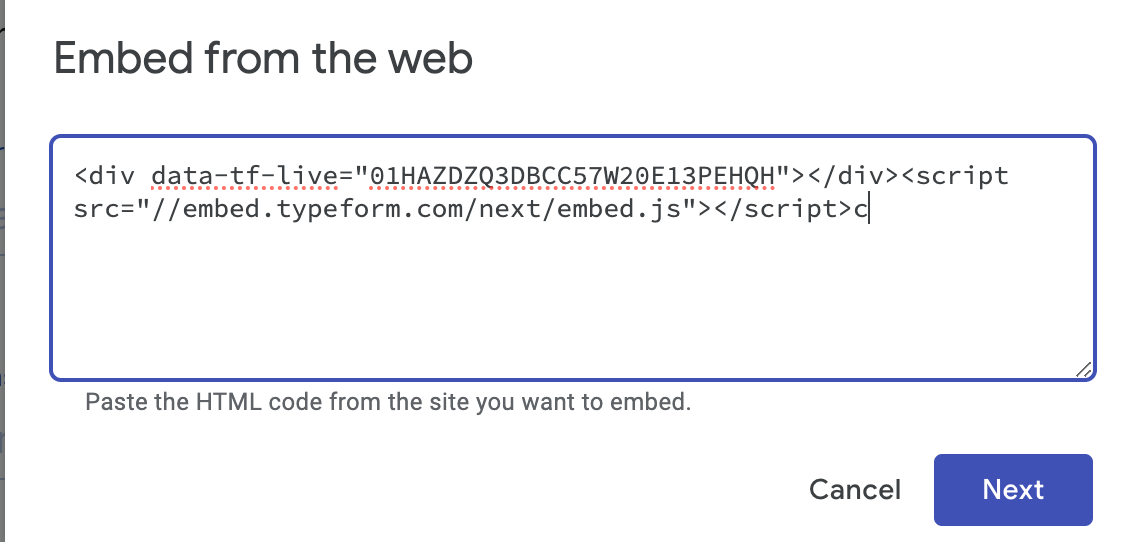
I’m having this issue with my Google Site. Where would I put the inlineOnMobile code in order to bypass the welcome screen being displayed on mobile? 

Here is a screenshot of where I input the embed code for the form on my Google Site:


mathio-tf
Typeform
Forum|alt.badge.img+5
  • Typeform
  • Sep 25, 2023 7:29 AM UTC

Hello @lindsay_moonspin ,

this thread is related to React Embed SDK.


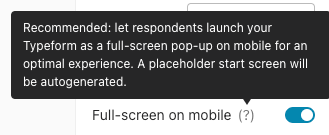
Since you are building the snippet using the share page, you can disable the full screen functionality on mobile that will also disable the welcome screen. You need to turn off this toggle (on the right hand side of the screen):




thank you @mathio - worked like a charm!